.png)

Appcues - The strongest WalkMe alternative for customer-facing teams. Cross-channel engagement across in-app, email, and mobile with AI-powered experience building (Captain AI, Appcues Advisor) and no engineering dependency.
Pendo - Analytics-first platform where product insights are the priority and in-app guidance is a supporting capability layered on top.
Whatfix - Enterprise DAP for large organizations that genuinely need both employee and customer adoption in a single platform.
Userpilot - Mid-market in-app onboarding with built-in analytics and A/B testing at a published price point ($249/mo).
Chameleon - Developer-friendly builder for product-engineering teams that need fine-grained UI control and CSS-level customization.
UserGuiding - Budget entry point for early-stage teams that need basic onboarding fast. Plan to outgrow it.
Stonly - Interactive knowledge bases for teams whose adoption problem is actually a support problem, not an onboarding problem.
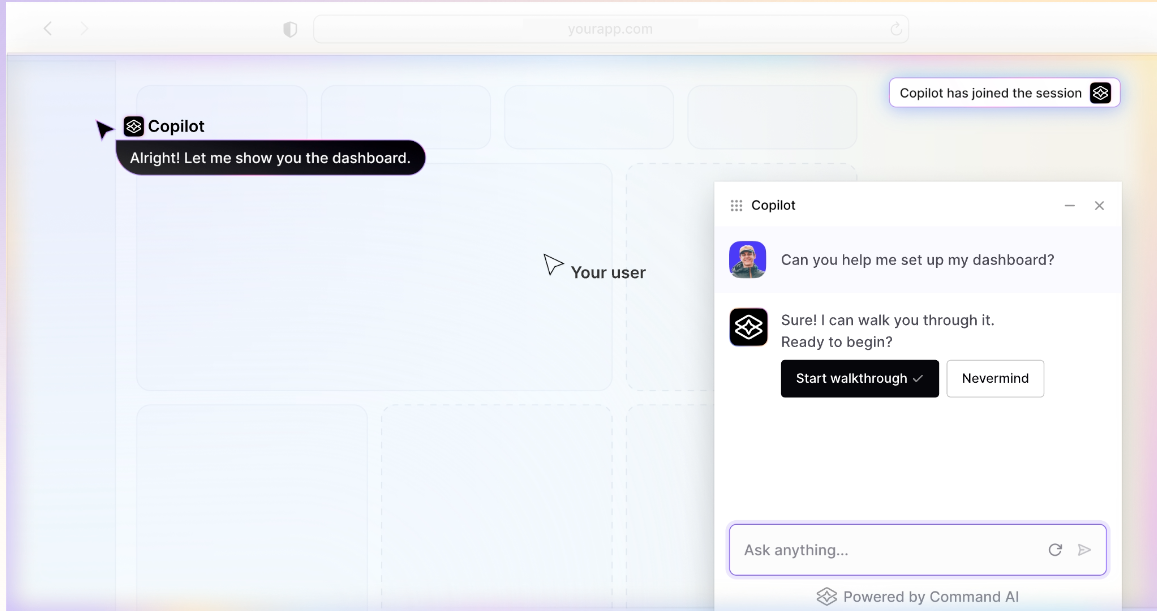
CommandBar - AI-native user assistance. The most forward-looking bet in the digital adoption category.
WalkMe pioneered digital adoption for employees - and the SAP acquisition doubles down on that direction. When SAP paid $1.5 billion for WalkMe in September 2024, the message was clear: WalkMe's future is enterprise employee adoption, embedded deeper into the SAP ecosystem alongside Signavio and LeanIX. That's a strong direction for enterprise buyers looking to drive adoption of complex systems like SAP and other ERP systems across large organizations.
But if you're here, you're probably not looking for a better way to train employees on new software. You're looking for a way to engage your customers: to onboard them, drive feature adoption, reduce churn, and deliver in-app guidance that feels native to your product across multiple channels.
And that's a fundamentally different problem than the one WalkMe was built to solve
WalkMe is genuinely strong for enterprise employee adoption: large-scale rollout of complex ERP tools (SAP, Salesforce, Workday), IT-governed change management, compliance tracking, and multi-system training for non-technical workforces. The SAP acquisition reinforces that strength, and organizations deep in the SAP ecosystem have a clear reason to stay.
But for customer-facing teams, the fit breaks down in specific, measurable ways:
Many teams are actively evaluating WalkMe alternatives that offer faster deployment, simpler ownership, and clearer pricing. This guide covers the best WalkMe competitors for teams that want to guide users through customer-facing experiences, not just employee training.
Here's how the leading WalkMe alternatives compare at a glance. G2 ratings below are drawn from G2's digital adoption platform category, based on verified user reviews.
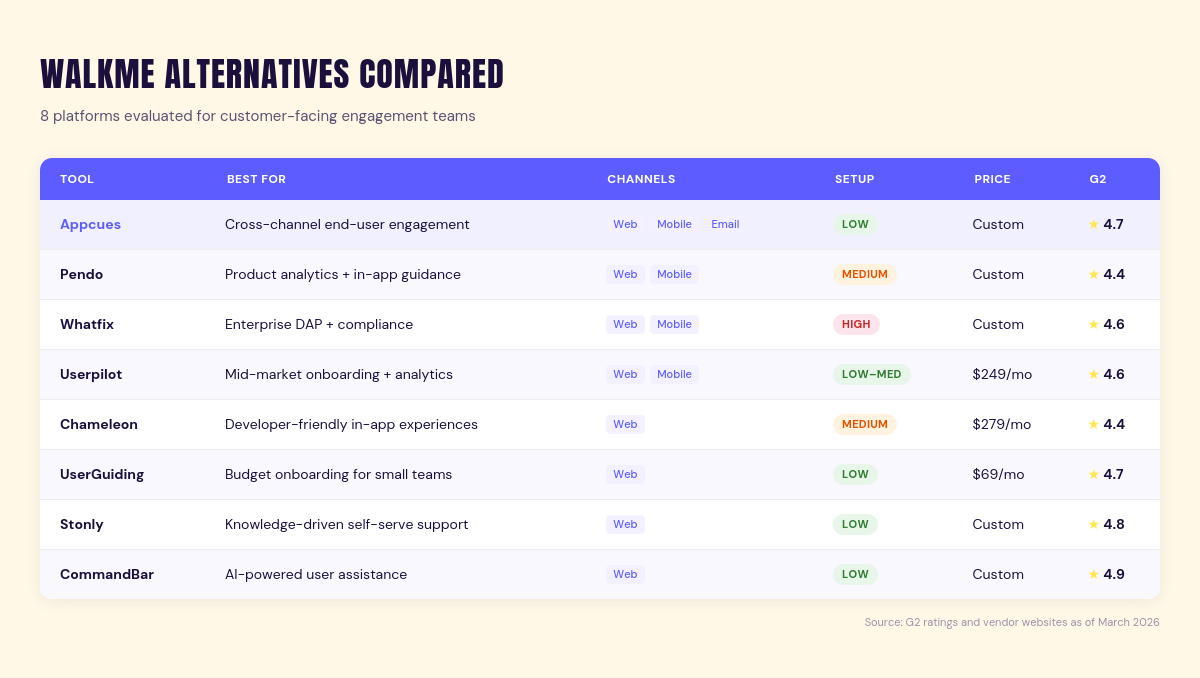
G2 ratings as of June 2026. Verify current ratings before making a final decision.
A digital adoption platform (DAP) is software that layers guidance, prompts, and analytics on top of existing applications to help users complete tasks and adopt new features. The category emerged to solve employee adoption challenges - helping workforces navigate complex enterprise tools like Salesforce, SAP, and Workday. But digital adoption for customers is a different discipline: it's about onboarding, activation, and retention in your own product, not training employees on someone else's software. Tools built for one purpose rarely excel at the other, which is why the customer-facing vs. employee distinction matters when evaluating digital adoption platform alternatives.
Choosing a digital adoption platform isn't about checking off features. It's about how quickly your team sees value, manages change, and keeps adoption steady without piling on more technical work.
WalkMe and most traditional digital adoption platforms were designed to help employees navigate enterprise applications. If you're building customer-facing adoption programs - onboarding, feature adoption, lifecycle engagement - you need something designed for that from the ground up. That single filter eliminates half the category.
Beyond focus, pay attention to time to value. WalkMe implementations usually require detailed planning, technical involvement, and ongoing configuration - tools that take months to configure delay impact. The best WalkMe alternatives support rapid deployment, letting your team start building and launching within days so your time to first value is measured in hours, not quarters. Look at whether the platform offers in-app walkthroughs, in-app prompts, onboarding flows, and contextual in-app guidance alongside cross-channel reach through email and mobile. Most digital adoption platforms stop at the product surface. The best ones don't.
AI is also reshaping how digital adoption platforms surface guidance and automate workflows. Look for platforms that use AI to accelerate experience building, generate content, or surface recommendations - it's becoming a real differentiator in how quickly teams can move from idea to live experience.
Make sure the adoption analytics go deeper than "views" and "completions." You need to see what users complete, where they struggle, and which processes need improvement tied to real user behavior and task completion.
Don't overlook the economics. WalkMe's pricing scales with user counts, and licensing, implementation, and support costs add up fast. Many WalkMe competitors differ sharply in how costs grow with usage. A platform that costs $249/month but requires zero implementation fees delivers faster ROI than a $50,000/year tool with $15,000 in professional services on top. Prioritize adoption tools with transparent pricing models that don't bury hidden costs behind service fees and ongoing maintenance - and that let business teams create and manage guidance without constant engineering support or IT bottlenecks.
Appcues is the strongest WalkMe alternative for teams focused on customer-facing engagement. While WalkMe optimizes for employee adoption of enterprise tools, Appcues is purpose-built for SaaS and product-led teams that need to onboard, activate, and retain customers across in-app, email, and mobile channels.
The platform lets non-technical teams build product tours, Tooltips, Checklists, Modals, Banners, and Surveys without writing code. That means product managers, marketers, and customer success leads can launch and iterate on experiences without waiting for engineering sprints. New Flows typically go live in hours, not weeks.
Product analytics are built in, with session data, funnel analysis, and goal tracking tied directly to the experiences you build. You can see which Flows drive activation, where users drop off, and how behavior changes over time.
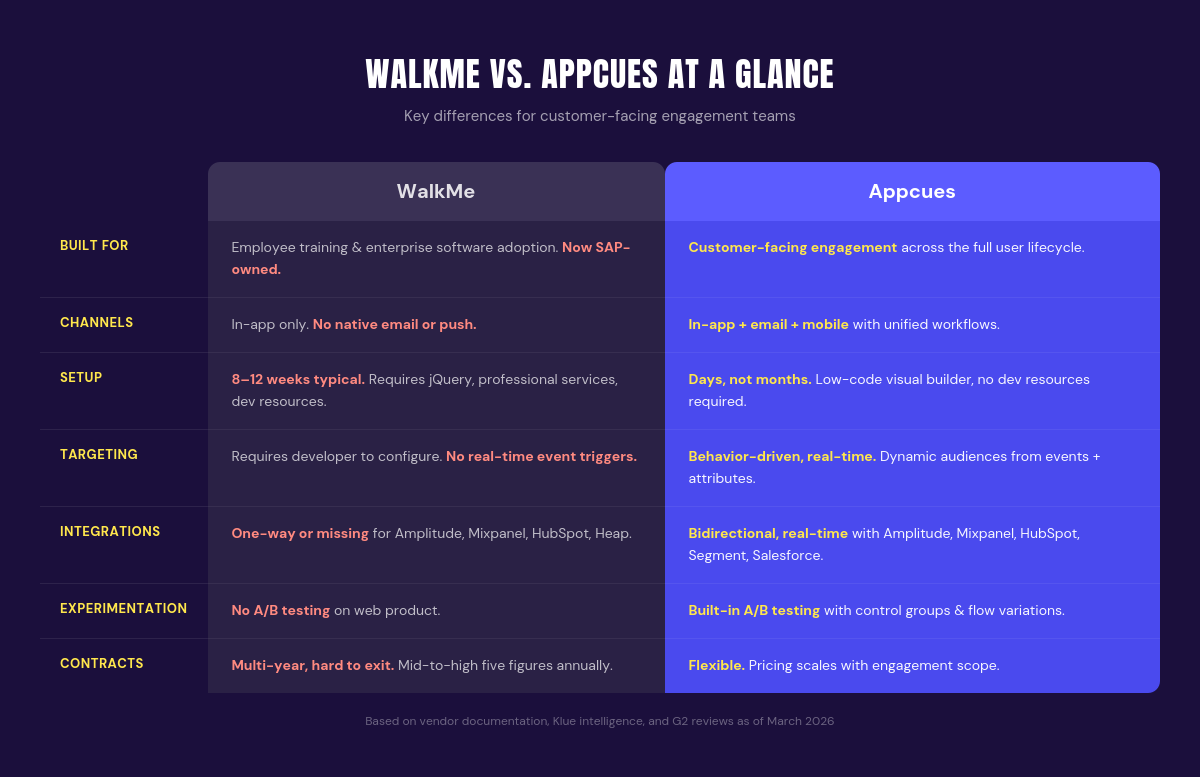
Appcues is built for customer-facing use cases - teams that need internal employee training tools should look at Whatfix or the honorable mentions section below. Pricing is custom and MAU-based; very large user bases require an enterprise quote.
Appcues offers three plans - Start, Grow, and Enterprise - all with the full platform included from day one. Every plan covers in-app, email, and mobile channels, with differences in published experience limits, reporting history, and support tiers. Pricing is based on monthly active users and scales with usage. See Appcues pricing →
Best for: SaaS and product-led teams that want to move fast, reach users across channels, and measure what works without turning adoption into an engineering project.
See how Appcues compares to WalkMe →
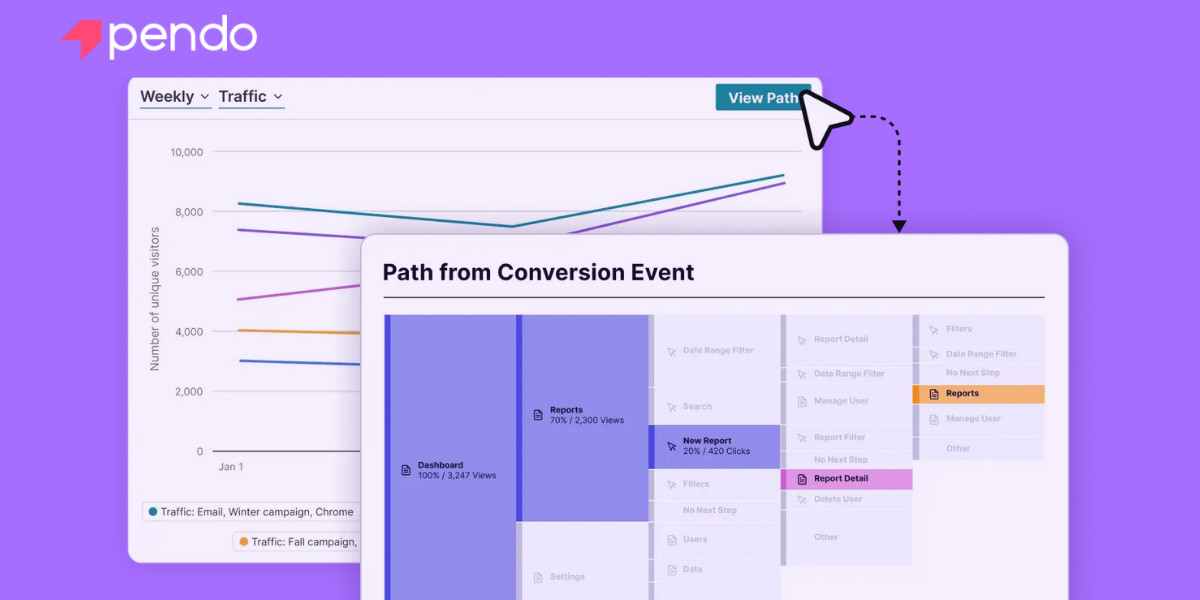
Pendo is the right WalkMe alternative if your primary need is product analytics - and you want in-app guidance as a secondary capability layered on top.
The platform is built around behavioral analytics: feature usage, session tracking, user paths, retention curves. It gives product teams deep visibility into how users interact with the product, which features get adopted, and where friction occurs. The in-app guidance layer (guides, tooltips, walkthroughs) is designed to act on those insights - surfacing prompts, announcements, or help content based on what the data reveals.
Pendo also serves both customer-facing and employee adoption use cases, which can be an advantage for teams with overlapping needs.
That analytics-first architecture is Pendo's strength - and its limitation. Teams that prioritize understanding over action will find a powerful toolset. But if your primary goal is launching onboarding flows, activation campaigns, or lifecycle messaging quickly, you may find Pendo's guidance tools less flexible than purpose-built engagement platforms. The builder is capable but not as intuitive as some alternatives, and cross-channel reach (email, mobile push) is limited compared to tools like Appcues. Some features are designed with internal training in mind rather than customer engagement.
Pricing is not published. Pendo operates on custom quotes based on MAU counts, modules, and enterprise requirements. Expect mid-to-high five figures annually for most production deployments, with enterprise plans reaching six figures.
Best for: Product teams that prioritize analytics and want in-app guidance as a supporting capability. See the full 2026 comparison.
Whatfix is the WalkMe alternative that most closely resembles WalkMe itself - a full-scale enterprise digital adoption platform built for large organizations with complex compliance, training, and customer onboarding requirements.
If you need to support both employee adoption (training on Salesforce, SAP, Workday) and customer-facing guidance in the same platform, Whatfix is one of the few tools that genuinely serves both use cases. It offers in-app walkthroughs, task automation, self-help widgets, and detailed analytics across web and desktop applications.
The trade-off is complexity. Whatfix implementations typically involve professional services, technical configuration, and multi-week deployments. That's appropriate for large-scale enterprise rollouts - but overkill for SaaS teams that need to ship onboarding flows quickly. The learning curve is steeper than most customer-facing tools.
Custom quotes only, with annual contracts often in the mid-to-high five figures and up. The pricing reflects the enterprise positioning.
Best for: Large enterprises with genuine dual needs - employee training and customer adoption - who are willing to invest in a platform that covers both. Check out our 2026 comparison.
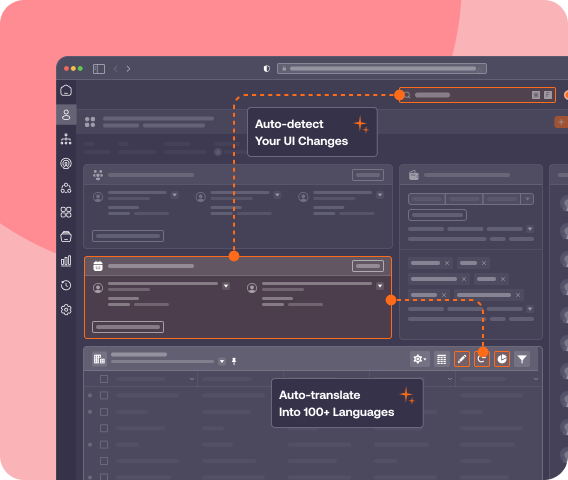
Userpilot is a solid mid-market WalkMe alternative for teams that want in-app onboarding with built-in product analytics.
The platform covers the core use cases - product tours, tooltips, checklists, banners, NPS surveys - with a visual builder that non-technical teams can operate. Where Userpilot differentiates is depth of analytics for its price point. You get feature tagging, funnel analysis, user segmentation, and retention reporting without needing a separate analytics tool. That makes it a strong fit for user onboarding teams that want to understand behavior and act on it in the same platform. Userpilot also includes built-in A/B testing for in-app experiences, letting you test flow variations and measure impact on completion rates - a differentiator compared to other mid-market tools.
The limitations are channel reach and scale. Userpilot is in-app only - no email, no mobile push, no cross-channel orchestration. And while it handles mid-market volumes well, teams with large user bases or complex segmentation needs may outgrow the platform faster than expected.
Starts at $249/month (billed annually) for the Starter plan, which includes up to 2,000 MAUs and access to core features. Growth and Enterprise tiers add higher limits, advanced analytics, and localization. The pricing is transparent and accessible, though per-MAU scaling can add up at higher volumes.
Best for: Mid-market teams that want in-app onboarding plus analytics in a single, affordable platform - as long as you don't need cross-channel reach. Check out our 2026 comparison.

Chameleon is the WalkMe alternative for teams that want more technical control over in-app experiences. The platform is built for developer-product partnerships: it offers a visual builder for non-technical users, but the real power comes from its customization options, CSS overrides, and API flexibility.
If you care deeply about making in-app prompts look and behave exactly like native product UI, Chameleon gives you the tools to get there. Chameleon covers the core patterns: tours, tooltips, microsurveys, launchers, and checklists. The targeting is capable, with event-based and property-based segmentation.
That level of control comes with trade-offs. Setup is more involved than simpler tools, and you'll likely need engineering support for advanced use cases. Like Userpilot, it's in-app only: no email, no mobile, and no cross-channel reach. Chameleon does not have a dedicated AI content generation or recommendation layer, so teams looking for AI-assisted experience building will need to look elsewhere.
Starts at $279/month (billed annually) for the Startup plan. Growth and Enterprise tiers add rate limits, advanced integrations, and dedicated support. The value proposition is control and customization, not ease of use or speed.
Best for: Product-engineering teams that want fine-grained control over in-app experiences and don't mind a steeper learning curve. See our 2026 Chameleon vs Appcues breakdown.
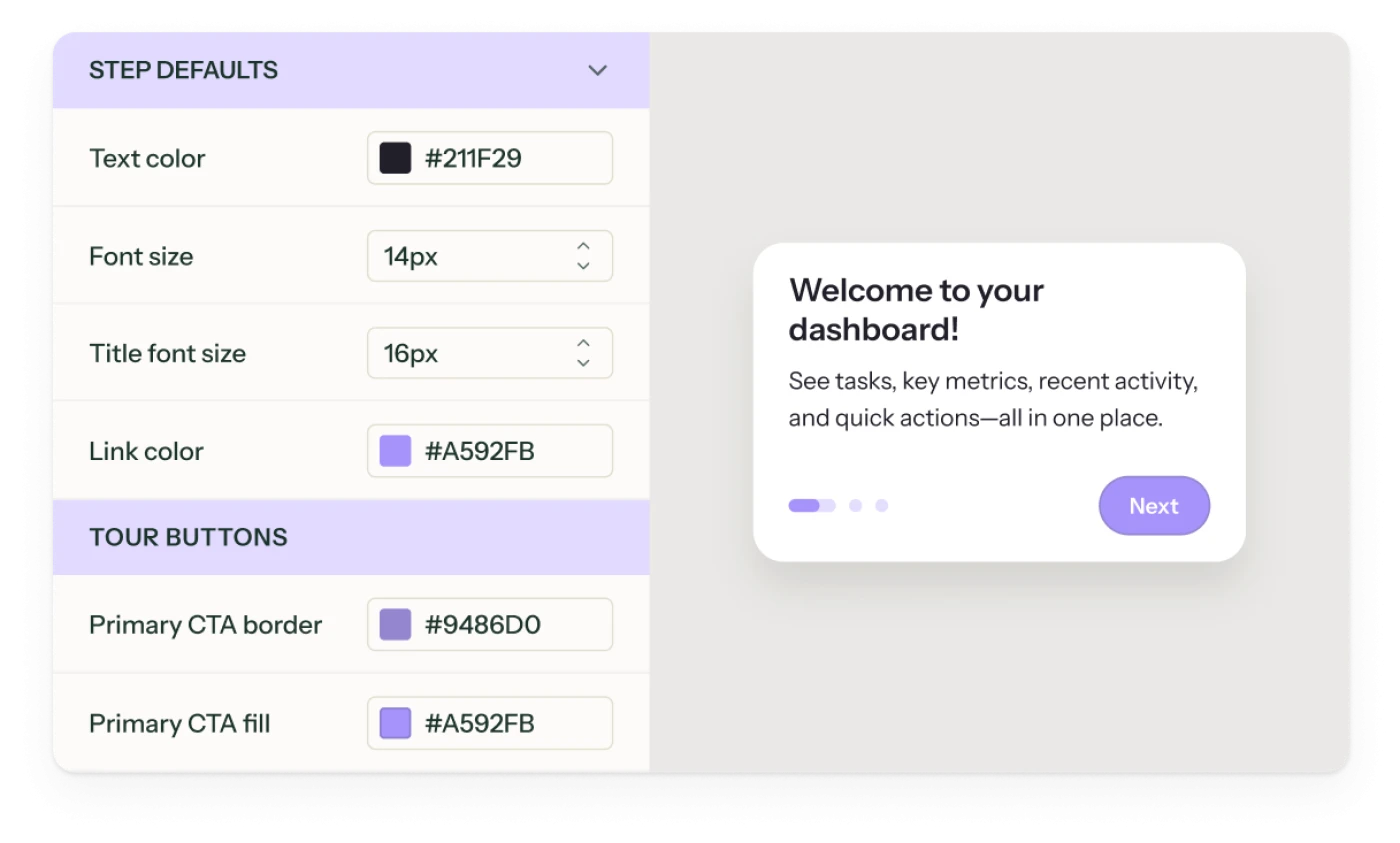
UserGuiding is the most accessible WalkMe alternative for small teams or early-stage startups that need basic in-app onboarding at a low price point.
The platform covers the essentials: product tours, onboarding checklists, tooltips, hotspots, modals, and a changelog widget. The builder is simple and visual, designed for non-technical users who need to get something live quickly without engineering help.
What you trade for that simplicity is depth. UserGuiding's analytics are basic, segmentation is limited, and customization options are constrained compared to more mature platforms. Cross-channel reach doesn't exist - it's in-app only. There are no built-in AI features for experience building or recommendations. And while the low starting price is attractive, many teams find they outgrow the platform as their needs mature, leading to a migration that costs time and retraining.
Starts at $69/month (billed annually) for the Basic plan, which includes up to 1,000 MAUs and access to core features. The Professional and Corporate plans add higher limits, integrations, and support.
Best for: Small teams that need basic onboarding at the lowest possible price - with eyes open about the limitations you'll hit as you scale. Check out our 2026 comparison.
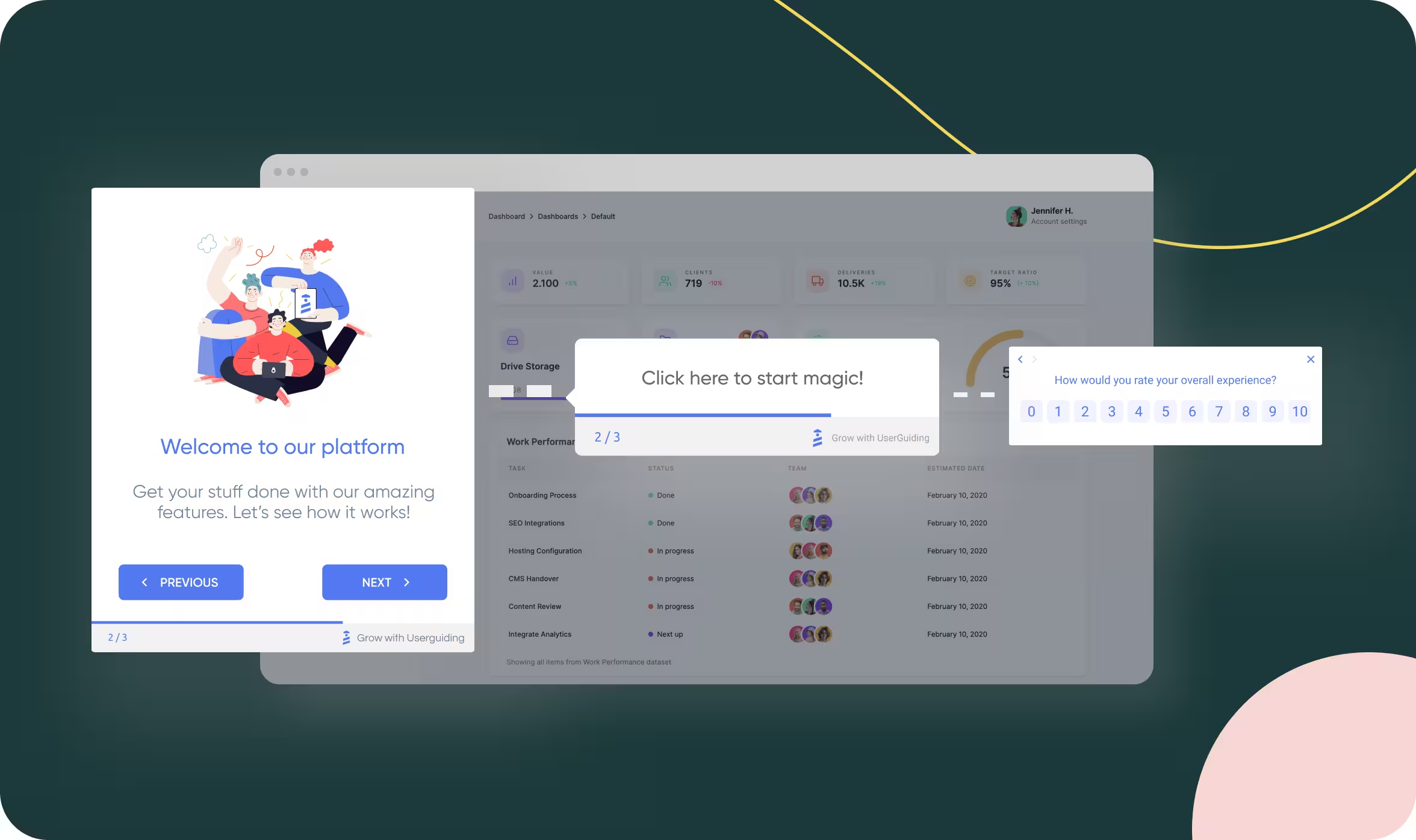
Stonly takes a different approach than most WalkMe alternatives. Instead of layering prompts and tours on top of the product, it focuses on interactive knowledge bases and self-serve support content: step-by-step guides, decision trees, and contextual help that users access on demand.
If your adoption problem is actually a support problem where users don't know how to do things, and they need clear documentation, not more tooltips, Stonly may be the right fit. The platform excels at creating searchable, interactive help content that scales. It's particularly strong for support teams, success teams, and products with complex workflows where guided documentation beats pop-up prompts.
The trade-off is that Stonly isn't designed for proactive engagement. It won't push users through onboarding flows, trigger messages based on behavior, or drive lifecycle campaigns. It's reactive; users have to seek out the help. That's the right model for some products and the wrong one for others.
Custom, based on usage and modules. Expect mid-market pricing for production deployments.
Best for: Teams whose adoption challenges are knowledge gaps, not onboarding friction - and who need self-serve support that scales.
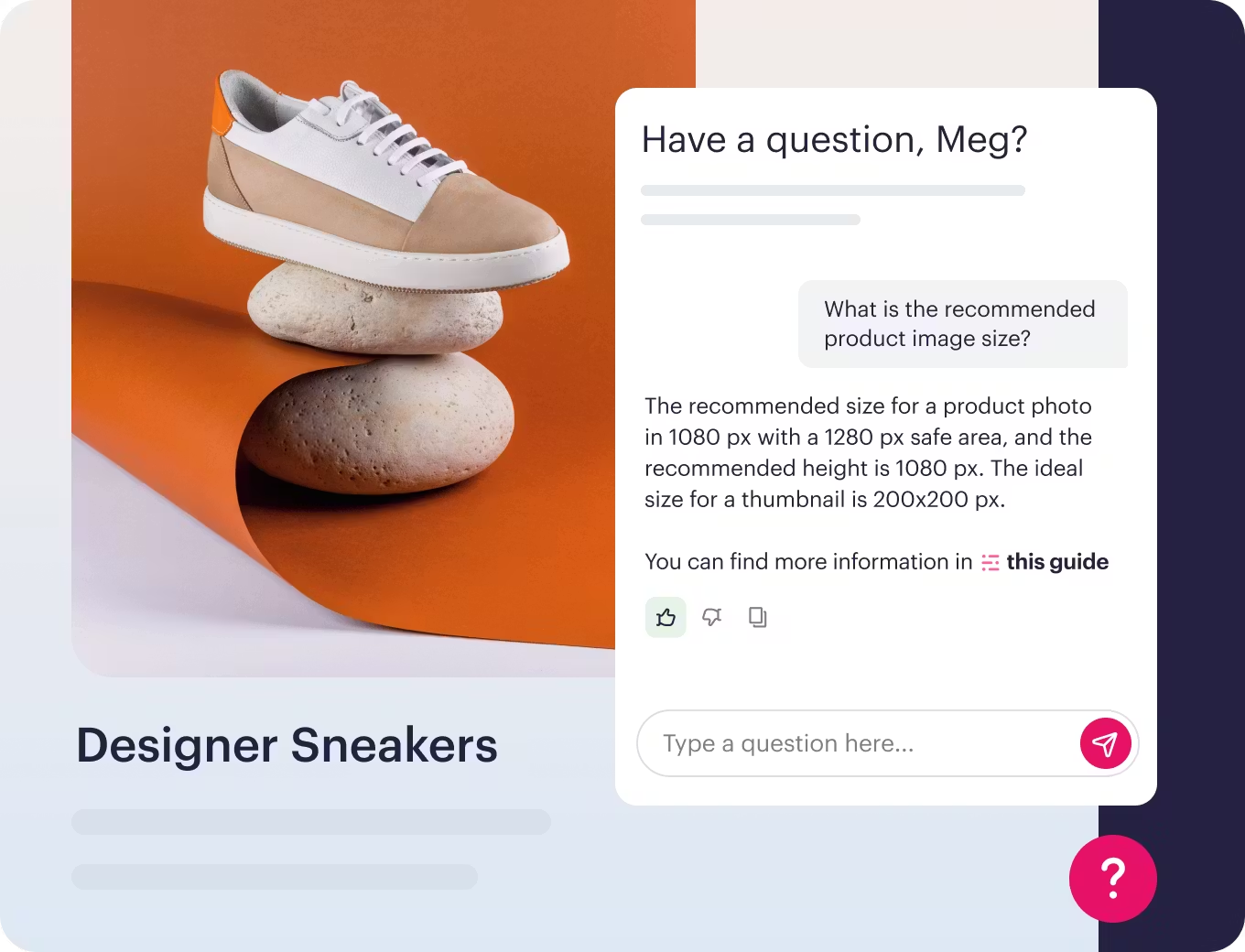
CommandBar is the newest entrant on this list, and it takes the most unconventional approach: AI-powered search and assistance inside the product. Think of it as a command palette (like Spotlight on Mac or Cmd+K in Slack) combined with contextual help and AI-generated answers.
The core idea is that users don't need to be walked through onboarding if they can just ask for what they need. CommandBar surfaces actions, documentation, and guidance based on natural language queries and context. For products with power users, complex feature sets, or developer-centric audiences, that model can feel more native than traditional tours and tooltips. The platform also supports traditional in-app prompts - nudges, tours, checklists - but the AI assistance layer is the differentiator.
It's early-stage technology, and the maturity varies depending on your product's complexity and documentation depth. Teams that need proven, production-grade onboarding today may find CommandBar's approach too emergent for their timeline.
Custom, with usage-based scaling. Expect to start in the low-to-mid four figures annually for early production deployments.
Best for: Teams that want to experiment with AI-native assistance and are comfortable with emerging technology. As AI reshapes how users discover and learn software, CommandBar represents a bet on where the entire digital adoption category is heading.
Here's how these WalkMe competitors compare on price.
Sticker price is only part of the picture. Total cost of ownership varies significantly across these tools. WalkMe and Whatfix typically require professional services for implementation, which can add 20 - 50% to first-year costs. Enterprise platforms often bundle training, onboarding support, and success management into annual contracts - valuable if you use them, expensive if you don't. Tools with transparent, self-serve pricing (Appcues, Userpilot, UserGuiding, Chameleon) let you start smaller and scale predictably.
Before committing, ask about implementation fees, training costs, and what happens to your pricing if you exceed MAU limits mid-contract. See Appcues pricing for an example.
If you're evaluating WalkMe alternatives for employee adoption and internal training - rather than customer-facing engagement - these tools serve that use case more directly:
These platforms are worth evaluating if employee adoption is your primary use case. If you're focused on customer-facing experiences, the eight tools covered above are a better fit - and customer engagement tools are built for that purpose.
Userflow: A newer entrant with a fast visual builder and AI-assisted content creation. Userflow focuses on web-based in-app onboarding at mid-market pricing ($240/month starting). It's web-only - no mobile support - but carries a strong 4.8 G2 rating. Worth evaluating if speed and ease of use are your top priorities. Check out our comparison.Other WalkMe Alternatives Worth Knowing
If you're evaluating WalkMe alternatives for employee adoption and internal training - rather than customer-facing engagement - these tools serve that use case more directly:
These platforms are worth evaluating if employee adoption is your primary use case. If you're focused on customer-facing experiences, the eight tools covered above are a better fit - and customer engagement tools are built for that purpose.
Userflow: A newer entrant with a fast visual builder and AI-assisted content creation. Userflow focuses on web-based in-app onboarding at mid-market pricing ($240/month starting). It's web-only - no mobile support - but carries a strong 4.8 G2 rating. Worth evaluating if speed and ease of use are your top priorities. Check out our comparison.
No single WalkMe alternative is right for every team. The best fit depends on what you're trying to accomplish, who needs to own the tool, and how fast you need to move.
Before working through the options, answer these four questions:
If budget is a primary constraint, here's how the options stack up:
WalkMe pioneered digital adoption - but its future is enterprise employee adoption, not customer engagement. If you're building customer-facing experiences, you need a tool designed for that purpose from the start.
The best WalkMe alternative depends on your specific needs. Appcues is the strongest choice for teams that want cross-channel engagement without engineering dependency. Pendo fits teams that prioritize analytics. Whatfix serves enterprises with dual employee and customer needs. And a range of mid-market and specialized tools cover narrower use cases at lower price points.
The fastest way to know what works is to try it. Book a demo to see how Appcues compares or explore on your own.
Lifecycle Marketing
Email Marketing
In-App Guidance & Self-Serve Support
AI
TL;DR
Appcues - The strongest WalkMe alternative for customer-facing teams. Cross-channel engagement across in-app, email, and mobile with AI-powered experience building (Captain AI, Appcues Advisor) and no engineering dependency.
Pendo - Analytics-first platform where product insights are the priority and in-app guidance is a supporting capability layered on top.
Whatfix - Enterprise DAP for large organizations that genuinely need both employee and customer adoption in a single platform.
Userpilot - Mid-market in-app onboarding with built-in analytics and A/B testing at a published price point ($249/mo).
Chameleon - Developer-friendly builder for product-engineering teams that need fine-grained UI control and CSS-level customization.
UserGuiding - Budget entry point for early-stage teams that need basic onboarding fast. Plan to outgrow it.
Stonly - Interactive knowledge bases for teams whose adoption problem is actually a support problem, not an onboarding problem.
CommandBar - AI-native user assistance. The most forward-looking bet in the digital adoption category.
WalkMe pioneered digital adoption for employees - and the SAP acquisition doubles down on that direction. When SAP paid $1.5 billion for WalkMe in September 2024, the message was clear: WalkMe's future is enterprise employee adoption, embedded deeper into the SAP ecosystem alongside Signavio and LeanIX. That's a strong direction for enterprise buyers looking to drive adoption of complex systems like SAP and other ERP systems across large organizations.
But if you're here, you're probably not looking for a better way to train employees on new software. You're looking for a way to engage your customers: to onboard them, drive feature adoption, reduce churn, and deliver in-app guidance that feels native to your product across multiple channels.
And that's a fundamentally different problem than the one WalkMe was built to solve
WalkMe is genuinely strong for enterprise employee adoption: large-scale rollout of complex ERP tools (SAP, Salesforce, Workday), IT-governed change management, compliance tracking, and multi-system training for non-technical workforces. The SAP acquisition reinforces that strength, and organizations deep in the SAP ecosystem have a clear reason to stay.
But for customer-facing teams, the fit breaks down in specific, measurable ways:
Many teams are actively evaluating WalkMe alternatives that offer faster deployment, simpler ownership, and clearer pricing. This guide covers the best WalkMe competitors for teams that want to guide users through customer-facing experiences, not just employee training.
Here's how the leading WalkMe alternatives compare at a glance. G2 ratings below are drawn from G2's digital adoption platform category, based on verified user reviews.
G2 ratings as of June 2026. Verify current ratings before making a final decision.
A digital adoption platform (DAP) is software that layers guidance, prompts, and analytics on top of existing applications to help users complete tasks and adopt new features. The category emerged to solve employee adoption challenges - helping workforces navigate complex enterprise tools like Salesforce, SAP, and Workday. But digital adoption for customers is a different discipline: it's about onboarding, activation, and retention in your own product, not training employees on someone else's software. Tools built for one purpose rarely excel at the other, which is why the customer-facing vs. employee distinction matters when evaluating digital adoption platform alternatives.
Choosing a digital adoption platform isn't about checking off features. It's about how quickly your team sees value, manages change, and keeps adoption steady without piling on more technical work.
WalkMe and most traditional digital adoption platforms were designed to help employees navigate enterprise applications. If you're building customer-facing adoption programs - onboarding, feature adoption, lifecycle engagement - you need something designed for that from the ground up. That single filter eliminates half the category.
Beyond focus, pay attention to time to value. WalkMe implementations usually require detailed planning, technical involvement, and ongoing configuration - tools that take months to configure delay impact. The best WalkMe alternatives support rapid deployment, letting your team start building and launching within days so your time to first value is measured in hours, not quarters. Look at whether the platform offers in-app walkthroughs, in-app prompts, onboarding flows, and contextual in-app guidance alongside cross-channel reach through email and mobile. Most digital adoption platforms stop at the product surface. The best ones don't.
AI is also reshaping how digital adoption platforms surface guidance and automate workflows. Look for platforms that use AI to accelerate experience building, generate content, or surface recommendations - it's becoming a real differentiator in how quickly teams can move from idea to live experience.
Make sure the adoption analytics go deeper than "views" and "completions." You need to see what users complete, where they struggle, and which processes need improvement tied to real user behavior and task completion.
Don't overlook the economics. WalkMe's pricing scales with user counts, and licensing, implementation, and support costs add up fast. Many WalkMe competitors differ sharply in how costs grow with usage. A platform that costs $249/month but requires zero implementation fees delivers faster ROI than a $50,000/year tool with $15,000 in professional services on top. Prioritize adoption tools with transparent pricing models that don't bury hidden costs behind service fees and ongoing maintenance - and that let business teams create and manage guidance without constant engineering support or IT bottlenecks.
Appcues is the strongest WalkMe alternative for teams focused on customer-facing engagement. While WalkMe optimizes for employee adoption of enterprise tools, Appcues is purpose-built for SaaS and product-led teams that need to onboard, activate, and retain customers across in-app, email, and mobile channels.
The platform lets non-technical teams build product tours, Tooltips, Checklists, Modals, Banners, and Surveys without writing code. That means product managers, marketers, and customer success leads can launch and iterate on experiences without waiting for engineering sprints. New Flows typically go live in hours, not weeks.
Product analytics are built in, with session data, funnel analysis, and goal tracking tied directly to the experiences you build. You can see which Flows drive activation, where users drop off, and how behavior changes over time.
Appcues is built for customer-facing use cases - teams that need internal employee training tools should look at Whatfix or the honorable mentions section below. Pricing is custom and MAU-based; very large user bases require an enterprise quote.
Appcues offers three plans - Start, Grow, and Enterprise - all with the full platform included from day one. Every plan covers in-app, email, and mobile channels, with differences in published experience limits, reporting history, and support tiers. Pricing is based on monthly active users and scales with usage. See Appcues pricing →
Best for: SaaS and product-led teams that want to move fast, reach users across channels, and measure what works without turning adoption into an engineering project.
See how Appcues compares to WalkMe →
Pendo is the right WalkMe alternative if your primary need is product analytics - and you want in-app guidance as a secondary capability layered on top.
The platform is built around behavioral analytics: feature usage, session tracking, user paths, retention curves. It gives product teams deep visibility into how users interact with the product, which features get adopted, and where friction occurs. The in-app guidance layer (guides, tooltips, walkthroughs) is designed to act on those insights - surfacing prompts, announcements, or help content based on what the data reveals.
Pendo also serves both customer-facing and employee adoption use cases, which can be an advantage for teams with overlapping needs.
That analytics-first architecture is Pendo's strength - and its limitation. Teams that prioritize understanding over action will find a powerful toolset. But if your primary goal is launching onboarding flows, activation campaigns, or lifecycle messaging quickly, you may find Pendo's guidance tools less flexible than purpose-built engagement platforms. The builder is capable but not as intuitive as some alternatives, and cross-channel reach (email, mobile push) is limited compared to tools like Appcues. Some features are designed with internal training in mind rather than customer engagement.
Pricing is not published. Pendo operates on custom quotes based on MAU counts, modules, and enterprise requirements. Expect mid-to-high five figures annually for most production deployments, with enterprise plans reaching six figures.
Best for: Product teams that prioritize analytics and want in-app guidance as a supporting capability. See the full 2026 comparison.
Whatfix is the WalkMe alternative that most closely resembles WalkMe itself - a full-scale enterprise digital adoption platform built for large organizations with complex compliance, training, and customer onboarding requirements.
If you need to support both employee adoption (training on Salesforce, SAP, Workday) and customer-facing guidance in the same platform, Whatfix is one of the few tools that genuinely serves both use cases. It offers in-app walkthroughs, task automation, self-help widgets, and detailed analytics across web and desktop applications.
The trade-off is complexity. Whatfix implementations typically involve professional services, technical configuration, and multi-week deployments. That's appropriate for large-scale enterprise rollouts - but overkill for SaaS teams that need to ship onboarding flows quickly. The learning curve is steeper than most customer-facing tools.
Custom quotes only, with annual contracts often in the mid-to-high five figures and up. The pricing reflects the enterprise positioning.
Best for: Large enterprises with genuine dual needs - employee training and customer adoption - who are willing to invest in a platform that covers both. Check out our 2026 comparison.
Userpilot is a solid mid-market WalkMe alternative for teams that want in-app onboarding with built-in product analytics.
The platform covers the core use cases - product tours, tooltips, checklists, banners, NPS surveys - with a visual builder that non-technical teams can operate. Where Userpilot differentiates is depth of analytics for its price point. You get feature tagging, funnel analysis, user segmentation, and retention reporting without needing a separate analytics tool. That makes it a strong fit for user onboarding teams that want to understand behavior and act on it in the same platform. Userpilot also includes built-in A/B testing for in-app experiences, letting you test flow variations and measure impact on completion rates - a differentiator compared to other mid-market tools.
The limitations are channel reach and scale. Userpilot is in-app only - no email, no mobile push, no cross-channel orchestration. And while it handles mid-market volumes well, teams with large user bases or complex segmentation needs may outgrow the platform faster than expected.
Starts at $249/month (billed annually) for the Starter plan, which includes up to 2,000 MAUs and access to core features. Growth and Enterprise tiers add higher limits, advanced analytics, and localization. The pricing is transparent and accessible, though per-MAU scaling can add up at higher volumes.
Best for: Mid-market teams that want in-app onboarding plus analytics in a single, affordable platform - as long as you don't need cross-channel reach. Check out our 2026 comparison.
Chameleon is the WalkMe alternative for teams that want more technical control over in-app experiences. The platform is built for developer-product partnerships: it offers a visual builder for non-technical users, but the real power comes from its customization options, CSS overrides, and API flexibility.
If you care deeply about making in-app prompts look and behave exactly like native product UI, Chameleon gives you the tools to get there. Chameleon covers the core patterns: tours, tooltips, microsurveys, launchers, and checklists. The targeting is capable, with event-based and property-based segmentation.
That level of control comes with trade-offs. Setup is more involved than simpler tools, and you'll likely need engineering support for advanced use cases. Like Userpilot, it's in-app only: no email, no mobile, and no cross-channel reach. Chameleon does not have a dedicated AI content generation or recommendation layer, so teams looking for AI-assisted experience building will need to look elsewhere.
Starts at $279/month (billed annually) for the Startup plan. Growth and Enterprise tiers add rate limits, advanced integrations, and dedicated support. The value proposition is control and customization, not ease of use or speed.
Best for: Product-engineering teams that want fine-grained control over in-app experiences and don't mind a steeper learning curve. See our 2026 Chameleon vs Appcues breakdown.
UserGuiding is the most accessible WalkMe alternative for small teams or early-stage startups that need basic in-app onboarding at a low price point.
The platform covers the essentials: product tours, onboarding checklists, tooltips, hotspots, modals, and a changelog widget. The builder is simple and visual, designed for non-technical users who need to get something live quickly without engineering help.
What you trade for that simplicity is depth. UserGuiding's analytics are basic, segmentation is limited, and customization options are constrained compared to more mature platforms. Cross-channel reach doesn't exist - it's in-app only. There are no built-in AI features for experience building or recommendations. And while the low starting price is attractive, many teams find they outgrow the platform as their needs mature, leading to a migration that costs time and retraining.
Starts at $69/month (billed annually) for the Basic plan, which includes up to 1,000 MAUs and access to core features. The Professional and Corporate plans add higher limits, integrations, and support.
Best for: Small teams that need basic onboarding at the lowest possible price - with eyes open about the limitations you'll hit as you scale. Check out our 2026 comparison.
Stonly takes a different approach than most WalkMe alternatives. Instead of layering prompts and tours on top of the product, it focuses on interactive knowledge bases and self-serve support content: step-by-step guides, decision trees, and contextual help that users access on demand.
If your adoption problem is actually a support problem where users don't know how to do things, and they need clear documentation, not more tooltips, Stonly may be the right fit. The platform excels at creating searchable, interactive help content that scales. It's particularly strong for support teams, success teams, and products with complex workflows where guided documentation beats pop-up prompts.
The trade-off is that Stonly isn't designed for proactive engagement. It won't push users through onboarding flows, trigger messages based on behavior, or drive lifecycle campaigns. It's reactive; users have to seek out the help. That's the right model for some products and the wrong one for others.
Custom, based on usage and modules. Expect mid-market pricing for production deployments.
Best for: Teams whose adoption challenges are knowledge gaps, not onboarding friction - and who need self-serve support that scales.
CommandBar is the newest entrant on this list, and it takes the most unconventional approach: AI-powered search and assistance inside the product. Think of it as a command palette (like Spotlight on Mac or Cmd+K in Slack) combined with contextual help and AI-generated answers.
The core idea is that users don't need to be walked through onboarding if they can just ask for what they need. CommandBar surfaces actions, documentation, and guidance based on natural language queries and context. For products with power users, complex feature sets, or developer-centric audiences, that model can feel more native than traditional tours and tooltips. The platform also supports traditional in-app prompts - nudges, tours, checklists - but the AI assistance layer is the differentiator.
It's early-stage technology, and the maturity varies depending on your product's complexity and documentation depth. Teams that need proven, production-grade onboarding today may find CommandBar's approach too emergent for their timeline.
Custom, with usage-based scaling. Expect to start in the low-to-mid four figures annually for early production deployments.
Best for: Teams that want to experiment with AI-native assistance and are comfortable with emerging technology. As AI reshapes how users discover and learn software, CommandBar represents a bet on where the entire digital adoption category is heading.
Here's how these WalkMe competitors compare on price.
Sticker price is only part of the picture. Total cost of ownership varies significantly across these tools. WalkMe and Whatfix typically require professional services for implementation, which can add 20 - 50% to first-year costs. Enterprise platforms often bundle training, onboarding support, and success management into annual contracts - valuable if you use them, expensive if you don't. Tools with transparent, self-serve pricing (Appcues, Userpilot, UserGuiding, Chameleon) let you start smaller and scale predictably.
Before committing, ask about implementation fees, training costs, and what happens to your pricing if you exceed MAU limits mid-contract. See Appcues pricing for an example.
If you're evaluating WalkMe alternatives for employee adoption and internal training - rather than customer-facing engagement - these tools serve that use case more directly:
These platforms are worth evaluating if employee adoption is your primary use case. If you're focused on customer-facing experiences, the eight tools covered above are a better fit - and customer engagement tools are built for that purpose.
Userflow: A newer entrant with a fast visual builder and AI-assisted content creation. Userflow focuses on web-based in-app onboarding at mid-market pricing ($240/month starting). It's web-only - no mobile support - but carries a strong 4.8 G2 rating. Worth evaluating if speed and ease of use are your top priorities. Check out our comparison.Other WalkMe Alternatives Worth Knowing
If you're evaluating WalkMe alternatives for employee adoption and internal training - rather than customer-facing engagement - these tools serve that use case more directly:
These platforms are worth evaluating if employee adoption is your primary use case. If you're focused on customer-facing experiences, the eight tools covered above are a better fit - and customer engagement tools are built for that purpose.
Userflow: A newer entrant with a fast visual builder and AI-assisted content creation. Userflow focuses on web-based in-app onboarding at mid-market pricing ($240/month starting). It's web-only - no mobile support - but carries a strong 4.8 G2 rating. Worth evaluating if speed and ease of use are your top priorities. Check out our comparison.
No single WalkMe alternative is right for every team. The best fit depends on what you're trying to accomplish, who needs to own the tool, and how fast you need to move.
Before working through the options, answer these four questions:
If budget is a primary constraint, here's how the options stack up:
WalkMe pioneered digital adoption - but its future is enterprise employee adoption, not customer engagement. If you're building customer-facing experiences, you need a tool designed for that purpose from the start.
The best WalkMe alternative depends on your specific needs. Appcues is the strongest choice for teams that want cross-channel engagement without engineering dependency. Pendo fits teams that prioritize analytics. Whatfix serves enterprises with dual employee and customer needs. And a range of mid-market and specialized tools cover narrower use cases at lower price points.
The fastest way to know what works is to try it. Book a demo to see how Appcues compares or explore on your own.

Sign up for Quickcues and get our monthly updates!
.svg)


