.png)
If you're comparing Appcues vs Chameleon, there's a good chance you've already noticed how similar they look on the surface. Both platforms help teams create in-app product tours, tooltips, modals, and checklists with low-code lift. Both are aimed at product and marketing teams who want to move fast. And both show up in the same G2 grids and shortlists.
So what's actually different?
Scope. That's really what it comes down to. Chameleon is a focused in-app guidance tool with real strengths in styling and customization. Appcues is a cross-channel engagement platform that includes in-app guidance as one capability among many, alongside email, push notifications, mobile, and automated Workflows driven by user behavior.
If your engagement strategy starts and ends inside your web product, both platforms can work. If it extends beyond that, across channels, across devices, across the full customer lifecycle, the gap between them gets wide quickly.
We're Appcues, so we'll be straightforward about our perspective here. But we've tried to make this comparison genuinely useful. Where Chameleon has real advantages, we'll say so. Where we think we're the stronger choice, we'll explain why.
Here's how the two platforms actually compare.
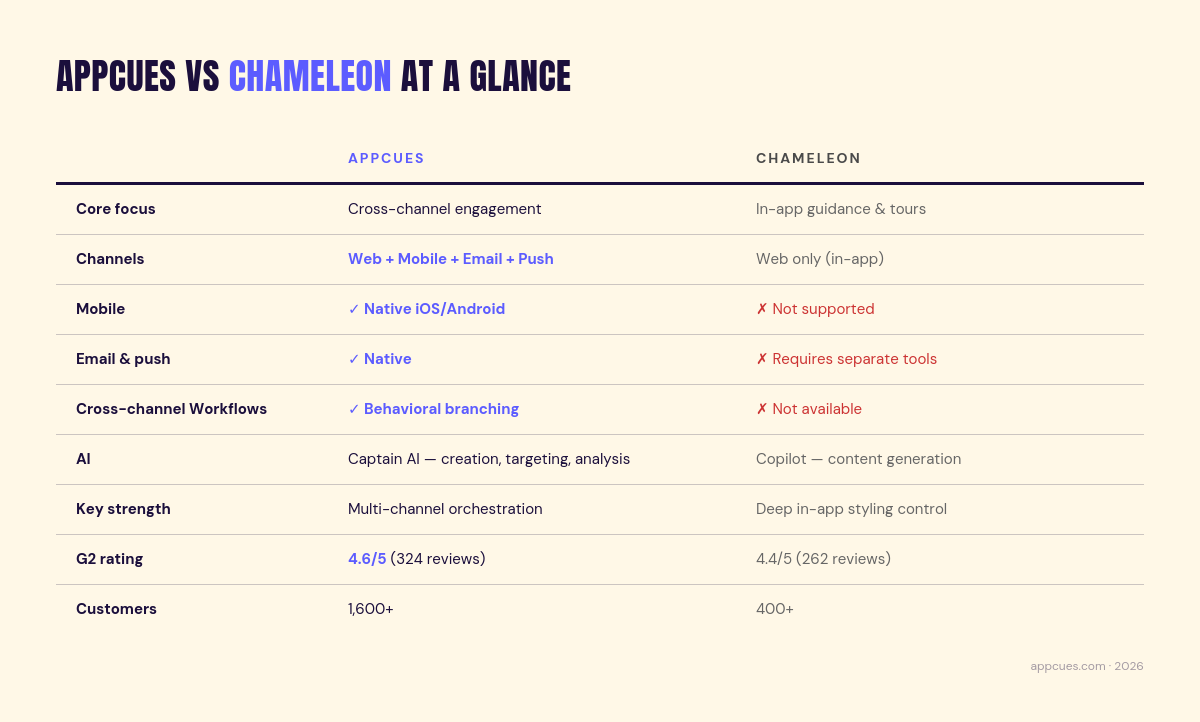
Here's how the two platforms compare across focus, channels, AI, and team fit.
The short version: Appcues is the stronger choice for teams that need to engage users across channels and devices. Chameleon is a solid option for teams whose engagement strategy lives entirely inside a web product and who value deep in-app styling control.
Before we get into where the platforms diverge, it's worth being honest about where Chameleon does well. If you've already demoed both products, you probably noticed.
In-app styling and customization. Chameleon offers deeper customization for how in-app flows look and feel, including advanced branded themes and delight animations like confetti bursts and heart effects. If visual polish on your in-app experiences is a top priority and your design team cares about fine-grained control, this is a real strength.
Embedded content. Chameleon supports embedded cards and banners. These are persistent, contextual content that lives within your product's UI rather than overlaying it. Useful for teams that want guidance to feel native to the product surface.
HelpBar.ai. A free in-app search widget that lets users search documentation, help content, and product actions from within the app. It's a smart feature. Appcues' Launchpad and Resource Center serve a similar purpose (helping users self-serve within the product) but they approach the problem differently.
Interactive demos. Through their acquisition of Driveway, Chameleon is building interactive product demo capabilities, with a full launch coming soon. If you need self-guided product walkthroughs for prospects or trial users, this is a direction Appcues doesn't currently offer.
Role management. Chameleon offers more granular user roles (Admin, Viewer, Creator, Designer, Publisher, and Engineer), which gives larger teams finer control over who can do what inside the platform.
Startup plan generosity. Chameleon includes event triggering, six seats, and a Launcher (which can function as a checklist, resource center, or both) on their Startup plan. They also support multiple NPS surveys on all plans, where Appcues currently supports one.
None of this is trivial. For a team with a web-only product and a focused in-app guidance use case, these strengths matter. But the differences between the two platforms show up most clearly when your engagement needs extend beyond in-app. And for most growing teams, they do.
Here's how the two platforms stack up across the features that matter most when you're evaluating this decision.
This table breaks down feature-level differences between Appcues and Chameleon across in-app guidance, cross-channel engagement, analytics, and integrations.
The top half of this table is where the overlap is real. Both platforms cover the core in-app patterns: tours, tooltips, modals, checklists, surveys, banners, resource centers. If you're only evaluating in-app capabilities, the differences are about execution quality rather than fundamental capability gaps.
The bottom half is where things diverge. Appcues supports cross-channel Workflows, native email, push notifications, and mobile, none of which Chameleon offers. That's not a feature gap. It's a structural difference in what these platforms were designed to do.
Want to see these capabilities in your own product? [Try Appcues free →]
Both Appcues and Chameleon let non-technical teams build in-app experiences without engineering support. The builders are comparable in concept: visual, low-code, what-you-see-is-what-you-get. But they emphasize different things.
Chameleon leans into visual control. Their styling tools, custom CSS, and animation options give design-conscious teams more control over how in-app content looks and behaves. If you want every tooltip and modal to feel pixel-perfect and fully native to your product's design language, Chameleon offers strong tools for that. Worth noting, though: this level of customization can mean more involvement from someone comfortable with CSS. If your team is entirely non-technical, that's a real consideration.
Appcues emphasizes breadth and speed. The builder supports a wide range of content types (Flows, Modals, Tooltips, Slideouts, Banners, Checklists, Launchpads) and is designed for rapid iteration. Captain AI assists with content creation, targeting suggestions, and performance analysis, so teams can go from idea to live experience faster. And because Appcues extends beyond in-app, the content you create can connect to email, push, and mobile experiences within the same Workflow.
They're optimized for different goals. Chameleon is for in-app polish. Appcues is for cross-channel speed and reach.
Both platforms support behavioral and attribute-based segmentation with dynamic personalization. Core targeting capabilities (filtering by user actions, properties, and custom events) are comparable.
Where they differ is context and reliability.
Chameleon's segmentation operates within the boundaries of in-app behavior, because that's the only channel it has visibility into. Appcues draws on a broader pool of signals: in-app behavior plus email engagement, push response, mobile activity, and Workflow interaction data.
It's also worth flagging that segmentation reliability is a recurring theme in Chameleon reviews. G2's aggregated sentiment analysis notes that users face a steep learning curve with Chameleon's filters and segmentation, and multiple reviewers describe the tooling as sometimes buggy or hard to manage. If your engagement strategy depends on precise targeting, that's not a minor issue.
And over time, segments that only see one channel's worth of data start making less precise decisions. A user who dismissed a tooltip but opened three emails looks different from one who ignored both. Only one platform can tell the difference.
This is the big one.
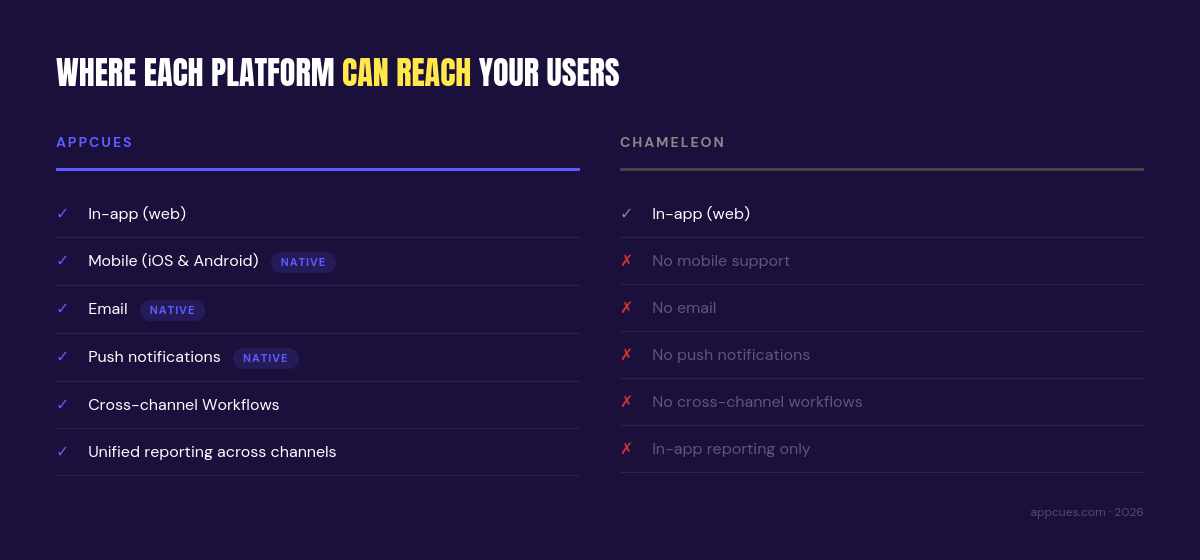
Chameleon is an in-app tool. No native email, no push notifications, no mobile, no cross-channel Workflows. If you want to engage users outside your web product (re-engage someone who dropped off mid-onboarding, send a feature announcement via email, trigger a mobile push based on in-app behavior), you'll need to bring in additional tools. Separate platforms, separate data, separate workflows, disconnected reporting.
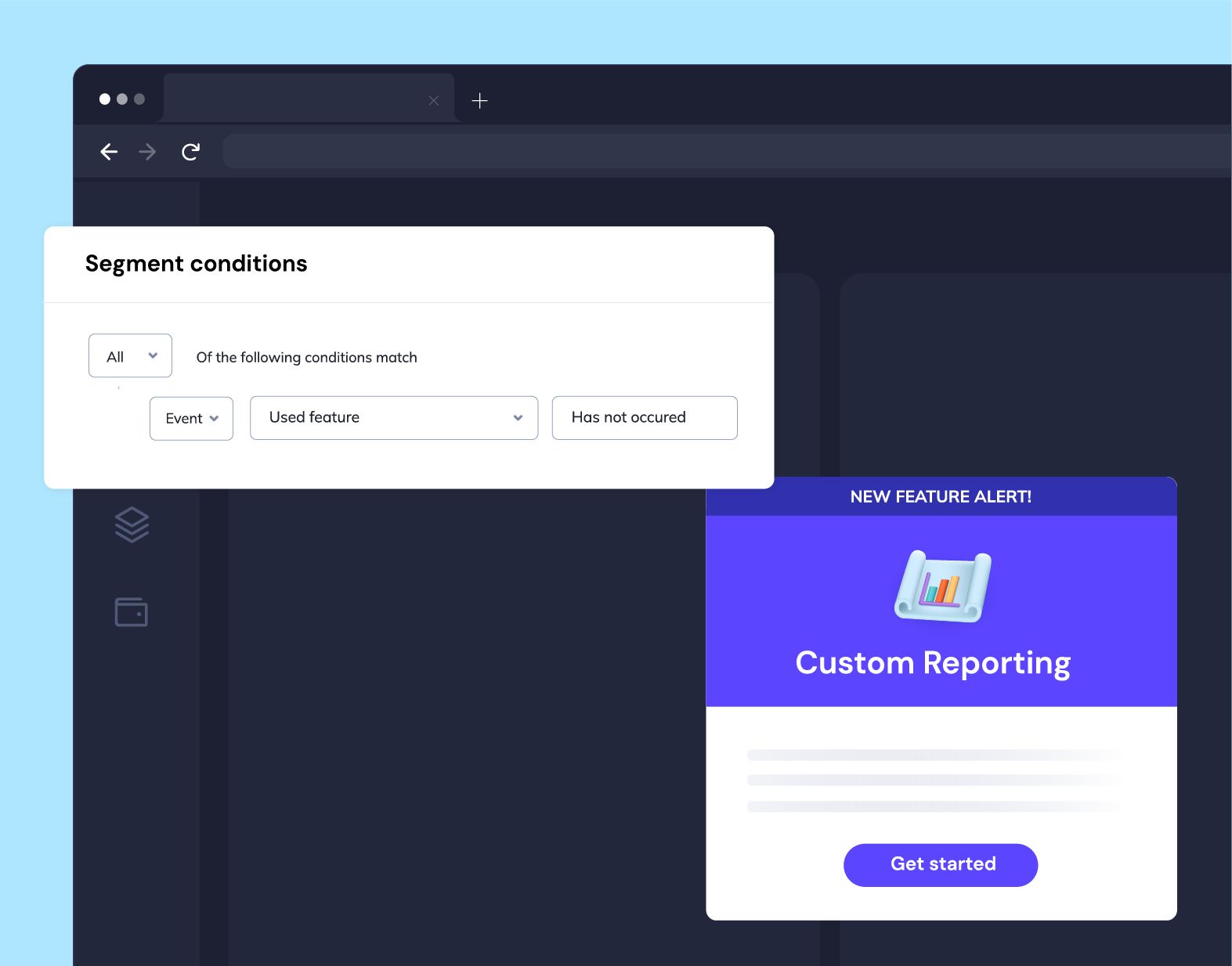
Appcues coordinates in-app, email, push, and mobile from a single platform. Workflows can branch based on what users are actually doing across channels. If a user completes a tooltip tour, skip the follow-up email. If they stall during onboarding, trigger a push on mobile. If they haven't logged in this week, send a re-engagement email. These aren't hypothetical scenarios. This is what behavioral engagement looks like in practice.
See how it works and take the tour!
Here's a way to think about it: a user who abandons your onboarding flow doesn't just need another tooltip tomorrow. They might need a well-timed email, a different in-app approach, or a mobile nudge. That kind of coordinated response requires a platform that sees the full picture, not a tool limited to one channel.
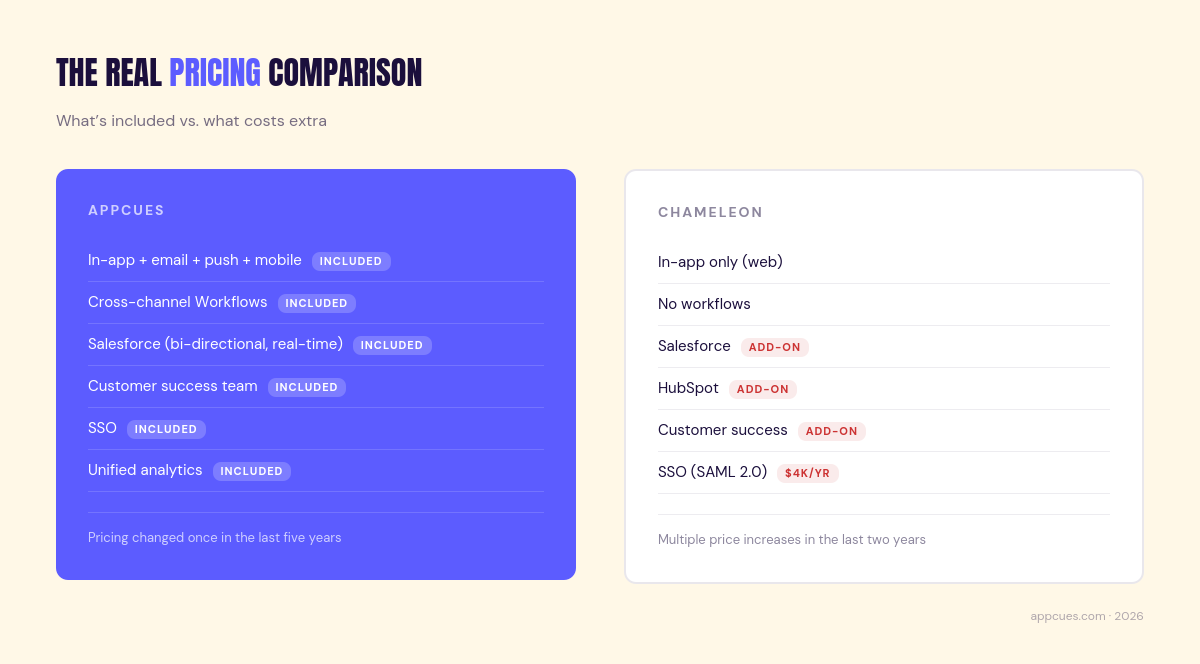
Both Appcues and Chameleon use MTU-based pricing (monthly tracked users, meaning you pay based on active users rather than per-seat). That's the similarity. The differences are in what's included and how predictable the cost stays over time.
Chameleon offers three paid tiers: Startup (starting at $279/month for 2,000 MTUs), Growth (starting at $999/month), and Enterprise (custom pricing). But the listed price doesn't always tell the full story.
Salesforce and HubSpot integrations are paid add-ons, even on the Growth plan. SSO costs $4,000 per year on any plan. Customer success support isn't included; it's a separate add-on available in Bronze, Silver, or Gold tiers. Localization isn't available below Enterprise.
Then there's the pricing stability question. Chameleon has increased pricing multiple times over the past two years. Several reviews on Vendr and G2 mention navigating these increases at renewal time. If you've ever had to go back to your CFO to explain why a tool costs 30% more than it did last year, you know why this matters.
Appcues pricing reflects the broader scope of the platform. In-app, email, push, mobile, Workflows, and unified analytics are all included. We've changed our pricing once in the last five years, which means the number you sign up for is closer to the number you'll renew at.
Customer success is included, not an add-on. Salesforce integration syncs both directions in real time, not once every 24 hours. First-party implementation is available on non-Enterprise plans.
At the entry level, Chameleon's Startup plan is more affordable. No question. But for mid-market and growing teams (the teams most likely running this comparison), the total cost of Chameleon often climbs once you factor in CRM add-ons, SSO, customer success, and the additional tools you'll need for email, push, and mobile engagement.
Appcues includes more by default. And because it replaces the need for separate email and push tools in your engagement stack, the total cost of ownership can actually be lower even if the sticker price is higher.
Features matter, but outcomes matter more.
Awareness: Launch new features, surface relevant offers, and promote events, both in-app and via email, to the right segments at the right time. Behavior-based targeting means announcements reach users who'll actually care, not just everyone who logged in this week.
Adoption: Personalized onboarding Flows, activation journeys, and feature adoption campaigns that adapt based on what users are actually doing. Someone completes a core workflow? They skip the basics and see what's next. Someone stalls? They get a different path, whether that's in-app, via email, or on mobile.
Engagement: NPS surveys, in-app feedback, referral prompts, and re-engagement Workflows triggered by inactivity or usage patterns. Because Appcues spans channels, you can reach users who've gone quiet, not just the ones who are still showing up.
Chameleon's sweet spot is onboarding and product tours, and it does this well. Polished tours with strong visual customization, a HelpBar for in-product self-service. For teams with a straightforward adoption use case on a web product, it's a capable tool.
Where it hits a ceiling is everything around that core use case. Re-engaging users who've left the product? No email, no push. Coordinating onboarding across web and mobile? No mobile support. Measuring how in-app experiences connect to broader business outcomes? No Workflow-level reporting.
That ceiling matters more for some teams than others. But we hear from a lot of mid-market teams that engagement doesn't stay in one channel for long.
Quick version, since this is an area where both platforms are actively building:
Appcues' Captain AI spans the full experience lifecycle: content creation, targeting suggestions, performance analysis, iteration across channels. Chameleon's Copilot focuses on AI-powered content generation for in-app experiences, helping teams write copy and build flows faster. Both useful, different scope.
On analytics, the pattern is consistent with everything else in this comparison. Strong overlap for in-app (both offer flow-level reporting, goals, A/B testing). Significant divergence beyond it. Appcues extends to Workflow-level reporting, account-level profiles, unified cross-channel analytics, and Click-to-Track Events that let you monitor user interactions without complex setup.

If your engagement lives entirely in one channel, Chameleon's analytics will likely be enough. If you need to understand how in-app, email, and push work together and which experiences actually drive the outcomes you care about, Appcues is where you'll find those answers.
No comparison is worth reading if it only shows one side.
More capabilities means more decisions upfront. Appcues does more, which means there's more to configure. Teams with very simple, single-use-case needs may find they're not using everything the platform offers.
No interactive demos. Chameleon is building this through their Driveway acquisition. If interactive product demos are a primary need, Appcues doesn't offer this today.
Single NPS. Chameleon supports multiple NPS surveys on all plans. Appcues currently supports one.
No mobile. Non-starter for teams with mobile apps or cross-device users. Chameleon only supports web.
No email. No push. Re-engaging users who've left the product means adding separate tools, with all the fragmentation that comes with it.
CRM integrations cost extra. Salesforce and HubSpot are paid add-ons, even on Growth. Included with Appcues.
Customer success is a paid add-on. No included strategic guidance unless you pay for Bronze, Silver, or Gold support tiers.
Salesforce sync is limited. One-way with 24-hour refresh intervals. Appcues syncs both directions in real time.
Segmentation can be unreliable. Multiple G2 reviewers flag buggy filters and difficult-to-manage targeting rules as complexity increases. For teams that depend on precise audience targeting, this is a real operational risk.
Pricing unpredictability. Multiple price increases over the past two years make long-term budgeting harder.
Scaling requires more tools. As engagement needs grow beyond in-app, you'll need to add and maintain separate tools for email, push, mobile, and cross-channel coordination.
If you're currently on Chameleon and evaluating a switch, the first thing worth knowing is that you're not rebuilding from scratch. The in-app overlap between the platforms means your core experiences (tours, tooltips, checklists, modals) translate naturally. Most teams are up and running within a few weeks, not months.
The most common reasons teams make the move: mobile support and cross-channel engagement, followed closely by segmentation reliability. We hear this one a lot. Teams that depend on precise targeting find that Chameleon's filtering tools don't scale smoothly as audience rules get more complex, and the G2 reviews back that up.
The typical path looks like this: recreate your highest-impact in-app Flows first, layer in the email and push Workflows that weren't possible before, then expand to mobile. The unified analytics give you a clear view of what's working across all channels from day one.
Skillshare chose Appcues after evaluating both Chameleon and Pendo. They needed a solution that covered both web and mobile. Chameleon couldn't support their mobile users. With Appcues, they launched onboarding and product nudges across both platforms from a single tool, without managing separate systems or waiting on engineering.
CRU switched after evaluating Chameleon, Userpilot, and Hopscotch. Their team cited ease of use and the ability to move faster without waiting on development cycles. If you're a product marketing team that's been stuck filing tickets to get experiences live, that probably resonates.
Thinking about making a switch? [Talk to our team about what migration looks like →]
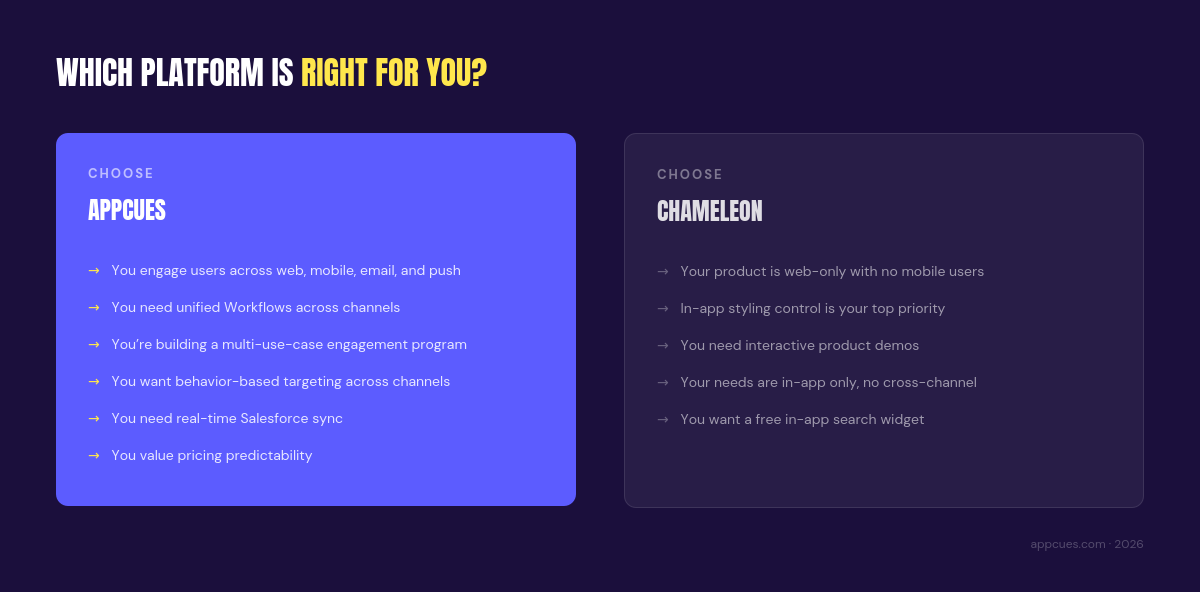
If three or more of these describe your team, [start a free Appcues trial →] or [book a personalized walkthrough →] to see how it works in your product.
Appcues and Chameleon share a starting point: helping teams build in-app product experiences without relying on engineering. If your needs stay within that boundary (web-only, in-app-only, focused on product tours and guidance), Chameleon is a capable tool with real strengths in styling and customization.
But most growing teams find that engagement doesn't stay in one channel. Users move across devices. They disengage and need re-engagement outside the product. Teams need to measure how in-app experiences connect to email, push, and mobile outcomes. And budgets need pricing that doesn't shift unpredictably at every renewal.
Appcues is built for that reality: personalized engagement across in-app, email, push, and mobile, with unified Workflows, cross-channel analytics, and a team that's invested in your success from day one.
Ready to see the difference? Check out the product→ or get a personalized demo →
Lifecycle Marketing
Email Marketing
In-App Guidance & Self-Serve Support
AI
TL;DR
If you're comparing Appcues vs Chameleon, there's a good chance you've already noticed how similar they look on the surface. Both platforms help teams create in-app product tours, tooltips, modals, and checklists with low-code lift. Both are aimed at product and marketing teams who want to move fast. And both show up in the same G2 grids and shortlists.
So what's actually different?
Scope. That's really what it comes down to. Chameleon is a focused in-app guidance tool with real strengths in styling and customization. Appcues is a cross-channel engagement platform that includes in-app guidance as one capability among many, alongside email, push notifications, mobile, and automated Workflows driven by user behavior.
If your engagement strategy starts and ends inside your web product, both platforms can work. If it extends beyond that, across channels, across devices, across the full customer lifecycle, the gap between them gets wide quickly.
We're Appcues, so we'll be straightforward about our perspective here. But we've tried to make this comparison genuinely useful. Where Chameleon has real advantages, we'll say so. Where we think we're the stronger choice, we'll explain why.
Here's how the two platforms actually compare.
Here's how the two platforms compare across focus, channels, AI, and team fit.
The short version: Appcues is the stronger choice for teams that need to engage users across channels and devices. Chameleon is a solid option for teams whose engagement strategy lives entirely inside a web product and who value deep in-app styling control.
Before we get into where the platforms diverge, it's worth being honest about where Chameleon does well. If you've already demoed both products, you probably noticed.
In-app styling and customization. Chameleon offers deeper customization for how in-app flows look and feel, including advanced branded themes and delight animations like confetti bursts and heart effects. If visual polish on your in-app experiences is a top priority and your design team cares about fine-grained control, this is a real strength.
Embedded content. Chameleon supports embedded cards and banners. These are persistent, contextual content that lives within your product's UI rather than overlaying it. Useful for teams that want guidance to feel native to the product surface.
HelpBar.ai. A free in-app search widget that lets users search documentation, help content, and product actions from within the app. It's a smart feature. Appcues' Launchpad and Resource Center serve a similar purpose (helping users self-serve within the product) but they approach the problem differently.
Interactive demos. Through their acquisition of Driveway, Chameleon is building interactive product demo capabilities, with a full launch coming soon. If you need self-guided product walkthroughs for prospects or trial users, this is a direction Appcues doesn't currently offer.
Role management. Chameleon offers more granular user roles (Admin, Viewer, Creator, Designer, Publisher, and Engineer), which gives larger teams finer control over who can do what inside the platform.
Startup plan generosity. Chameleon includes event triggering, six seats, and a Launcher (which can function as a checklist, resource center, or both) on their Startup plan. They also support multiple NPS surveys on all plans, where Appcues currently supports one.
None of this is trivial. For a team with a web-only product and a focused in-app guidance use case, these strengths matter. But the differences between the two platforms show up most clearly when your engagement needs extend beyond in-app. And for most growing teams, they do.
Here's how the two platforms stack up across the features that matter most when you're evaluating this decision.
This table breaks down feature-level differences between Appcues and Chameleon across in-app guidance, cross-channel engagement, analytics, and integrations.
The top half of this table is where the overlap is real. Both platforms cover the core in-app patterns: tours, tooltips, modals, checklists, surveys, banners, resource centers. If you're only evaluating in-app capabilities, the differences are about execution quality rather than fundamental capability gaps.
The bottom half is where things diverge. Appcues supports cross-channel Workflows, native email, push notifications, and mobile, none of which Chameleon offers. That's not a feature gap. It's a structural difference in what these platforms were designed to do.
Want to see these capabilities in your own product? [Try Appcues free →]
Both Appcues and Chameleon let non-technical teams build in-app experiences without engineering support. The builders are comparable in concept: visual, low-code, what-you-see-is-what-you-get. But they emphasize different things.
Chameleon leans into visual control. Their styling tools, custom CSS, and animation options give design-conscious teams more control over how in-app content looks and behaves. If you want every tooltip and modal to feel pixel-perfect and fully native to your product's design language, Chameleon offers strong tools for that. Worth noting, though: this level of customization can mean more involvement from someone comfortable with CSS. If your team is entirely non-technical, that's a real consideration.
Appcues emphasizes breadth and speed. The builder supports a wide range of content types (Flows, Modals, Tooltips, Slideouts, Banners, Checklists, Launchpads) and is designed for rapid iteration. Captain AI assists with content creation, targeting suggestions, and performance analysis, so teams can go from idea to live experience faster. And because Appcues extends beyond in-app, the content you create can connect to email, push, and mobile experiences within the same Workflow.
They're optimized for different goals. Chameleon is for in-app polish. Appcues is for cross-channel speed and reach.
Both platforms support behavioral and attribute-based segmentation with dynamic personalization. Core targeting capabilities (filtering by user actions, properties, and custom events) are comparable.
Where they differ is context and reliability.
Chameleon's segmentation operates within the boundaries of in-app behavior, because that's the only channel it has visibility into. Appcues draws on a broader pool of signals: in-app behavior plus email engagement, push response, mobile activity, and Workflow interaction data.
It's also worth flagging that segmentation reliability is a recurring theme in Chameleon reviews. G2's aggregated sentiment analysis notes that users face a steep learning curve with Chameleon's filters and segmentation, and multiple reviewers describe the tooling as sometimes buggy or hard to manage. If your engagement strategy depends on precise targeting, that's not a minor issue.
And over time, segments that only see one channel's worth of data start making less precise decisions. A user who dismissed a tooltip but opened three emails looks different from one who ignored both. Only one platform can tell the difference.
This is the big one.
Chameleon is an in-app tool. No native email, no push notifications, no mobile, no cross-channel Workflows. If you want to engage users outside your web product (re-engage someone who dropped off mid-onboarding, send a feature announcement via email, trigger a mobile push based on in-app behavior), you'll need to bring in additional tools. Separate platforms, separate data, separate workflows, disconnected reporting.
Appcues coordinates in-app, email, push, and mobile from a single platform. Workflows can branch based on what users are actually doing across channels. If a user completes a tooltip tour, skip the follow-up email. If they stall during onboarding, trigger a push on mobile. If they haven't logged in this week, send a re-engagement email. These aren't hypothetical scenarios. This is what behavioral engagement looks like in practice.
See how it works and take the tour!
Here's a way to think about it: a user who abandons your onboarding flow doesn't just need another tooltip tomorrow. They might need a well-timed email, a different in-app approach, or a mobile nudge. That kind of coordinated response requires a platform that sees the full picture, not a tool limited to one channel.
Both Appcues and Chameleon use MTU-based pricing (monthly tracked users, meaning you pay based on active users rather than per-seat). That's the similarity. The differences are in what's included and how predictable the cost stays over time.
Chameleon offers three paid tiers: Startup (starting at $279/month for 2,000 MTUs), Growth (starting at $999/month), and Enterprise (custom pricing). But the listed price doesn't always tell the full story.
Salesforce and HubSpot integrations are paid add-ons, even on the Growth plan. SSO costs $4,000 per year on any plan. Customer success support isn't included; it's a separate add-on available in Bronze, Silver, or Gold tiers. Localization isn't available below Enterprise.
Then there's the pricing stability question. Chameleon has increased pricing multiple times over the past two years. Several reviews on Vendr and G2 mention navigating these increases at renewal time. If you've ever had to go back to your CFO to explain why a tool costs 30% more than it did last year, you know why this matters.
Appcues pricing reflects the broader scope of the platform. In-app, email, push, mobile, Workflows, and unified analytics are all included. We've changed our pricing once in the last five years, which means the number you sign up for is closer to the number you'll renew at.
Customer success is included, not an add-on. Salesforce integration syncs both directions in real time, not once every 24 hours. First-party implementation is available on non-Enterprise plans.
At the entry level, Chameleon's Startup plan is more affordable. No question. But for mid-market and growing teams (the teams most likely running this comparison), the total cost of Chameleon often climbs once you factor in CRM add-ons, SSO, customer success, and the additional tools you'll need for email, push, and mobile engagement.
Appcues includes more by default. And because it replaces the need for separate email and push tools in your engagement stack, the total cost of ownership can actually be lower even if the sticker price is higher.
Features matter, but outcomes matter more.
Awareness: Launch new features, surface relevant offers, and promote events, both in-app and via email, to the right segments at the right time. Behavior-based targeting means announcements reach users who'll actually care, not just everyone who logged in this week.
Adoption: Personalized onboarding Flows, activation journeys, and feature adoption campaigns that adapt based on what users are actually doing. Someone completes a core workflow? They skip the basics and see what's next. Someone stalls? They get a different path, whether that's in-app, via email, or on mobile.
Engagement: NPS surveys, in-app feedback, referral prompts, and re-engagement Workflows triggered by inactivity or usage patterns. Because Appcues spans channels, you can reach users who've gone quiet, not just the ones who are still showing up.
Chameleon's sweet spot is onboarding and product tours, and it does this well. Polished tours with strong visual customization, a HelpBar for in-product self-service. For teams with a straightforward adoption use case on a web product, it's a capable tool.
Where it hits a ceiling is everything around that core use case. Re-engaging users who've left the product? No email, no push. Coordinating onboarding across web and mobile? No mobile support. Measuring how in-app experiences connect to broader business outcomes? No Workflow-level reporting.
That ceiling matters more for some teams than others. But we hear from a lot of mid-market teams that engagement doesn't stay in one channel for long.
Quick version, since this is an area where both platforms are actively building:
Appcues' Captain AI spans the full experience lifecycle: content creation, targeting suggestions, performance analysis, iteration across channels. Chameleon's Copilot focuses on AI-powered content generation for in-app experiences, helping teams write copy and build flows faster. Both useful, different scope.
On analytics, the pattern is consistent with everything else in this comparison. Strong overlap for in-app (both offer flow-level reporting, goals, A/B testing). Significant divergence beyond it. Appcues extends to Workflow-level reporting, account-level profiles, unified cross-channel analytics, and Click-to-Track Events that let you monitor user interactions without complex setup.
If your engagement lives entirely in one channel, Chameleon's analytics will likely be enough. If you need to understand how in-app, email, and push work together and which experiences actually drive the outcomes you care about, Appcues is where you'll find those answers.
No comparison is worth reading if it only shows one side.
More capabilities means more decisions upfront. Appcues does more, which means there's more to configure. Teams with very simple, single-use-case needs may find they're not using everything the platform offers.
No interactive demos. Chameleon is building this through their Driveway acquisition. If interactive product demos are a primary need, Appcues doesn't offer this today.
Single NPS. Chameleon supports multiple NPS surveys on all plans. Appcues currently supports one.
No mobile. Non-starter for teams with mobile apps or cross-device users. Chameleon only supports web.
No email. No push. Re-engaging users who've left the product means adding separate tools, with all the fragmentation that comes with it.
CRM integrations cost extra. Salesforce and HubSpot are paid add-ons, even on Growth. Included with Appcues.
Customer success is a paid add-on. No included strategic guidance unless you pay for Bronze, Silver, or Gold support tiers.
Salesforce sync is limited. One-way with 24-hour refresh intervals. Appcues syncs both directions in real time.
Segmentation can be unreliable. Multiple G2 reviewers flag buggy filters and difficult-to-manage targeting rules as complexity increases. For teams that depend on precise audience targeting, this is a real operational risk.
Pricing unpredictability. Multiple price increases over the past two years make long-term budgeting harder.
Scaling requires more tools. As engagement needs grow beyond in-app, you'll need to add and maintain separate tools for email, push, mobile, and cross-channel coordination.
If you're currently on Chameleon and evaluating a switch, the first thing worth knowing is that you're not rebuilding from scratch. The in-app overlap between the platforms means your core experiences (tours, tooltips, checklists, modals) translate naturally. Most teams are up and running within a few weeks, not months.
The most common reasons teams make the move: mobile support and cross-channel engagement, followed closely by segmentation reliability. We hear this one a lot. Teams that depend on precise targeting find that Chameleon's filtering tools don't scale smoothly as audience rules get more complex, and the G2 reviews back that up.
The typical path looks like this: recreate your highest-impact in-app Flows first, layer in the email and push Workflows that weren't possible before, then expand to mobile. The unified analytics give you a clear view of what's working across all channels from day one.
Skillshare chose Appcues after evaluating both Chameleon and Pendo. They needed a solution that covered both web and mobile. Chameleon couldn't support their mobile users. With Appcues, they launched onboarding and product nudges across both platforms from a single tool, without managing separate systems or waiting on engineering.
CRU switched after evaluating Chameleon, Userpilot, and Hopscotch. Their team cited ease of use and the ability to move faster without waiting on development cycles. If you're a product marketing team that's been stuck filing tickets to get experiences live, that probably resonates.
Thinking about making a switch? [Talk to our team about what migration looks like →]
If three or more of these describe your team, [start a free Appcues trial →] or [book a personalized walkthrough →] to see how it works in your product.
Appcues and Chameleon share a starting point: helping teams build in-app product experiences without relying on engineering. If your needs stay within that boundary (web-only, in-app-only, focused on product tours and guidance), Chameleon is a capable tool with real strengths in styling and customization.
But most growing teams find that engagement doesn't stay in one channel. Users move across devices. They disengage and need re-engagement outside the product. Teams need to measure how in-app experiences connect to email, push, and mobile outcomes. And budgets need pricing that doesn't shift unpredictably at every renewal.
Appcues is built for that reality: personalized engagement across in-app, email, push, and mobile, with unified Workflows, cross-channel analytics, and a team that's invested in your success from day one.
Ready to see the difference? Check out the product→ or get a personalized demo →

Sign up for Quickcues and get our monthly updates!
.svg)


