

Congratulations! You've got a new customer 🎉
Now comes the part where a lot of SaaS companies stop. New customers are excited about your product, but they don't know where to go or how to use it. Enter: buyer's remorse. Keeping the customers you've already won is cheaper than finding new ones, and that's what customer onboarding is for.
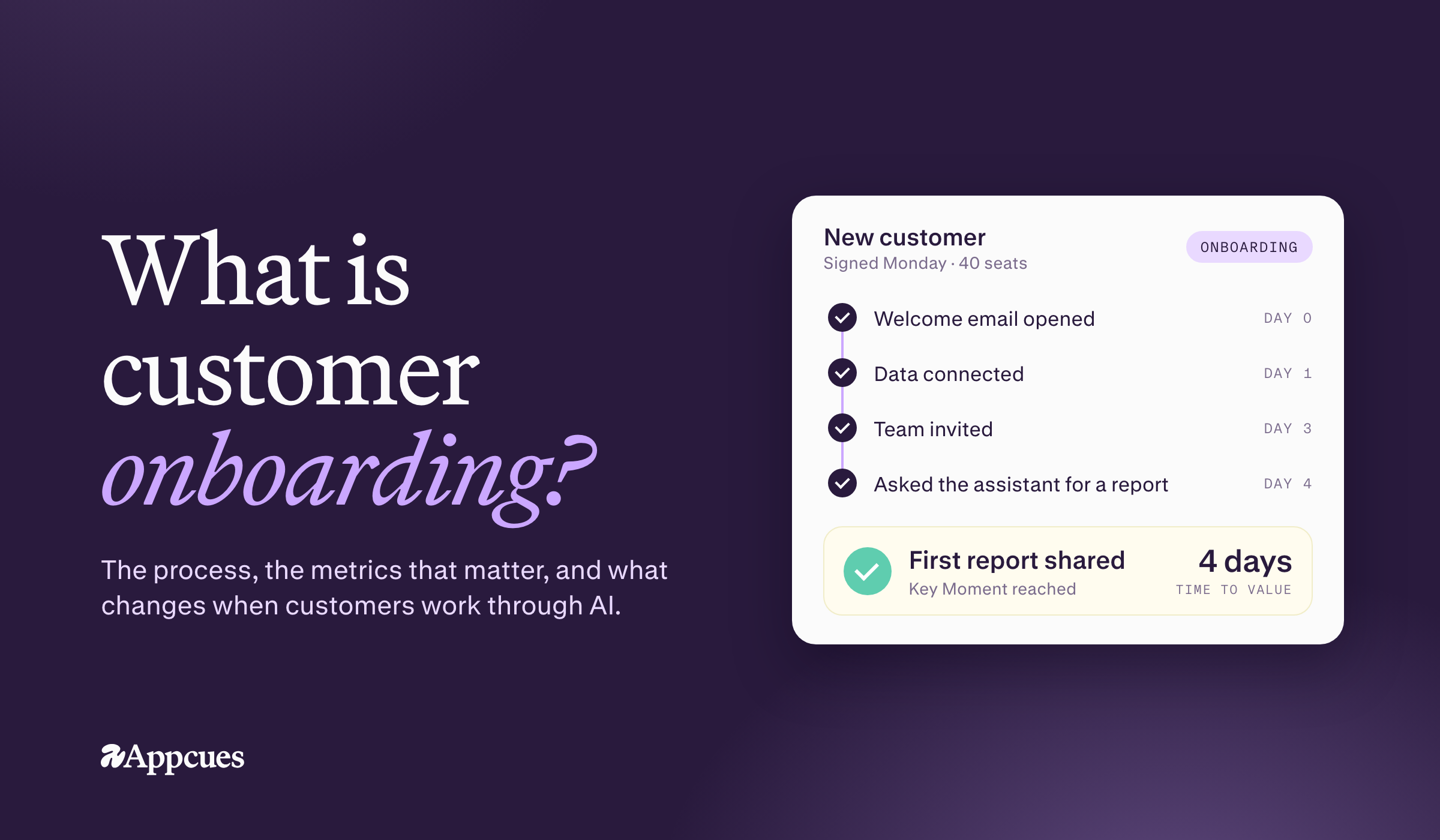
Customer onboarding is the process of guiding a new customer from purchase to the first meaningful outcome your product promised them. A good customer onboarding process teaches people how to use your product. It also helps them build it into their everyday workflow so they get the most out of what they bought. It should start the moment someone becomes a paying customer, not after a lag between sales and customer success.

Onboarding looks different for every product. Thinkific's version, above, highlights the most important areas of the product and shows new customers exactly where to go next.
People often use "customer" and "user" interchangeably, and many of the best practices below work for both. But the goals are different. User onboarding helps any individual who logs in, on a free plan or an enterprise one, realize value, with the aim of turning users into customers.
"Users don't have the time and patience to consume everything about your product. They'll cozy up with the first tool that shows them progress, outcome, and value with ease. But customers need more." - Ty Magnin, User vs. Customer Onboarding
Customer onboarding focuses on long-term success and the relationship. You still guide people to the right features, but you also help the organization hit the goals it bought your product for. Get that right and customers talk about you, or expand with a higher plan, more seats or add-ons.
Customer onboarding can feel like a "nice to have" when you're focused on shipping new features. But it's not a step you can skip (unless you want to pay big $$ to keep replacing customers).
Onboarding has a direct impact on retention, meaning how long a customer stays a customer. And retention compounds: Bain's research found that a 5% increase in customer retention can lift profits by 25% to 95%. Good onboarding builds momentum early, and that momentum is what keeps customers from churning. You also only get one first impression, and an easy start sets up a long relationship.
For a decade, customer onboarding assumed people use your product by clicking through it. Tours pointed at buttons, checklists tracked clicks and analytics counted feature usage. That's starting to break. Many products now ship an AI assistant in a sidebar. Some let customers work through an agent, and a few can be used entirely through an MCP connection. When a new customer asks your assistant to "set up my first project," there's no button to highlight.
Three things change:
Most SaaS companies sit in the middle, with most customers on a traditional UI and AI features shipping alongside it. So don't throw out tours and checklists. Keep what works, add what's new and measure both against outcomes.
Onboarding isn't just in-app. It takes coordination across product, marketing, sales and customer success, so start with a clear strategy: We will implement X, Y and Z to improve customer retention and loyalty. Then split ownership. The sales team hands off after the sale, and customer success continues the onboarding journey. Product runs the in-app experience, marketing runs behavior-based welcome messages, account managers check in after key milestones, and support keeps a self-service knowledge base current. That matters because 67% of consumers prefer self-service onboarding options.
If you have a customer success team, they should own retention and overall onboarding success. Product usually owns the adoption number, so they need a seat at the table too. Many teams also lack dedicated onboarding specialists—59.4% of customer success teams don't have them—so clear ownership and automation matter. Automating onboarding tasks improves efficiency and customer experience. Whoever owns it, don't send everyone the same messages. Customers expect better: 71% of customers expect personalized interactions, and 76% get frustrated when they don't get them.
Which customer onboarding metrics should you set goals around? Split them into the ones you can move this week and the ones that prove it worked, and note which delivery methods you use too: live onboarding sessions are common, with 90.6% of customer success professionals providing them.
Leading indicators (they move within days):
Lagging indicators (they take 30–60 days to move):
Track these together, and watch customer engagement in between: logins, time in app and key actions completed. If your product has an AI assistant, add what customers ask it and where those conversations stall. That's often the earliest sign someone is stuck.
Customer onboarding isn't a one-time demo or a product tour. Done right, it's a multi-channel process that combines account management, support and marketing touchpoints. The goal is to get each customer to their aha moment fast, because the longer your time to value, the more customers you lose before they see what they paid for.
Onboarding starts the moment a customer signs up, and a long sign-up is a common drop-off point. In other words, customer onboarding begin as soon as someone creates an account, not later in the process. Make it as easy as possible.
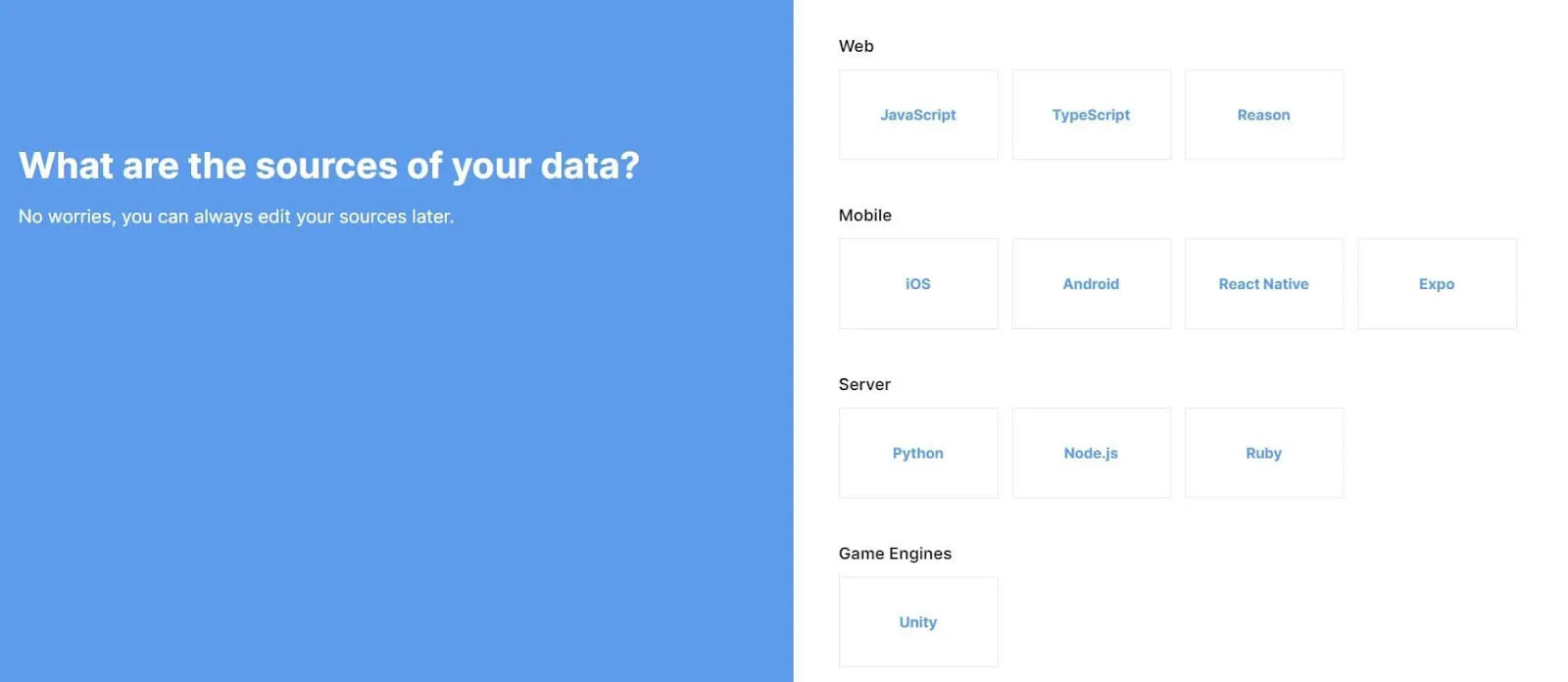
Analytics company Avo does this well. Each sign-up screen asks one question, which turns a complicated setup into a few easy steps. The copy also tells customers they can change or skip answers later, which removes the pressure and gets them into the app faster. Reducing this kind of early friction is part of optimizing onboarding for new users. (For more like this, see our roundup of the best user onboarding examples.) Automating simple setup tasks also improves efficiency and the onboarding experience.
Thank new customers for their purchase and give them a few ways to get started. A welcome email usually goes out right after the sales process ends and a new client signs up. Personalize it with their name and goal, and use a warm tone to help the customer feel valued so it reads like a note, not a blast. Keep it short. Its job is to get them to log in. Treat it as the first in a series of onboarding emails.

Miro's welcome email for new customers uses friendly, low-pressure copy, offers three clear first steps, and closes with a bit of social proof so customers feel good about their decision. That kind of message can improve the overall onboarding experience and support customer loyalty over time.
The first login can be information overload. What's this button? Why do I already have 10 notifications? Treat that moment as part of the customer onboarding experience for new users: don't throw everything at them at once. Give them a guided experience, and make sure the first screen isn't empty.
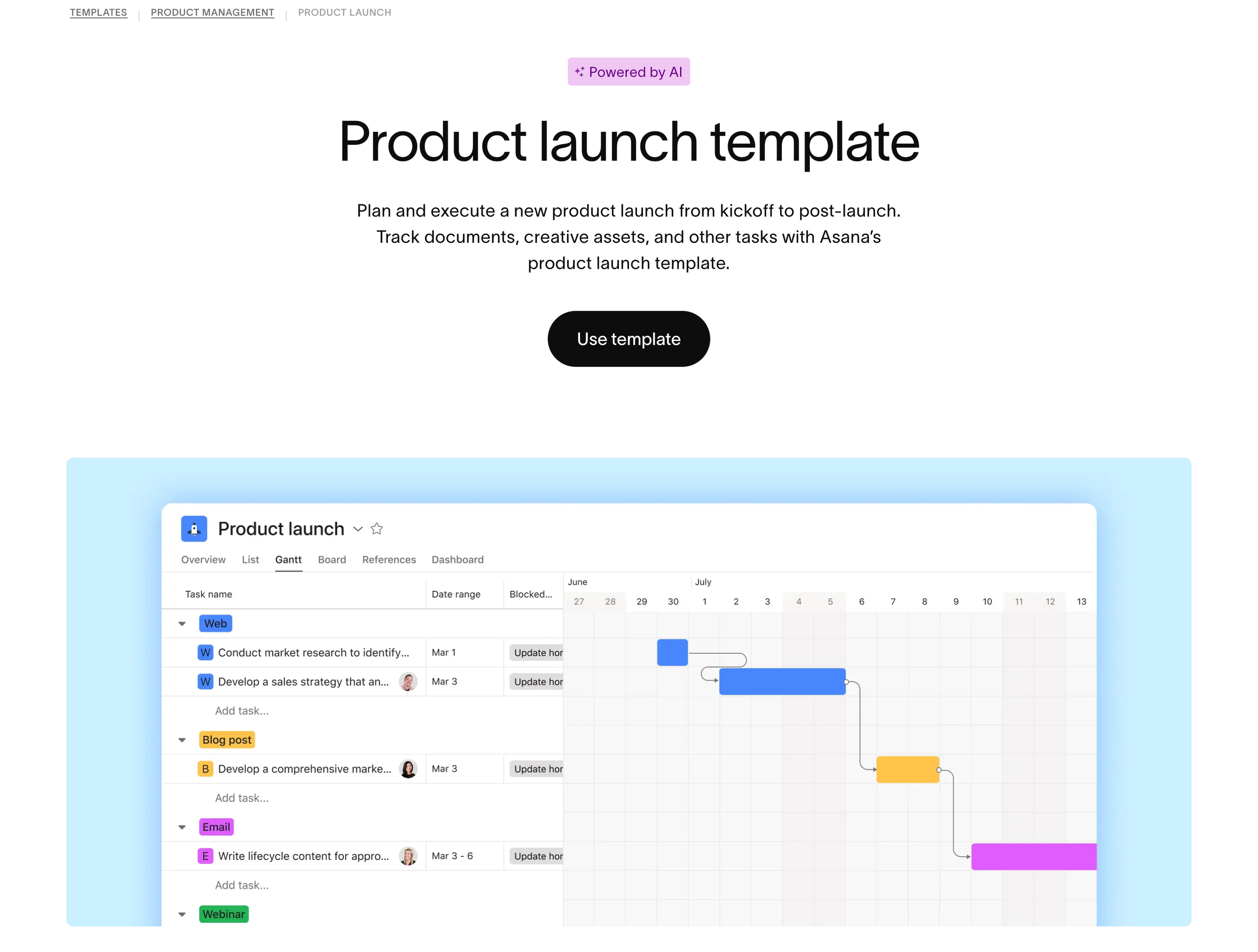
Asana only becomes valuable once someone has created a project, added tasks and invited teammates. That's a lot to ask on day one. So Asana offers pre-built templates, like the product launch template above, with tasks, owners and a timeline already in place. A new customer's first screen looks like real work instead of a blank page and points them to the key features they need first. Those templates and pre-built examples also support self-service onboarding, which matters because 67% of consumers prefer self-service onboarding options. If your product starts empty, fill it with templates, sample data or pre-built examples.
The best apps fit into a customer's existing tech stack, so connecting it should be one of the first things you prompt. Good onboarding software can simplify setup and reduce setup challenges early. The last thing you want is a customer filing an engineering ticket just to hook up their data.
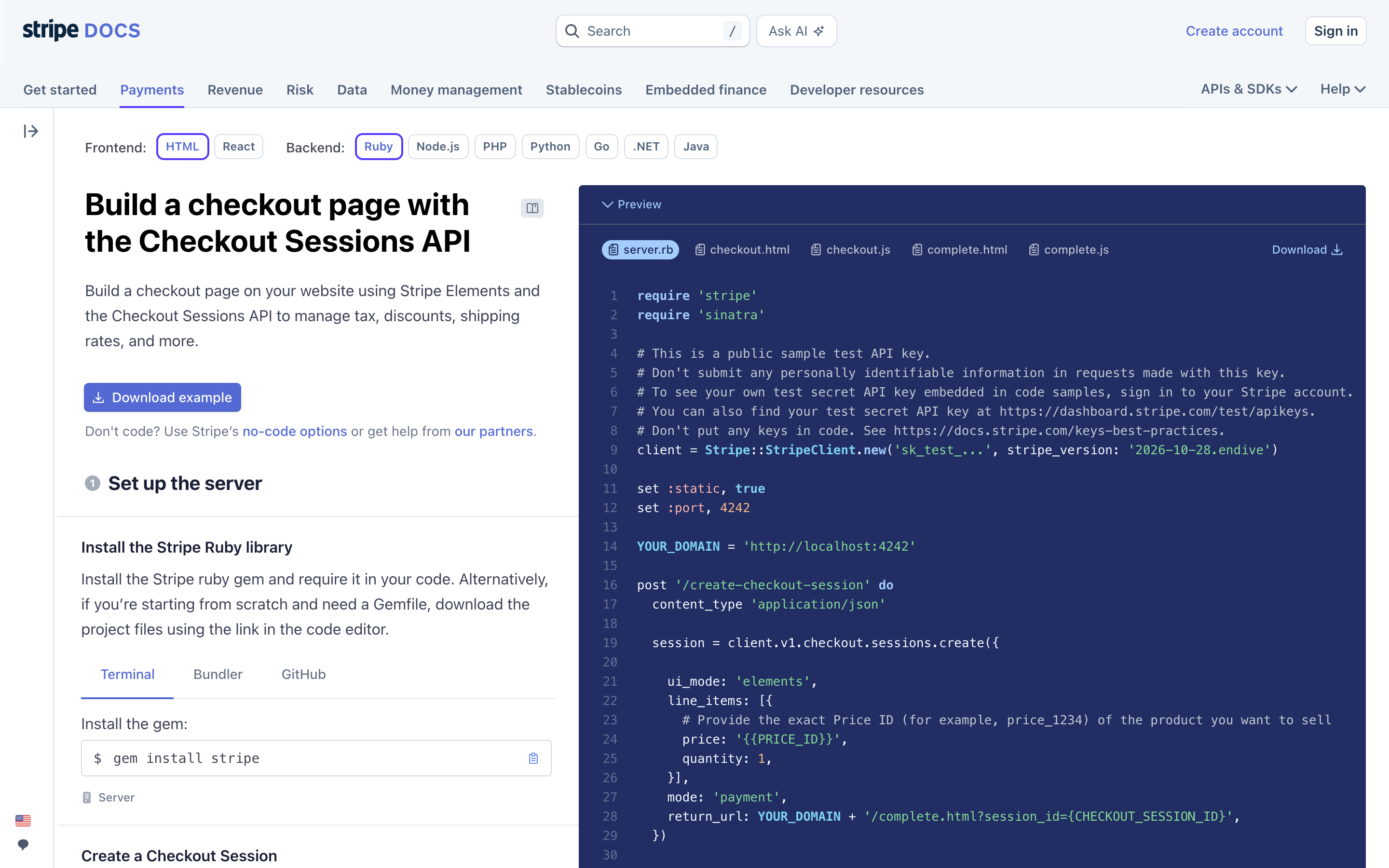
Stripe makes integration the onboarding. Its quickstart docs fill a test-mode API key straight into the sample code, so a developer can see a test payment go through in minutes. Digital adoption tools can improve user engagement here by guiding customers through integrations without extra engineering help. Your customers may not be developers. For office managers or service advisors, the equivalent is a pre-formatted CSV template, a one-click connector to the system they already use, or an import your team runs for them so they can start getting value from your product or service.
A guided walkthrough shows new customers the features that matter for their goals and the key tasks to complete, in order. Pair it with an onboarding checklist so they can see their progress.
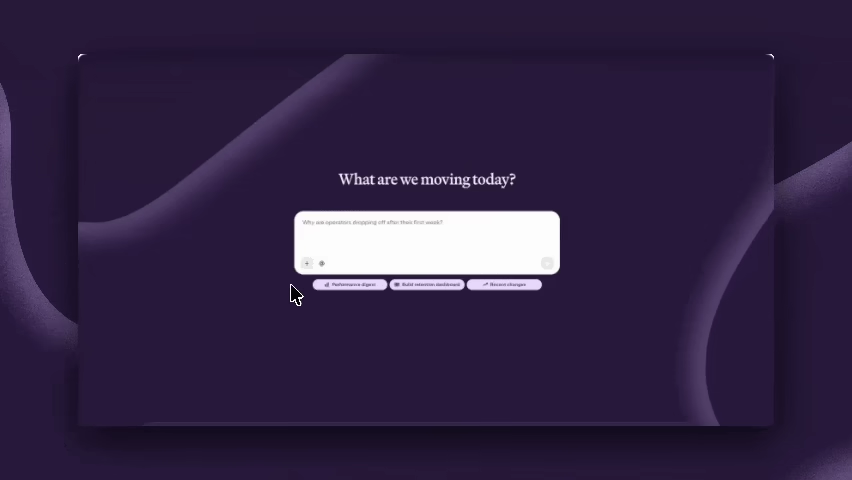
The best walkthroughs help people do something real, and that matters most for AI features. Here's how we approach it at Appcues. When customers hand Appcues AI a mockup, a page or an old Flow, it builds a draft, and nothing goes live until a person reviews and publishes it. Admins set audience and tone rules once, and those rules apply to every conversation. Customers see the AI work on their own material before they trust it with their users. If your product has an AI assistant, onboard customers to it the same way: what it can do, what to ask it and how to check its work.
Your welcome email is just the beginning. Follow up with emails that encourage customers to try other features, share use cases or point to templates and your community. Triggering those messages based on behavior is one of the most effective customer onboarding strategies, like celebrating a customer's first milestone so each one shows the value they're already getting. Personalized follow-up can boost customer retention by up to 25% and help retain customers.
This email from Google showcases a customer milestone using a behavioral trigger, which can keep momentum going for new customers as they hit their first big numbers. Milestone-based messages work best when the customer completes a meaningful step worth celebrating. While this email is for a more established user, the idea remains the same: How can you show your customers the value of your product, so they continue to work with you?

What matters most is a consistent approach across the broader customer journey. New customers won't consume hours of content at once. They might do the product tour and then not log in for a week. Use a mix of email, push notifications and in-app reminders to nudge them along, and if your product has an assistant or agent, treat that conversation as a channel too. Tailor the mix by customer segments, and you'll help customers build a habit of using your product, with consistent guidance across channels helping create loyal customers.
Want to put this on paper? Our customer onboarding template turns these steps into a plan you can hand your team: welcome packet, intake form, timeline, training resources and handoff.
At Appcues, we help product teams, customer success managers and marketers build better onboarding every day. When teams say their onboarding "isn't working," here's usually why.
The biggest problem we see is onboarding that tries to cover every detail. Your new customer doesn't need a feature four clicks deep on their first login, so pace your onboarding materials in short lessons. You wouldn't send a first-day medical student into heart surgery. Let customers build experience naturally. Better materials can be refined over time based on where customers stall.
Product teams get excited about what they've built and forget why they built it. That new feature may not matter yet to a customer who just wants to understand their main dashboard. Align onboarding with the customer's goals to build confidence and increase product adoption—because effective customer onboarding starts with what the customer is trying to achieve. Companies using personalized onboarding see a 20% increase in product adoption.
Metrics tell you where customers drop off, not why. Don't ask for feedback on day one, but do check in with new customers about how they're doing, what else they need, and what signals and customer feedback you can learn from existing customers, then adjust your onboarding to match.
Input from existing customers can also improve the onboarding process for future accounts.
Most onboarding breaks in the handoffs across the customer lifecycle: product sees the drop-off, marketing owns the email, CS hears about it at renewal. About 40.5% of onboarding teams use 4-6 software tools for efficiency. Appcues closes that gap so the team that spots a problem can act on it.
Client workspaces fit high-touch B2B collaboration, while onboarding tools may be low-code digital adoption platforms or developer-first tools.
See how Appcues works or book a demo to walk through your onboarding with our team.
Product Adoption
Retention & Churn
Email Marketing
Customer Journeys
TL;DR
Congratulations! You've got a new customer 🎉
Now comes the part where a lot of SaaS companies stop. New customers are excited about your product, but they don't know where to go or how to use it. Enter: buyer's remorse. Keeping the customers you've already won is cheaper than finding new ones, and that's what customer onboarding is for.
Customer onboarding is the process of guiding a new customer from purchase to the first meaningful outcome your product promised them. A good customer onboarding process teaches people how to use your product. It also helps them build it into their everyday workflow so they get the most out of what they bought. It should start the moment someone becomes a paying customer, not after a lag between sales and customer success.
Onboarding looks different for every product. Thinkific's version, above, highlights the most important areas of the product and shows new customers exactly where to go next.
People often use "customer" and "user" interchangeably, and many of the best practices below work for both. But the goals are different. User onboarding helps any individual who logs in, on a free plan or an enterprise one, realize value, with the aim of turning users into customers.
"Users don't have the time and patience to consume everything about your product. They'll cozy up with the first tool that shows them progress, outcome, and value with ease. But customers need more." - Ty Magnin, User vs. Customer Onboarding
Customer onboarding focuses on long-term success and the relationship. You still guide people to the right features, but you also help the organization hit the goals it bought your product for. Get that right and customers talk about you, or expand with a higher plan, more seats or add-ons.
Customer onboarding can feel like a "nice to have" when you're focused on shipping new features. But it's not a step you can skip (unless you want to pay big $$ to keep replacing customers).
Onboarding has a direct impact on retention, meaning how long a customer stays a customer. And retention compounds: Bain's research found that a 5% increase in customer retention can lift profits by 25% to 95%. Good onboarding builds momentum early, and that momentum is what keeps customers from churning. You also only get one first impression, and an easy start sets up a long relationship.
For a decade, customer onboarding assumed people use your product by clicking through it. Tours pointed at buttons, checklists tracked clicks and analytics counted feature usage. That's starting to break. Many products now ship an AI assistant in a sidebar. Some let customers work through an agent, and a few can be used entirely through an MCP connection. When a new customer asks your assistant to "set up my first project," there's no button to highlight.
Three things change:
Most SaaS companies sit in the middle, with most customers on a traditional UI and AI features shipping alongside it. So don't throw out tours and checklists. Keep what works, add what's new and measure both against outcomes.
Onboarding isn't just in-app. It takes coordination across product, marketing, sales and customer success, so start with a clear strategy: We will implement X, Y and Z to improve customer retention and loyalty. Then split ownership. The sales team hands off after the sale, and customer success continues the onboarding journey. Product runs the in-app experience, marketing runs behavior-based welcome messages, account managers check in after key milestones, and support keeps a self-service knowledge base current. That matters because 67% of consumers prefer self-service onboarding options.
If you have a customer success team, they should own retention and overall onboarding success. Product usually owns the adoption number, so they need a seat at the table too. Many teams also lack dedicated onboarding specialists—59.4% of customer success teams don't have them—so clear ownership and automation matter. Automating onboarding tasks improves efficiency and customer experience. Whoever owns it, don't send everyone the same messages. Customers expect better: 71% of customers expect personalized interactions, and 76% get frustrated when they don't get them.
Which customer onboarding metrics should you set goals around? Split them into the ones you can move this week and the ones that prove it worked, and note which delivery methods you use too: live onboarding sessions are common, with 90.6% of customer success professionals providing them.
Leading indicators (they move within days):
Lagging indicators (they take 30–60 days to move):
Track these together, and watch customer engagement in between: logins, time in app and key actions completed. If your product has an AI assistant, add what customers ask it and where those conversations stall. That's often the earliest sign someone is stuck.
Customer onboarding isn't a one-time demo or a product tour. Done right, it's a multi-channel process that combines account management, support and marketing touchpoints. The goal is to get each customer to their aha moment fast, because the longer your time to value, the more customers you lose before they see what they paid for.
Onboarding starts the moment a customer signs up, and a long sign-up is a common drop-off point. In other words, customer onboarding begin as soon as someone creates an account, not later in the process. Make it as easy as possible.
Analytics company Avo does this well. Each sign-up screen asks one question, which turns a complicated setup into a few easy steps. The copy also tells customers they can change or skip answers later, which removes the pressure and gets them into the app faster. Reducing this kind of early friction is part of optimizing onboarding for new users. (For more like this, see our roundup of the best user onboarding examples.) Automating simple setup tasks also improves efficiency and the onboarding experience.
Thank new customers for their purchase and give them a few ways to get started. A welcome email usually goes out right after the sales process ends and a new client signs up. Personalize it with their name and goal, and use a warm tone to help the customer feel valued so it reads like a note, not a blast. Keep it short. Its job is to get them to log in. Treat it as the first in a series of onboarding emails.
Miro's welcome email for new customers uses friendly, low-pressure copy, offers three clear first steps, and closes with a bit of social proof so customers feel good about their decision. That kind of message can improve the overall onboarding experience and support customer loyalty over time.
The first login can be information overload. What's this button? Why do I already have 10 notifications? Treat that moment as part of the customer onboarding experience for new users: don't throw everything at them at once. Give them a guided experience, and make sure the first screen isn't empty.
Asana only becomes valuable once someone has created a project, added tasks and invited teammates. That's a lot to ask on day one. So Asana offers pre-built templates, like the product launch template above, with tasks, owners and a timeline already in place. A new customer's first screen looks like real work instead of a blank page and points them to the key features they need first. Those templates and pre-built examples also support self-service onboarding, which matters because 67% of consumers prefer self-service onboarding options. If your product starts empty, fill it with templates, sample data or pre-built examples.
The best apps fit into a customer's existing tech stack, so connecting it should be one of the first things you prompt. Good onboarding software can simplify setup and reduce setup challenges early. The last thing you want is a customer filing an engineering ticket just to hook up their data.
Stripe makes integration the onboarding. Its quickstart docs fill a test-mode API key straight into the sample code, so a developer can see a test payment go through in minutes. Digital adoption tools can improve user engagement here by guiding customers through integrations without extra engineering help. Your customers may not be developers. For office managers or service advisors, the equivalent is a pre-formatted CSV template, a one-click connector to the system they already use, or an import your team runs for them so they can start getting value from your product or service.
A guided walkthrough shows new customers the features that matter for their goals and the key tasks to complete, in order. Pair it with an onboarding checklist so they can see their progress.
The best walkthroughs help people do something real, and that matters most for AI features. Here's how we approach it at Appcues. When customers hand Appcues AI a mockup, a page or an old Flow, it builds a draft, and nothing goes live until a person reviews and publishes it. Admins set audience and tone rules once, and those rules apply to every conversation. Customers see the AI work on their own material before they trust it with their users. If your product has an AI assistant, onboard customers to it the same way: what it can do, what to ask it and how to check its work.
Your welcome email is just the beginning. Follow up with emails that encourage customers to try other features, share use cases or point to templates and your community. Triggering those messages based on behavior is one of the most effective customer onboarding strategies, like celebrating a customer's first milestone so each one shows the value they're already getting. Personalized follow-up can boost customer retention by up to 25% and help retain customers.
This email from Google showcases a customer milestone using a behavioral trigger, which can keep momentum going for new customers as they hit their first big numbers. Milestone-based messages work best when the customer completes a meaningful step worth celebrating. While this email is for a more established user, the idea remains the same: How can you show your customers the value of your product, so they continue to work with you?
What matters most is a consistent approach across the broader customer journey. New customers won't consume hours of content at once. They might do the product tour and then not log in for a week. Use a mix of email, push notifications and in-app reminders to nudge them along, and if your product has an assistant or agent, treat that conversation as a channel too. Tailor the mix by customer segments, and you'll help customers build a habit of using your product, with consistent guidance across channels helping create loyal customers.
Want to put this on paper? Our customer onboarding template turns these steps into a plan you can hand your team: welcome packet, intake form, timeline, training resources and handoff.
At Appcues, we help product teams, customer success managers and marketers build better onboarding every day. When teams say their onboarding "isn't working," here's usually why.
The biggest problem we see is onboarding that tries to cover every detail. Your new customer doesn't need a feature four clicks deep on their first login, so pace your onboarding materials in short lessons. You wouldn't send a first-day medical student into heart surgery. Let customers build experience naturally. Better materials can be refined over time based on where customers stall.
Product teams get excited about what they've built and forget why they built it. That new feature may not matter yet to a customer who just wants to understand their main dashboard. Align onboarding with the customer's goals to build confidence and increase product adoption—because effective customer onboarding starts with what the customer is trying to achieve. Companies using personalized onboarding see a 20% increase in product adoption.
Metrics tell you where customers drop off, not why. Don't ask for feedback on day one, but do check in with new customers about how they're doing, what else they need, and what signals and customer feedback you can learn from existing customers, then adjust your onboarding to match.
Input from existing customers can also improve the onboarding process for future accounts.
Most onboarding breaks in the handoffs across the customer lifecycle: product sees the drop-off, marketing owns the email, CS hears about it at renewal. About 40.5% of onboarding teams use 4-6 software tools for efficiency. Appcues closes that gap so the team that spots a problem can act on it.
Client workspaces fit high-touch B2B collaboration, while onboarding tools may be low-code digital adoption platforms or developer-first tools.
See how Appcues works or book a demo to walk through your onboarding with our team.

Sign up for Quickcues and get our monthly updates!