.png)

Your product does the heavy lifting, but retention emails keep the conversation going between sessions. They nudge users toward the next milestone, surface value they haven't discovered yet, and remind people why they signed up in the first place. (If you're tracking the impact, here are the retention metrics that matter most.)
The best retention emails don't feel like marketing. They feel like a well-timed tap on the shoulder from someone who actually knows what you need. That's the bar.
Below are 11 emails worth adding to your lifecycle toolkit, plus what makes each one effective. If you're already using retention emails to drive engagement, use these as a gut check. If you're building from scratch, this is your starting lineup.
A welcome email sets the tone for the entire customer relationship. It's your first chance to guide a new user toward their next step, and it has some of the highest engagement rates of any email you'll ever send.
The best welcome emails do three things: make the recipient feel like they made a good decision, give them one clear next action, and set expectations for what's coming.
Polar nails this in their activation email:
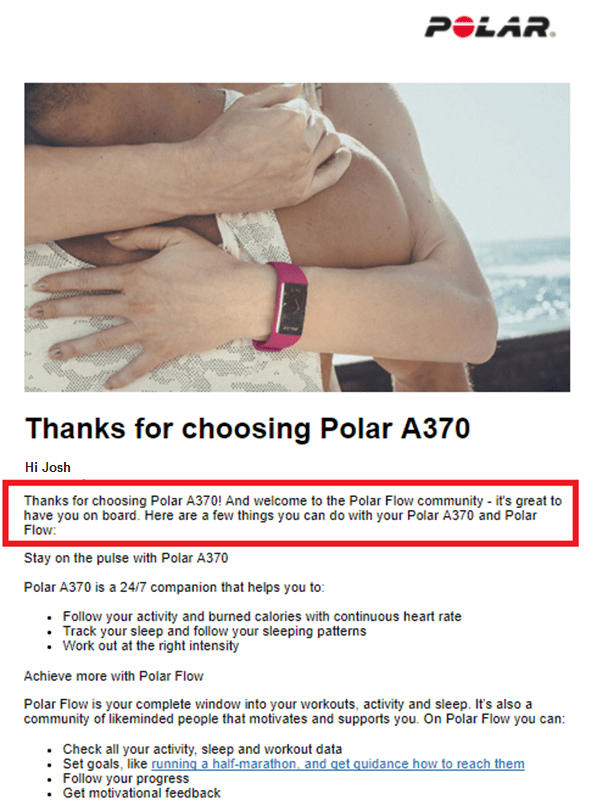
Polar's welcome email pairs a warm greeting with a clear product breakdown in easy-to-scan bullets.
They open with a genuine thank you, then immediately shift to "here's what you can do with your Polar A370," breaking features into scannable bullets. No fluff, no overwhelm. Just enough to get someone started.
If you're in B2B SaaS, your welcome email might look different, but the structure stays the same: acknowledge the signup, deliver one clear action (like completing a profile or launching a first project), and keep it short. Consider splitting your welcome content across two emails so you don't overwhelm new users on day one.
A single welcome email gets users in the door. An onboarding drip sequence walks them to their first value moment.
The format is simple: a short sequence of 3 to 5 emails over 7 to 14 days, each with one goal and one action. Email one covers setup. Email two highlights a key feature. Email three shares a quick win. Every message builds on the last without repeating itself.
Lumosity does this well. After their welcome email, they follow up with a second message that explains how the app works, what areas of the brain get challenged, and how to track your score:
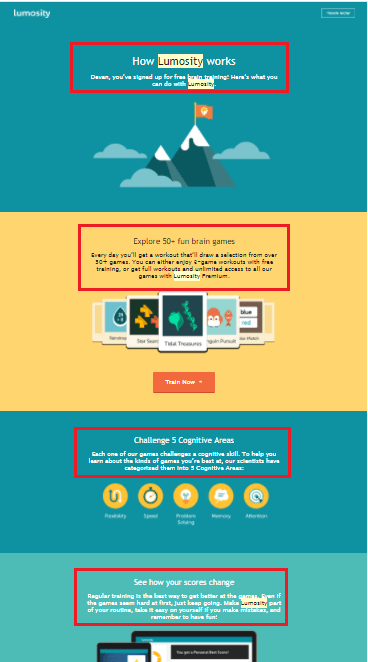
Lumosity's follow-up breaks product value into color-coded, bite-sized sections.
Each section uses a different color and keeps copy to 2 to 3 sentences. It's easy to scan, easy to act on, and doesn't try to explain everything at once.
For B2B SaaS, the principle is identical. Map your drip to the actions that predict long-term retention, then guide users there one email at a time. For more on structuring these sequences, see our guide to onboarding emails.
Most SaaS products have features that users never discover on their own. Feature adoption emails fix that by surfacing underused capabilities at exactly the right moment.
The format is the "did you know you can do X?" email. It works best when triggered by user behavior: someone who's been using your basic reporting for a month might be ready to hear about custom dashboards.
Grammarly's weekly writing stats email is a strong example. It doesn't just report metrics. It weaves in tips like "you used more unique words than 80% of Grammarly users this week" alongside suggestions for features the user hasn't tried yet. The stats make you feel good; the feature nudges give you a reason to come back.
The best feature adoption emails pair email with in-app messaging. Send the email to spark curiosity, then use an in-app tooltip or modal to guide the user through the feature when they log in. That one-two combination drives adoption faster than either channel alone.
Feedback emails show customers their voice matters, and they give you data you can actually act on. The key is timing: send them after a milestone (completing onboarding, hitting a usage threshold, finishing a project) rather than on an arbitrary schedule.
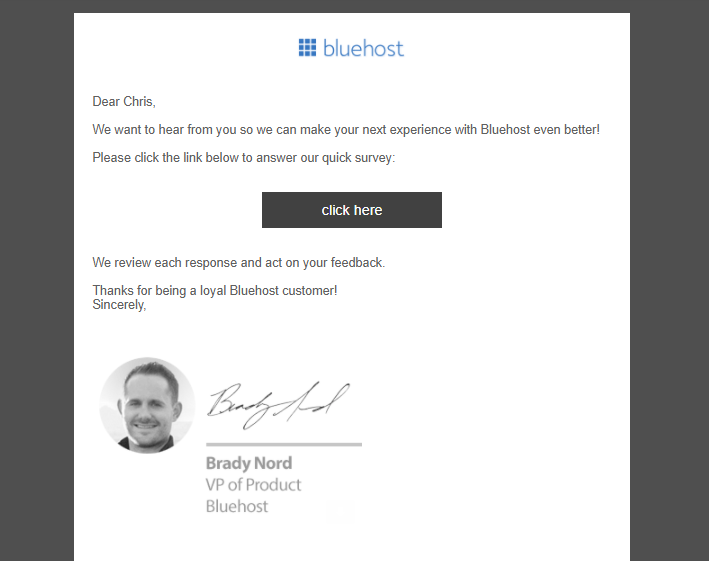
A simple feedback email makes it easy for customers to share input without a heavy time commitment.
Keep the ask short. A single NPS question ("How likely are you to recommend us?") or a 2-minute survey gets far more responses than a 15-question form. Frame it around the customer's experience, not your product roadmap.
You can combine your feedback ask with a public review request. After a customer shares positive feedback, follow up with a link to leave a review on G2 or Capterra. Customers who just told you they're happy are the most likely to say it publicly. That's a double win: you strengthen the relationship and build social proof at the same time.
Appreciation emails have no agenda. No upsell, no survey, no CTA. They exist to make your customer feel valued, and that simplicity is exactly what makes them effective.
In B2B SaaS, this often takes the form of a customer anniversary email: "You've been with us for a year. Here's what you've accomplished." Or a simple thank you during the holidays with no promotional strings attached.
The key is the no-sell, no-promo angle. The moment you tack on a discount code or product announcement, it stops being an appreciation email and becomes a marketing email wearing a thank-you costume. Your customers can tell the difference.
These emails build the kind of loyalty that doesn't show up in this month's metrics but absolutely shows up in next year's retention rate. They're a customer-centric email in the truest sense: the entire message is about the customer, not your product.
Milestone emails take personalization from "Hi [First Name]" to "here's what you actually did with our product." They use real usage data to reflect a customer's journey back to them, and the effect is powerful.
Spotify Wrapped is the most famous version: your top artists, total listening minutes, genre breakdowns, all packaged in a shareable format. But you don't need Spotify's scale to pull this off.
Any SaaS product with usage data can build a version of this. "You've sent 1,200 messages this quarter." "Your team completed 47 projects since January." "You've saved an estimated 12 hours this month using automation." Pick metrics that make your customers feel productive, and wrap them in a clean, visual format.
The best milestone emails are inherently shareable. When a customer posts their year-in-review stats on LinkedIn, that's organic advocacy you didn't have to pay for.
Exclusive offers work for retention when they feel genuinely exclusive, not when every subscriber gets the same "VIP" code.
The strongest versions tie the offer to something personal. A birthday discount. An anniversary reward. A usage milestone ("You've been with us for 6 months, here's 20% off your next renewal"). The personalization signals that this isn't a mass blast.
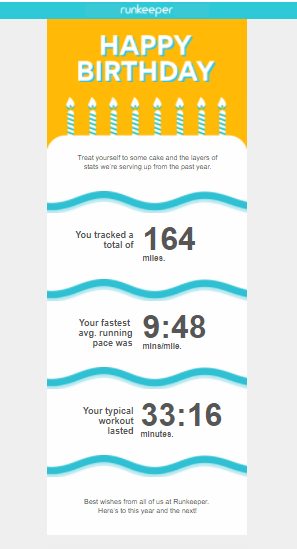
Runkeeper pairs a birthday greeting with personalized user stats, layered into a cake graphic.
Runkeeper's birthday email is a standout. They don't just say "happy birthday." They pull in the user's personal running stats since their last birthday and present them as layers of a cake. It's personal, it's fun, and it reinforces the product's value without a hard sell.
One more thing: if you send an exclusive offer and it goes unclaimed, follow up with a reminder before it expires. A simple "Your offer expires in 3 days" email can recover a surprising number of conversions.
Some subscribers go quiet. They stop opening emails, stop logging in, and slowly drift away. Re-engagement emails are your chance to pull them back before they churn for good.
Panera does this well:
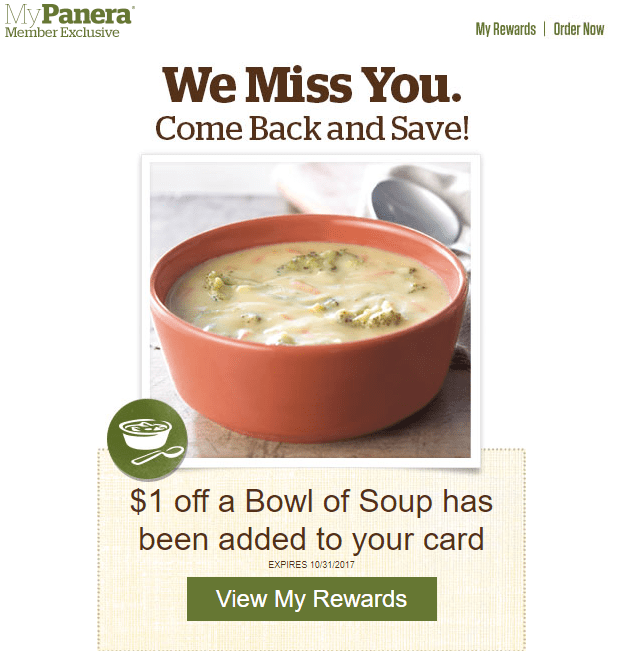
Panera's re-engagement email pairs a timely seasonal offer with a pre-loaded reward to minimize friction.
Based on recent inactivity, they send a pre-loaded coupon for a seasonal offer. The friction is nearly zero: the discount is already on the customer's reward card. They just have to show up.
In B2B SaaS, win-back emails often work best when paired with an in-app prompt. Send the email to get the user back to your product, then use an in-app message to re-orient them when they arrive. That combination addresses both the "why should I come back" and the "what do I do now" questions in sequence.
A note on list hygiene: if a subscriber doesn't respond to your re-engagement sequence, consider removing them. Keeping dead contacts on your list damages deliverability and inflates your metrics. For a deeper look at re-engagement emails, we've written a full guide. And if churn is a broader concern, our framework for reducing customer churn covers the full picture.
Your happiest customers are your best acquisition channel, but most of them won't refer anyone unless you ask. A referral email makes the ask explicit and the action frictionless.
The best referral emails have three things: a clear reward (for both the referrer and the friend), a one-click sharing mechanism, and timing tied to a positive moment. Send it after a customer hits a milestone, leaves positive feedback, or renews their subscription.
Dropbox built an entire growth engine on this model. Their referral email offered extra storage for both parties, made sharing as simple as copying a link, and reminded users exactly what they'd get. The reward was relevant to the product, not a generic gift card, which made it feel like an extension of the experience rather than a marketing promotion.
For B2B SaaS, referral emails tend to perform best when the reward maps to product value: extra seats, extended trials, premium features. Keep the mechanics simple and the value obvious.
Upsell emails are a core SaaS retention play, but they only work when they're triggered by behavior rather than sent on a calendar.
The signal matters. A user who just hit their plan's usage limit is ready to hear about an upgrade. A user who's been on a free trial for 2 days is not. The best upsell emails feel like a natural next step, not a sales pitch.
A strong pattern looks like this: "You've used 90% of your storage this month. Upgrade to Pro for 3x the space and priority support." Lead with the value, tie it to their actual usage, and make the upgrade path a single click.
Cross-sell emails follow a similar logic. If a customer is using your reporting tool heavily, an email introducing your analytics add-on with a relevant use case ("Teams like yours typically pair reporting with custom dashboards") feels helpful rather than pushy.
The key is relevance. When the email responds to what the customer is actually doing, it reads as service. When it doesn't, it reads as spam.
Renewal reminders are defensive retention emails. They prevent involuntary churn and give you one more chance to re-sell the value of your product before the renewal decision happens.
The best renewal emails do three things: remind the customer their subscription is coming up, highlight the value they've received (projects completed, time saved, goals hit), and make the renewal action effortless.
A simple structure works: "Your subscription renews on [date]. Here's what you've accomplished this year: [2 to 3 personalized stats]. No action needed if you'd like to continue." For customers who need to actively renew, swap the closing for a prominent renewal button.
Timing matters here. Send the first reminder 30 days before renewal, with a follow-up at 7 days. That gives customers enough time to evaluate without feeling pressured, and it surfaces any payment issues before they cause an unexpected cancellation.
The right retention emails show up at the right moment, with the right message, for the right person. That's easier to execute when your email strategy works alongside your in-app experience rather than in a silo.
Appcues helps B2B SaaS teams build personalized, behavior-driven campaigns across email, in-app, and push, so your retention messaging stays coordinated across every channel.
Lifecycle Marketing
Retention & Churn
Email Marketing
Advocacy & Referrals
TL;DR
Your product does the heavy lifting, but retention emails keep the conversation going between sessions. They nudge users toward the next milestone, surface value they haven't discovered yet, and remind people why they signed up in the first place. (If you're tracking the impact, here are the retention metrics that matter most.)
The best retention emails don't feel like marketing. They feel like a well-timed tap on the shoulder from someone who actually knows what you need. That's the bar.
Below are 11 emails worth adding to your lifecycle toolkit, plus what makes each one effective. If you're already using retention emails to drive engagement, use these as a gut check. If you're building from scratch, this is your starting lineup.
A welcome email sets the tone for the entire customer relationship. It's your first chance to guide a new user toward their next step, and it has some of the highest engagement rates of any email you'll ever send.
The best welcome emails do three things: make the recipient feel like they made a good decision, give them one clear next action, and set expectations for what's coming.
Polar nails this in their activation email:
Polar's welcome email pairs a warm greeting with a clear product breakdown in easy-to-scan bullets.
They open with a genuine thank you, then immediately shift to "here's what you can do with your Polar A370," breaking features into scannable bullets. No fluff, no overwhelm. Just enough to get someone started.
If you're in B2B SaaS, your welcome email might look different, but the structure stays the same: acknowledge the signup, deliver one clear action (like completing a profile or launching a first project), and keep it short. Consider splitting your welcome content across two emails so you don't overwhelm new users on day one.
A single welcome email gets users in the door. An onboarding drip sequence walks them to their first value moment.
The format is simple: a short sequence of 3 to 5 emails over 7 to 14 days, each with one goal and one action. Email one covers setup. Email two highlights a key feature. Email three shares a quick win. Every message builds on the last without repeating itself.
Lumosity does this well. After their welcome email, they follow up with a second message that explains how the app works, what areas of the brain get challenged, and how to track your score:
Lumosity's follow-up breaks product value into color-coded, bite-sized sections.
Each section uses a different color and keeps copy to 2 to 3 sentences. It's easy to scan, easy to act on, and doesn't try to explain everything at once.
For B2B SaaS, the principle is identical. Map your drip to the actions that predict long-term retention, then guide users there one email at a time. For more on structuring these sequences, see our guide to onboarding emails.
Most SaaS products have features that users never discover on their own. Feature adoption emails fix that by surfacing underused capabilities at exactly the right moment.
The format is the "did you know you can do X?" email. It works best when triggered by user behavior: someone who's been using your basic reporting for a month might be ready to hear about custom dashboards.
Grammarly's weekly writing stats email is a strong example. It doesn't just report metrics. It weaves in tips like "you used more unique words than 80% of Grammarly users this week" alongside suggestions for features the user hasn't tried yet. The stats make you feel good; the feature nudges give you a reason to come back.
The best feature adoption emails pair email with in-app messaging. Send the email to spark curiosity, then use an in-app tooltip or modal to guide the user through the feature when they log in. That one-two combination drives adoption faster than either channel alone.
Feedback emails show customers their voice matters, and they give you data you can actually act on. The key is timing: send them after a milestone (completing onboarding, hitting a usage threshold, finishing a project) rather than on an arbitrary schedule.
A simple feedback email makes it easy for customers to share input without a heavy time commitment.
Keep the ask short. A single NPS question ("How likely are you to recommend us?") or a 2-minute survey gets far more responses than a 15-question form. Frame it around the customer's experience, not your product roadmap.
You can combine your feedback ask with a public review request. After a customer shares positive feedback, follow up with a link to leave a review on G2 or Capterra. Customers who just told you they're happy are the most likely to say it publicly. That's a double win: you strengthen the relationship and build social proof at the same time.
Appreciation emails have no agenda. No upsell, no survey, no CTA. They exist to make your customer feel valued, and that simplicity is exactly what makes them effective.
In B2B SaaS, this often takes the form of a customer anniversary email: "You've been with us for a year. Here's what you've accomplished." Or a simple thank you during the holidays with no promotional strings attached.
The key is the no-sell, no-promo angle. The moment you tack on a discount code or product announcement, it stops being an appreciation email and becomes a marketing email wearing a thank-you costume. Your customers can tell the difference.
These emails build the kind of loyalty that doesn't show up in this month's metrics but absolutely shows up in next year's retention rate. They're a customer-centric email in the truest sense: the entire message is about the customer, not your product.
Milestone emails take personalization from "Hi [First Name]" to "here's what you actually did with our product." They use real usage data to reflect a customer's journey back to them, and the effect is powerful.
Spotify Wrapped is the most famous version: your top artists, total listening minutes, genre breakdowns, all packaged in a shareable format. But you don't need Spotify's scale to pull this off.
Any SaaS product with usage data can build a version of this. "You've sent 1,200 messages this quarter." "Your team completed 47 projects since January." "You've saved an estimated 12 hours this month using automation." Pick metrics that make your customers feel productive, and wrap them in a clean, visual format.
The best milestone emails are inherently shareable. When a customer posts their year-in-review stats on LinkedIn, that's organic advocacy you didn't have to pay for.
Exclusive offers work for retention when they feel genuinely exclusive, not when every subscriber gets the same "VIP" code.
The strongest versions tie the offer to something personal. A birthday discount. An anniversary reward. A usage milestone ("You've been with us for 6 months, here's 20% off your next renewal"). The personalization signals that this isn't a mass blast.
Runkeeper pairs a birthday greeting with personalized user stats, layered into a cake graphic.
Runkeeper's birthday email is a standout. They don't just say "happy birthday." They pull in the user's personal running stats since their last birthday and present them as layers of a cake. It's personal, it's fun, and it reinforces the product's value without a hard sell.
One more thing: if you send an exclusive offer and it goes unclaimed, follow up with a reminder before it expires. A simple "Your offer expires in 3 days" email can recover a surprising number of conversions.
Some subscribers go quiet. They stop opening emails, stop logging in, and slowly drift away. Re-engagement emails are your chance to pull them back before they churn for good.
Panera does this well:
Panera's re-engagement email pairs a timely seasonal offer with a pre-loaded reward to minimize friction.
Based on recent inactivity, they send a pre-loaded coupon for a seasonal offer. The friction is nearly zero: the discount is already on the customer's reward card. They just have to show up.
In B2B SaaS, win-back emails often work best when paired with an in-app prompt. Send the email to get the user back to your product, then use an in-app message to re-orient them when they arrive. That combination addresses both the "why should I come back" and the "what do I do now" questions in sequence.
A note on list hygiene: if a subscriber doesn't respond to your re-engagement sequence, consider removing them. Keeping dead contacts on your list damages deliverability and inflates your metrics. For a deeper look at re-engagement emails, we've written a full guide. And if churn is a broader concern, our framework for reducing customer churn covers the full picture.
Your happiest customers are your best acquisition channel, but most of them won't refer anyone unless you ask. A referral email makes the ask explicit and the action frictionless.
The best referral emails have three things: a clear reward (for both the referrer and the friend), a one-click sharing mechanism, and timing tied to a positive moment. Send it after a customer hits a milestone, leaves positive feedback, or renews their subscription.
Dropbox built an entire growth engine on this model. Their referral email offered extra storage for both parties, made sharing as simple as copying a link, and reminded users exactly what they'd get. The reward was relevant to the product, not a generic gift card, which made it feel like an extension of the experience rather than a marketing promotion.
For B2B SaaS, referral emails tend to perform best when the reward maps to product value: extra seats, extended trials, premium features. Keep the mechanics simple and the value obvious.
Upsell emails are a core SaaS retention play, but they only work when they're triggered by behavior rather than sent on a calendar.
The signal matters. A user who just hit their plan's usage limit is ready to hear about an upgrade. A user who's been on a free trial for 2 days is not. The best upsell emails feel like a natural next step, not a sales pitch.
A strong pattern looks like this: "You've used 90% of your storage this month. Upgrade to Pro for 3x the space and priority support." Lead with the value, tie it to their actual usage, and make the upgrade path a single click.
Cross-sell emails follow a similar logic. If a customer is using your reporting tool heavily, an email introducing your analytics add-on with a relevant use case ("Teams like yours typically pair reporting with custom dashboards") feels helpful rather than pushy.
The key is relevance. When the email responds to what the customer is actually doing, it reads as service. When it doesn't, it reads as spam.
Renewal reminders are defensive retention emails. They prevent involuntary churn and give you one more chance to re-sell the value of your product before the renewal decision happens.
The best renewal emails do three things: remind the customer their subscription is coming up, highlight the value they've received (projects completed, time saved, goals hit), and make the renewal action effortless.
A simple structure works: "Your subscription renews on [date]. Here's what you've accomplished this year: [2 to 3 personalized stats]. No action needed if you'd like to continue." For customers who need to actively renew, swap the closing for a prominent renewal button.
Timing matters here. Send the first reminder 30 days before renewal, with a follow-up at 7 days. That gives customers enough time to evaluate without feeling pressured, and it surfaces any payment issues before they cause an unexpected cancellation.
The right retention emails show up at the right moment, with the right message, for the right person. That's easier to execute when your email strategy works alongside your in-app experience rather than in a silo.
Appcues helps B2B SaaS teams build personalized, behavior-driven campaigns across email, in-app, and push, so your retention messaging stays coordinated across every channel.

Sign up for Quickcues and get our monthly updates!
.svg)


