
.png)
Vibe coding produces a convincing demo in 20 minutes. Getting it to production reveals the system you couldn't see from the outside: compliance exposure, engineer handoff problems, infrastructure depth that takes months to build correctly.
The cost gap is real too, but it's a symptom of the complexity, not the cause of it. We ran the experiment so you don't have to.
At some point in every product team’s life, someone says it: why can’t we just build this ourselves? This is one of those crucial decisions that requires the product team to carefully consider business needs, ensuring that any approach to user onboarding aligns with organizational goals and solves the core problems at hand.
It’s a reasonable question. It’s gotten more reasonable in the last two years, now that AI coding tools can produce something that looks like working software in 20 minutes. AI has changed the build vs buy decision-making process by allowing teams to validate a build path almost as quickly as signing a vendor contract, shifting the bottleneck from product development to AI evaluation. We know this because we tried it. Three members of our team built working versions of Appcues, without engineering involvement, in an afternoon. The demos were convincing. We showed them around internally and people were impressed.
Then we asked our Operations Director what it would take to ship either one.
He was not thrilled.
What followed was a useful exercise in the difference between the surface and the system. The surface, the modals, the flow builder, the checklist with its progress counter, is easy to reproduce. We reproduced it in 20 minutes. The system underneath is what you can’t see from the outside, and it’s also what determines whether your onboarding program actually works. This experiment serves as a real world example of the build vs buy dilemma, highlighting the complexities that arise beyond the initial demo.
This post is about that gap. Not just the engineering complexity, but the compliance exposure you don’t discover until a customer asks, the infrastructure depth you don’t know you need until you try to run an experiment, and the maintenance reality that accumulates quietly after the build. Cost comes into it too, but it’s a symptom of the complexity, not the headline. Our goal is to help you make crucial decisions by sharing real world examples and ensuring your solution aligns with your business needs.
The build vs buy decision is a software decision that involves evaluating trade-offs and making a strategic choice that can impact business success. While it may look like a cost question, it is really a question about complexity. Most build vs buy comparisons focus on the visible surface. For standardized processes like payroll, document automation, or payment processing that don’t create competitive advantage, buying is almost always right.
These categories have mature solutions that offer stability and reliability, making them a strategic choice for many organizations, as no custom build can match them on features or dependability. User onboarding is more nuanced, but the same principle applies more often than teams expect. Most teams on either side of the build vs buy decision underestimate something.
Most teams who evaluate buying underestimate what the vendor actually provides. The goal of this post is to close both gaps and give you a clear framework for making this software decision.
Before getting into the system, a quick definition of the three options you’re choosing between:
A note on methodology: In early 2026, three members of our team built working versions of Appcues using Lovable, without engineering involvement. Cost figures come from that research, cross-referenced against independent analysis by Garrick van Buren in For Starters, and by our product team.
Before getting into what we found, here’s what each option means in practice.
Build in-house means your engineering team creates a custom onboarding system tailored to your product architecture. This approach provides more control over the roadmap, customization, and feature set, and can lead to a lower long-term total cost of ownership—especially if your team's capabilities and internal resources are strong. Teams with strong technical and product capabilities can afford to build more because they can sustain, evolve, and govern what they create over time. However, building in-house comes with a higher upfront investment, ongoing maintenance responsibility, and long-term ownership burden that compounds over time.
Technical debt can accumulate from custom code, leading to increased maintenance burdens over time, which can become a significant long-term cost for organizations—especially when you’re investing heavily in product onboarding to drive activation and retention.
Buy a platform means subscribing to a purpose-built solution that handles the infrastructure, targeting, analytics, and iteration loop. Buying software trades some control for speed, support, and the accumulated product investment of a vendor who’s been solving this specific problem for years. Time to market improves not just for the initial launch but for every update and experiment after it. Vendor lock-in is a real concern worth weighing. But that risk cuts both ways: building in-house to avoid it introduces a different dependency: on the specific engineers who built it and the decisions they made under time pressure.
Vibe code means using AI tools like Lovable or Cursor to generate working software quickly, without dedicated engineering resources. It’s genuinely useful for prototyping and demos. It is not a production onboarding strategy, and the reasons why go well beyond engineering complexity.
Our Head of Performance Marketing built a working version of Appcues in 20 minutes with Lovable: a two-panel layout with a flow builder, mock CRM, four experience types, and a Publish button that actually renders overlays on a fake product. Our Product Marketing Director built an entire fake wealth management platform with imagined onboarding experiences layered on top. About 30 minutes. Neither is a developer.
Both looked completely real. Both were convincing enough to show stakeholders.
This is genuinely useful. A working demo solution built in 20 minutes is a real thing you can put in front of a decision-maker to show what the experience could feel like. Vibe coding offers rapid time to value by enabling teams to quickly demonstrate potential solutions to stakeholders. If your goal is internal buy-in before committing to a platform budget, vibe coding gets you there.
The question is what comes next.
Simon Wilson, discussing this on Lenny’s podcast, draws a distinction that gets lost in most build vs buy conversations: vibe coding is generating quick personal projects without real data connections or production constraints. Agentic engineering is proper software development: building software with AI assistance and engineer oversight throughout, and crucially, moving from a demo to production requires careful consideration of the programming language used and how well the solution integrates with your existing tech stack.
Most teams evaluating the build vs buy decision imagine they’re doing agentic engineering. What they actually produce in a proof-of-concept is vibe coding. The gap between those two things is where this decision gets expensive.
Getting a vibe-coded solution to actually work inside a real product, your product, running on real users, means building a JavaScript snippet that loads asynchronously without breaking page performance, handles React, Vue, and Angular apps where the DOM is constantly changing, works across every browser, and doesn’t get blocked by ad blockers or Content Security Policy headers.
Implementing specific functionality—such as real-time event tracking or ensuring cross-browser compatibility—adds onto the complexity. Any one of those is a scoped engineering problem. Together, they’re a focused sprint of at least two to four weeks, and the result will still break on edge cases for months afterward.
Then there’s state management. The checklist with its progress counter needs to know, per user, which steps are complete, and stay consistent across sessions, devices, and the edge case where someone has two tabs open. That requires a real backend. Then event tracking: knowing that a user actually clicked through a feature versus just saw a modal requires instrumentation across the whole product, a separate project from the onboarding build, and the first thing pushed to the backlog when the build runs long.
Here’s what teams most consistently underestimate when they’re making the build vs buy decision. Customization needs often drive the complexity and scope of the infrastructure required for a successful onboarding program. In most build vs buy analyses, these capabilities don’t appear on the comparison list because they’re invisible from the outside. These aren’t edge cases or advanced features. They’re the core functionality that determines whether your onboarding program actually works.
When you're running multiple onboarding experiences simultaneously, something has to decide which one a given user sees at a given moment. Without collision detection, a user who qualifies for three different experiences gets all three. Building this logic is a significant engineering project on its own.
Running a proper experiment on your onboarding requires a holdout group, users who don't see the experience, so you can measure whether it's actually driving behavior. Without holdout testing, you're measuring completion rates, not impact. Building holdout logic requires careful instrumentation that tends to get deferred indefinitely.
Showing the right experience to the right user requires a live connection to your user data, logic that fires on behavioral events rather than page load, and suppression rules that stop surfacing completed content. Dynamic segment targeting with a conditions editor, frequency rate limiting, Salesforce data connections, informed by user onboarding metrics and KPIs, is the layer that makes onboarding feel relevant rather than generic. It's also what takes months to build correctly and constant attention to keep working.
In-product experiences stop working the moment a user closes the tab. Behavioral email and push notifications are where re-engagement happens. Coordinating those channels so users get consistent messages across surfaces requires a unified targeting and analytics layer, as well as following best practices for in-app notifications that stay contextual and timely, plus integrations with survey tools and customer relationship management systems that are often directly tied to key business outcomes such as user engagement and retention, and document automation workflows that keep everything in sync.
Completion tracking that stays consistent across sessions, devices, and concurrent tabs, with race condition handling and real-time sync. The infrastructure behind "show this checklist only to users who haven't finished onboarding" is not a feature. It's a backend problem that most custom builds never fully solve.
There’s a fifth problem that doesn’t get discussed enough.
A non-technical person creates the vibe-coded prototype by building software with an AI tool. An engineer is now responsible for reviewing and maintaining code they didn’t write, that doesn’t follow the team’s established patterns. Every subsequent change to that software solution requires filing a ticket or rebuilding the engineer’s mental model. There’s no observability. The marketer who owns the onboarding program still can’t update copy or targeting without engineering involvement. The dependency loop is the same as a traditional custom build, with the additional problem that the code itself is harder to reason about. Over time, this engineer handoff problem increases the maintenance burden, making ongoing support and updates more challenging.
Our Operations Director’s bottom line: three months of his time, $40,000 to $60,000 minimum before accounting for what else he wouldn’t be doing during those three months.
There’s one more dimension that doesn’t show up in engineering conversations.
GDPR violations carry penalties of up to 4% of annual global revenue or 20 million euros. For B2B SaaS companies, the exposure compounds through your customers’ Data Processing Agreements, which specify how their end user data is handled and what third-party systems it flows through. Many compliance requirements are non-negotiable for organizations, especially when it comes to core functionalities, data governance, or feature prioritization. Vibe-coded solution components that touch user identity data or session information may not meet those obligations. There’s no SOC 2 audit trail covering code generated without an independent review process. If your trust center attestations don’t reflect how your production systems actually handle data, that’s a customer conversation you don’t want to have after the fact. If your product value comes from proprietary, regulated, or highly sensitive data, pushing everything through a third-party vendor may not be tenable long term—making in-house capabilities necessary.
Research from Veracode in 2025 found roughly 45% of AI-generated code contains security vulnerabilities. A Georgia Tech study from March 2026 found developers using AI coding assistants wrote less secure code while feeling more confident in it. Onboarding code sits near your authentication layer and session data, not where you want to deploy something that hasn’t been through a proper security review.
If neither the compliance exposure nor the infrastructure complexity is enough to settle the question, here’s the cost picture.
The cost implications of AI in the build vs buy decision are complex, as traditional budgeting struggles with AI's usage-based costs, making it essential to evaluate long-term dependencies and potential hidden costs.
Year 1 build at typical inputs (10,000 MAU, 2 engineers, 6 updates/month):
Year 1 Appcues at comparable scale: Priced to match your scale, starting well below custom build costs, and it stays predictable as you grow.
The gap widens every year: Maintenance costs compound while platform pricing stays predictable.
To put it plainly: building user onboarding in-house costs approximately $180,000 in Year 1. A platform like Appcues runs a fraction of that, with pricing that scales with your MAU, use cases, and compliance needs. And unlike a custom build, that cost doesn't compound. It stays predictable while your maintenance burden does not.
Factor in hidden costs like compliance certification, integration work, and ongoing support when you do. Future costs like ongoing maintenance, dependency updates, and re-architecture as the product evolves tend to make a custom build significantly more expensive than the sticker price suggests.
AdRoll's experience is an example of how the build vs buy decision plays out in practice. They got far enough into scoping their own in-app messaging system to know what it would take. In their words, “the list grew intimidating really quickly. Hurdles like user targeting, permissioning and analytics made the build vs buy decision easy.” They estimated buying instead saved months of engineering time, with non-technical teammates handling updates in about 15 minutes rather than days.
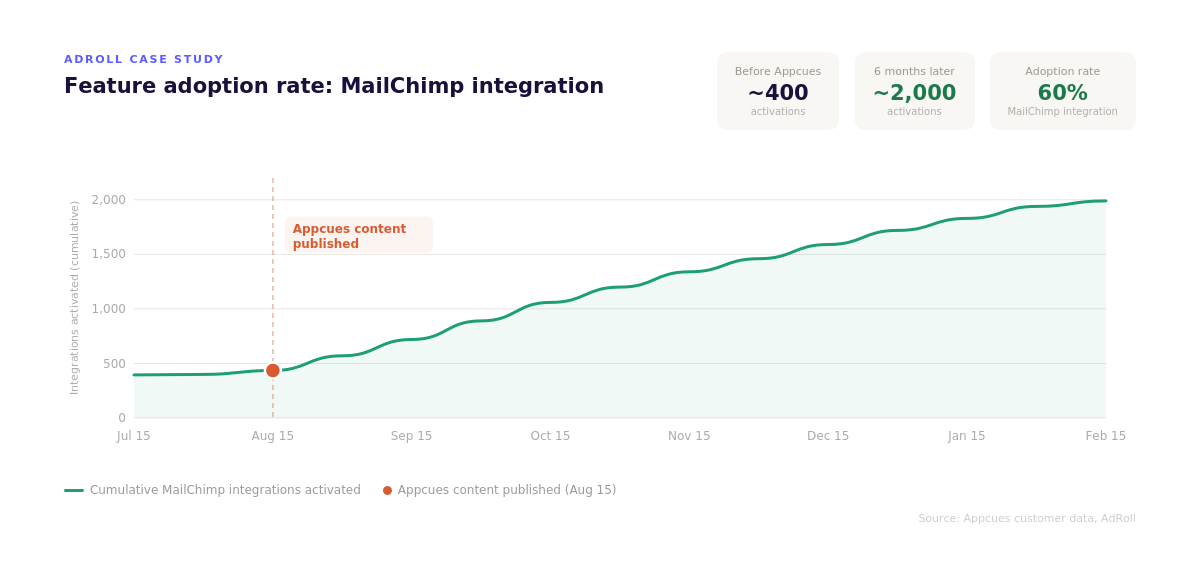
The cost estimate also tends to leave out the opportunity cost: what your team isn't building during those months. Time spent building software for onboarding is time not spent on core product, the roadmap work that doesn't happen, the integrations deferred, the features pushed. Building user onboarding infrastructure is not a strategic use of most product engineering teams. It's table stakes that a platform has already solved.
There’s also the maintenance reality that accumulates quietly. When your product ships a UI change, someone has to check whether the CSS selectors still point at the right elements. Ongoing maintenance includes regular bug fixes to keep the system functioning as the product evolves. Technical debt from building software compounds over time. Every copy change is a ticket. Every experiment is a sprint item. With a platform, the person who notices the problem fixes it that afternoon.
Building your own onboarding solution (building software specifically for your team’s onboarding needs) is sometimes the right call. Sophisticated engineering teams with the scale, technical environment, or competitive requirements that genuinely justify it do build internally. The competitive advantage question is the most important one: is this onboarding layer core to your product’s value proposition, or is it infrastructure? If the software is central to your company’s competitive edge or provides strategic control over key product differentiators, it may be worth building in house to retain ownership and flexibility. In most cases, though, it’s infrastructure. When the competitive advantage case is unclear, the build vs buy decision should default to buying. The build vs buy decision lands differently when:
All of those conditions usually have to be true simultaneously in any build vs buy analysis. Most teams who think this describes them end up wrong on at least one count. Sustained ownership, not just initial capacity, is the condition that most often goes unmet. Consider involving other stakeholders in the build versus buy decision before committing, since engineering teams tend to be optimistic about scope and timeline. At enterprise scale, the build cost also scales: more MAUs, more use cases, more compliance overhead, more surface area to maintain. The gap between build and buy doesn’t close as cleanly as the top-line platform cost might suggest.
The "it's just tooltips" perception is one of the most common things we hear from teams making the build vs buy decision, and it consistently underestimates what the vendor solution is actually providing underneath the demo solution. The tooltips, modals, and checklists are the part anyone can reproduce in an afternoon. They're the smallest part of what a platform provides.
What a mature vendor solution provides underneath is a decade of engineering work on one specific problem: how do you deliver the right experience to the right user at the right moment, measure whether it worked, and let the people who care about it most update it without touching code? No custom solution built in-house has that accumulated investment. No vibe-coded solution has the infrastructure to support it. Building software from scratch to replace that investment is a multi-year commitment, not a sprint. Unless the onboarding system itself is a source of competitive advantage, that commitment is hard to justify.
What mature customer engagement platforms for web and mobile provide goes well beyond the visible surface. Here’s what buying software actually delivers:
Behavioral targeting connected to live user data, not page load triggers, but behavioral events, with suppression rules, frequency rate limiting, and dynamic segment targeting with a conditions editor. Collision detection that prevents multiple experiences from competing for the same user. Holdout testing and control groups built into the platform rather than deferred to the backlog. Per-user state across sessions, devices, and concurrent tabs. In-session and out-of-session workflow coordination across in-app, email, and push.
Every content change in a custom-built solution is an engineering ticket. With a platform, the marketer or customer success person who noticed the problem fixes it without a ticket. That difference compounds over a year into the gap between an onboarding program that stays current and one that quietly drifts.
A feedback loop that ties what users see to what they do next: activation, feature adoption, retention, connected directly to the experiences, not reconstructed from separate tooling, and informed by onboarding metrics and KPIs you track over time.
Security and compliance infrastructure that's already been through a review process, with SOC 2 certification, data residency options, and access controls that reflect how data is actually handled. Vendor solutions that serve enterprise customers have already passed the security reviews your customers will ask about.
Captain AI, Appcues' built-in assistant, generates experience content, suggests targeting logic, and helps teams move from idea to live experience without starting from scratch. The difference from a general AI coding tool is context: it operates inside the same targeting infrastructure and analytics layer as everything else on the platform. AI agents built into the platform surface insights and automate engagement tasks within a system that already understands your users and segments.
You can also connect Appcues data to AI tools via our MCP Server so AI agents can summarize, audit, and troubleshoot experiences without leaving your existing workflow.
The build vs buy decision is rarely as close as it feels in the moment when someone first suggests building in-house. The upfront numbers look manageable. What accumulates quietly is the compliance exposure, the engineer handoff problem, and the infrastructure depth you discover only after committing.
Before deciding, it helps to use a structured framework. The MoSCoW method (Must have, Should have, Could have, Won't have) is useful for separating what your onboarding system must do from what would be nice to have. Must-have requirements that no existing vendor solution meets might justify building a custom solution. Must-haves that vendor solutions already handle well argue clearly against building in-house.
Beyond that framework, use these key questions—alongside a clear view of the best user onboarding tools to build your stack—to guide your build vs buy decision:
Who will own this system when the person who built it moves on? This is the question most build decisions don't ask. The answer determines whether the investment was worth it two years later.
Can the people who most need to update onboarding content do it without filing a ticket? If not, how many updates do you expect per month, and what's the cost of each?
Do your customers have DPAs that specify how their end user data is handled? Does a vibe-coded or custom-built system meet those obligations, and is there an audit trail to prove it?
What happens to your onboarding layer the next time your product ships a major UI change? CSS selectors break, component names change, page structures get refactored. Who catches that before users hit a broken experience?
Do you need collision detection, holdout testing, and behavioral targeting? If you're not running experiments and you're not personalizing at scale, you may not. If you are, these need to be built or bought.
What does the total cost of ownership look like by Year 3? Map your team's engineer rate, update frequency, and compliance overhead against a platform subscription. The build cost almost always grows; the platform cost stays flat.
Vibe coding made the upfront numbers look even more manageable. What it didn't change is what comes after: the security review that didn't happen, the DPA exposure, the engineer who now owns code they didn't write, the marketer who still can't update copy without filing a ticket.
The question isn't whether you can build it. With AI tools, you can build a version of almost anything in an afternoon. The question is whether you can see the full system from the outside, and whether you're prepared to own it indefinitely.
You can build something that looks like one in under 30 minutes. Getting it to work in a real production environment, with live targeting, user state, event tracking, content that non-engineers can update, and compliance documentation your enterprise customers can audit, is a different project entirely. Two people on our team built convincing demos with Lovable. When we asked our Operations Director what it would take to ship either one, his estimate was three months and $40-60K, before opportunity cost.
Peter Clark, Director of Product at AdRoll, got close enough to a build decision to know what it would actually take. His team's scoping of a custom solution found that "the list grew intimidating really quickly. Hurdles like user targeting, permissioning and analytics made the build vs buy decision easy." That was before vibe coding existed. The surface is faster to produce now. The system underneath is the same.
Building a full user onboarding system in-house takes two to four months for a cross-functional team. That covers the initial build only. The ongoing maintenance runs indefinitely after that, compounding as the product changes, dependencies update, and technical debt accumulates. Teams that plan for the initial cost and not the maintenance cost are the ones that end up with an onboarding layer that quietly drifts out of sync with the product.
Building user onboarding in-house only becomes financially competitive with buying software at around $60,000 per year in platform spend, per independent analysis from the newsletter For Starters. Below that threshold, buying software almost always wins on total cost. Above it, the answer gets more complicated, but even at enterprise scale, the build cost scales too: more MAUs, more compliance overhead, more surface area to maintain. The gap between build and buy doesn't close as cleanly as the top-line platform cost suggests.
GDPR violations carry penalties of up to 4% of annual global revenue or 20 million euros. For B2B companies, the exposure goes further: customers have Data Processing Agreements that specify how their end user data is handled. Vibe-coded solution components that touch user identity data may not meet those obligations, and there's no SOC 2 audit trail for code generated without an independent review process. If your trust center attestations don't reflect how your production systems actually work, that's a customer conversation you don't want to have after the fact.
Whether to keep that solution depends on what "working" means. If the existing solution is current, updatable by non-engineers, covers cross-channel reach, handles compliance requirements, and gives you holdout testing and collision detection—possibly as part of a broader stack of user engagement tools across channels—it may be serving you well. If it requires engineering tickets for content changes or breaks on UI updates, the question is what it would cost to close the gap. Running the build vs buy calculation honestly on both sides is worth doing before deciding to stay the course. The existing solution may be serving you better than you think, or costing more than you realize.
Research from Veracode in 2025 found roughly 45% of AI-generated code contains security vulnerabilities. A Georgia Tech study from March 2026 found developers using AI coding assistants wrote less secure code while feeling more confident in it. For anything near your authentication layer or session data, which onboarding often is, this matters, especially for teams with SOC 2 obligations or enterprise customers who require compliance documentation.
And critically, you can access all of this through pricing plans built for midsized and enterprise teams, rather than committing to the open-ended investment of a custom build.
Under the hood, Appcues also exposes a comprehensive Public API for managing flows, segments, and user data, which is difficult and time-consuming to replicate reliably in a custom build.
Behavioral targeting connected to live user data, per-user state across sessions and devices, cross-channel orchestration across in-app, email, and push, and a feedback loop tied directly to activation and retention outcomes. The capabilities teams most consistently underestimate: collision detection across simultaneous messages, holdout testing and control groups, personalization at scale, and in-session and out-of-session workflow coordination—all while preserving a thoughtful onboarding UX that’s designed for user experience. Plus the ability for non-engineers to build, update, and iterate without touching code, and AI agents that surface insights within a system that already understands your users.


.png)
%2520(1).png)