.png)
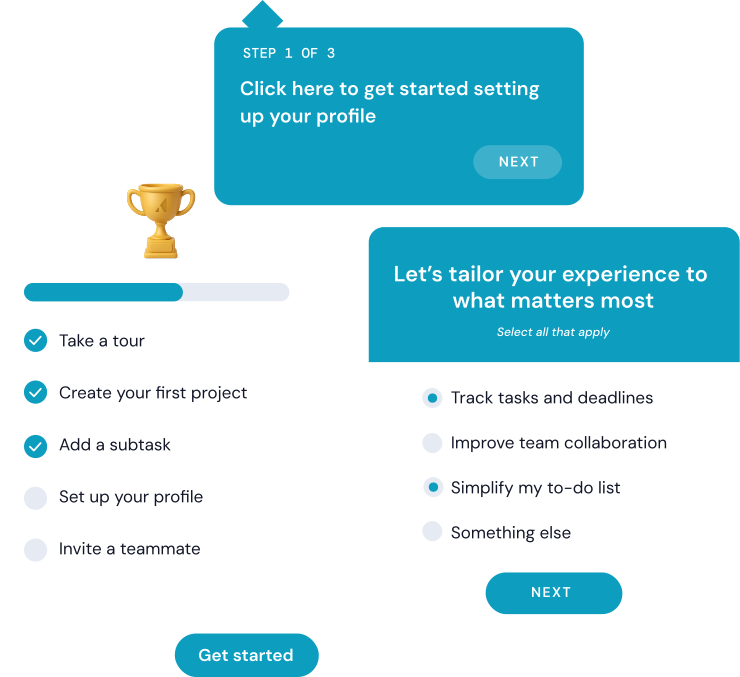
Most SaaS teams have lived the same arc: a feature ships, the launch email goes out, signups tick up for a week, and then growth quietly stalls. The gap between acquiring users and keeping them active every day is where that stall happens. Daily active users tell you whether people actually find your product valuable enough to come back.
And that distinction matters more than ever. As acquisition costs climb, activation matters as much as acquisition. The companies seeing consistent growth are building products sticky enough to become part of someone's daily workflow.
This post breaks down what daily active users actually are, why they matter for SaaS growth, and 15+ strategies you can use to move the needle - from onboarding and product analytics to multi-channel messaging, personalization, and A/B testing. Whether you're a product manager trying to improve activation rates or a growth marketer focused on retention, you'll walk away with a concrete playbook you can start using this week.
Daily active users (DAU) is the count of unique users who engage with your product within a 24-hour period. It's one of the most direct ways to measure whether people are finding enough value to come back.
But "active" doesn't mean the same thing for every product. For some apps, a login counts. For others, it only makes sense to count users who complete a meaningful action - like sending a message, saving a report, or closing a deal.
The distinction matters. Counting logins alone can inflate your numbers with people who opened the app and immediately bounced. Tying "active" to a high-value action gives you a more honest read on engagement.
At its simplest:
DAU = Unique new users + Unique returning users (within 24 hours)
How a SaaS company calculates this looks different from a consumer app. For a SaaS CRM tool, you might define an active user as someone who logged in and completed a task - like closing a deal. If only 300 out of 1,000 users who logged in that day actually closed a deal, your DAU is 300.
Compare that to a social media platform like Pinterest, where DAU is anyone who logs in or scrolls the feed that day. Users don't have to create boards or save pins to count. SaaS products tend to require genuine engagement to justify the metric, while consumer apps cast a wider net focused on reach.
You'll often see DAU discussed alongside monthly active users (MAU). The ratio between them - sometimes called the "stickiness ratio" - tells you how often your monthly users are actually showing up.
Stickiness ratio = DAU / MAU
A higher ratio means more of your monthly user base is engaging daily, which is a strong signal of product-market fit. A low ratio suggests people sign up but don't stick around. We'll dig into what "good" looks like in the benchmarks section below.
Tracking daily active users reflects product stickiness and engagement trends.
When your number of daily active users is rising, people are starting to include your product into their daily routines. For instance, if you get consistent daily logins for your fitness app, that's a clear sign the app resonates with them. Once that number dips, it's time to look into what's causing friction in the user experience.
This retention metric is also a must if you want to predict growth and, conversely, churn. A declining number of daily active users signals retention issues that need fixing and a lower chance for you to monetize your app. Research from Mixpanel's product benchmarks report found that the average SaaS product retains only about 25-30% of users after 8 weeks - which makes early DAU trends one of the best leading indicators of long-term retention health.
Speaking of monetization, more active users mean a higher lifetime value (LTV) and expansion opportunities. If we took the same fitness app example, you can make the most out of the frequent visits to earn money from plenty of streams: personalized ads, premium tiers, extra features, etc.
But as usual, a good DAU rate for SaaS depends on your app's use case. Sure, a fitness app might be something people can use daily. But for other apps like CRMs or email marketing tools, daily use isn't a must.
So what keeps people away from using your product every day? Frankly, active users are the ones who either overcame certain product usage barriers or simply didn't encounter them. Among the most common reasons you might struggle to improve daily retention:
To overcome these challenges, product analytics will give you close insights into common drop-off points based on session length, feature usage, and funnel completion. Looking into the analytics for our fitness app example, you might notice first-time users haven't even logged a workout. Heatmaps or event tracking can reveal where and why users get stuck on specific screens or simply abandon a task.
One of the most common questions teams ask is: "Is our DAU actually good?" The answer depends entirely on your product type, use case, and audience.
The stickiness ratio (DAU/MAU) is the most useful benchmark here because it normalizes for audience size. (For a deeper look at the metrics that matter, see our guide to user engagement metrics.) Here's a rough guide based on industry data:
A few things to keep in mind when interpreting your own numbers. First, don't compare your B2B SaaS tool to a consumer social app - the use cases are fundamentally different. Second, a rising DAU/MAU ratio over time matters more than hitting a specific number. If your ratio is climbing, your product is getting stickier. Third, segment your DAU by user cohort (new vs. returning, free vs. paid) to understand what's actually driving the number.
Before diving into specific tactics, it helps to understand the main levers you have for driving daily active users. Each pillar addresses a different stage of the user lifecycle, and the strongest DAU strategies combine several of them.
The sections that follow break each of these pillars down into specific, actionable strategies.
User retention starts when users engage early. Here's how to boost engagement from the first touchpoints:
Reduce time-to-value with a frictionless onboarding flow that gets rid of any barriers or doubts users might have.
Loom, for example, drops new users straight into a setup checklist that outlines the steps they need to complete to use the product to its full potential. By telling users exactly what to do next, they're less confused and more likely to actually go through each step to set up and start using the tool.
Use progressive profiling to tailor onboarding to different user needs. You can do this with simple questions or just a list of options users can pick from.
Below, Coursera opts for a drop-down list of learning goals, roles, and experience levels to understand their users. They'll then use this essential information to recommend only the courses that best match the interests and experience level of their learners.
Consider creating interactive in-app guides users can turn to at any point.
Appcues' onboarding flows can make new users more likely to return. Here's an example of an in-app guide built with Appcues:
Streaks, progress bars, and rewards encourage habit formation through gamification. Buffer used a mix of progress bars and checklists in the following example:
Psychology impacts daily product usage and engagement like nothing else. Getting people to include your product in their routines is directly tied to habit formation - the critical tool you have for building an active user base.
The best approach is to incorporate a habit loop (cue-routine-reward) into your own product. Here's what this could look like for our fitness app:
Many companies rely on either in-app messaging or emails to re-engage users. But combining both is what creates exponential impact.
When you align your in-app and out-of-app touchpoints into one strategy, you can catch users wherever they are and pull them back before they churn.
Users need a seamless experience across multiple touchpoints. Inconsistent messaging confuses them.
A user may see a teaser for the feature in the email and then log into the dashboard only to find a generic screen without much information on the new feature. That's a perfect example of what you shouldn't do.
A single experience like this and users can lose attention.
Combining in-app and out-of-app messages can create better user relationships - simply because people will remember you.
What does this look like in practice?
For feature adoption, a push notification should announce a new tool before showing users where to find this in the app and taking them through a walkthrough or demo. After they've checked out a feature, you can send users an email showing them how other companies used the same functionality and what results they got. Yotpo used this multichannel strategy to improve product adoption.
By using Appcues to offer in-app guidance, they improved their onboarding with tooltips, walkthroughs, and milestone-based activation flows. Yotpo also linked its in-app onboarding through Segment to carry out targeted email campaigns to re-engage users who left the app.
This approach allowed Yotpo to achieve higher in-app and pre-notification guidance with a consequent 50% jump in retention and a 300% spike in reviews-tab feature adoption.
Using product usage data to send hyper-relevant messages at the right time is what separates re-engagement that works from noise that gets ignored. By tapping product usage data, you can trigger messages based on what users do (or don't do). Behavioral emails, for instance, boast open rates significantly higher than generic email blasts - Salesforce's email benchmarks show triggered messages consistently outperform batch sends by 2-3x.
Now imagine a user who logs into a SaaS tool but skips a key action, like setting up a dashboard. An in-app tooltip would point that out to them instantly. If they ignore it, a personalized email lands in their inboxes 24 hours later, highlighting what they'll get out of using the feature. When they return to the app to finish the task, they'll then get a celebratory in-app message that seals the win.
Ready to turn engagement insights into action? Book a demo to see how Appcues helps you coordinate in-app, email, and push messaging from one platform.
But what's the best way to personalize user experiences without asking for too much from the user?
Behavioral data is one insight you can use to deliver a customized app experience without directly involving the user. By looking at past interactions (e.g. which features people use, what content they consume, whom they interact with), you can recommend similar products, content, or even people.
This is the strategy YouTube uses to recommend videos based on your past content consumption activity.
While you definitely don't want a cluttered experience for first-time users, advanced users will need the complexity. To keep everyone happy, change UI elements based on user activity.
Slack gets this right by hiding complex options for rookies but surfacing shortcuts for pros.
Avoid sending the same engagement prompts to active users and inactive ones. You'll then tailor your tone so power users get a "Unlock this pro tip" message while inactive ones get the classic "We've missed you - see what's new" pop-up.
Here's an example of the email you get from Duolingo after a period of inactivity.
Another pillar of a highly engaged user base is the power of people.
In-app communities allow the users to connect, share, and stay engaged. Community forums are also great to build if you want to encourage power users to exchange tips or support each other. Start with something simple such as a Slack-style channel or Meta group where people can exchange ideas.
Showcase testimonials or highlight popular actions users are taking for a boost of social proof that can earn you trust.
Stay creative and add these to in-app messages like "Users save 2 hours with this feature!" or "Most-used feature this month." Notion does this well by surfacing template usage stats and community-created content directly inside the product, reinforcing that thousands of other teams rely on the same workflows. Test different placements (e.g. sidebar versus pop-up) and keep adjusting them based on click-through rate.
Give users a reason to invite others, building a more engaged user base. Offer an incentive like bonus features for referring a friend or set challenges like "Refer three friends, win more!"
Added to building routines and habits, there are three main techniques you can use to also make engagement effortless:
Streaks and challenges can drive daily logins, as we all enjoy making progress and competing. Daily nudges, weekly leaderboards, and reward-based challenges are good ideas to implement here.
You can also work with in-app banners or push notifications to maintain momentum with simple counters in your backend. Start small, introducing daily actions and targets users can easily achieve.
Duolingo commonly employs this technique and the team noticed that daily active users spike whenever users try to complete their streak.
Small wins, such as unlocking features after engagement milestones, drive repeat visits. For example, unlocking a premium filter in a photo app after completing 5 photo edits or earning a badge in a SaaS tool after saving 10 reports.
Milestones are also popular although potentially oversaturated in the app space. You should also avoid too many rewards. Giving too much can detract from your 'rewards' marketing objectives and even prevent people from using the app naturally (as opposed to how you want them to).
First, define what friction means to you so you'll know what to pay attention to when you actually get rid of friction points.
You can start by simplifying your interface and in-app actions. For instance, instead of taking people through a list of three steps just to start a project or add a note, have them do this with a single tap.
Use heatmaps to see exactly how people use your app and spot their common workflows as well as blockers. Whatever feels out of place or "not as expected" needs to go into the testing process. Change key actions one by one then watch how it increases or decreases the number of daily active users vs. total users.
Note friction can go beyond app usability. Poor customer experiences, no proper app accessibility, or subscription delays can also pose great threats to user activity and long-term retention.
Test one element against another before you even think about multivariate tests.
A/B tests put two different messaging, UI elements, and prompts against each other.
Choose one element and then do a 50/50 split on it with Appcues. Track clicks or completions and launch the winning option.
Zywave replaced a slideout (with a 49% success rate) with a pin (with an 88% success rate), boosting feature adoption by 80%, with 1,700 daily views showing high friction worth fixing. Pins won over the slideout, proving a winning message can fail if the format is wrong.
Qualitative feedback is a must to add on top of any A/B testing or customer satisfaction score to find unique reasons behind DAU changes.
Bynder, a digital asset management platform, used an in-app survey made with Appcues with the "Did you find the tutorial tour helpful?" question. They then coupled it with data from the CRM to further probe what worked and what did not.
Bynder's survey got an 80% positive response rate and a 60% completion rate. This gave them insights into user engagement and showed them that the product demo was responsible for 20% of SQLs.
Adjust engagement tactics to align with real user behavior.
Appcues helped onboard and retain 35,000+ AdRoll users after experimenting and iterating on cross-sell flows. Their growth team moved from sales calls and emails to a self-service onboarding flow and tweaked that flow based on how users engaged with it.
AdRoll further tested in-app messages to highlight each feature's value. Instead of sending emails when users paused campaigns, they now added an in-product survey asking them for feedback. Thanks to this flexibility, they increased conversions by three times compared to their previous email-only strategy.
We've already talked about a couple of mistakes you might make when focusing on engagement, but tracking DAUs is also tricky.
DAU should be tied to meaningful engagement actions/indicators like sending a message or uploading a file, not just logins. You're not a social media network so don't focus on vanity metrics like scrolls, invited people, or even session length.
Looking at DAU as a whole can be misleading. Newbies, power users, app managers, and contributors all behave differently so break it down by user cohorts.
Back to our favorite fitness app example, you might have 10,000 daily active users. But this number can be misleading if new users drop off while only existing users stick.
This could indicate your app isn't ready to meet new demands and people might just be using it for the wrong reasons (like because their data is already there or they can't find a cheaper solution).
DAU alone doesn't tell the full story. You'll always need to consider monthly active users (MAUs), retention rates, churn, and more. Say you've just hit 10,000 active users in a day. This means nothing if 80% of them leave the next day or you can't replicate a similar success constantly.
The strategies above work best when you see them in context. Here are three companies that used Appcues to move the needle on daily engagement.
Yotpo, an e-commerce marketing platform, used Appcues to deliver in-app guidance with tooltips, walkthroughs, and milestone-based activation flows. They also linked their in-app onboarding through Segment to run targeted email campaigns to re-engage users who left the app. The result: a 50% jump in retention and a 300% spike in reviews-tab feature adoption.
Zywave, an insurance technology company, A/B tested different in-app patterns with Appcues and found that replacing a slideout (49% success rate) with a pin (88% success rate) boosted feature adoption by 80%. With 1,700 daily views on the new pattern, the test also revealed that a winning message can fail if the format is wrong.
AdRoll's growth team moved from sales calls and emails to a self-service onboarding flow built with Appcues, then tweaked that flow based on how users actually engaged with it. They added in-product surveys to replace reactive emails when users paused campaigns. The result: 35,000+ users onboarded and retained, with conversions increasing by three times compared to their previous email-only strategy.
Appcues helps SaaS teams turn more users into daily active users - with personalized onboarding, in-app messaging, and multi-channel engagement that meets users in the moments that matter. Book a demo to see it in action, or start a free trial to try Appcues for yourself.
Product Adoption
Retention & Churn
Product Launches
Personalization
TL;DR
Most SaaS teams have lived the same arc: a feature ships, the launch email goes out, signups tick up for a week, and then growth quietly stalls. The gap between acquiring users and keeping them active every day is where that stall happens. Daily active users tell you whether people actually find your product valuable enough to come back.
And that distinction matters more than ever. As acquisition costs climb, activation matters as much as acquisition. The companies seeing consistent growth are building products sticky enough to become part of someone's daily workflow.
This post breaks down what daily active users actually are, why they matter for SaaS growth, and 15+ strategies you can use to move the needle - from onboarding and product analytics to multi-channel messaging, personalization, and A/B testing. Whether you're a product manager trying to improve activation rates or a growth marketer focused on retention, you'll walk away with a concrete playbook you can start using this week.
Daily active users (DAU) is the count of unique users who engage with your product within a 24-hour period. It's one of the most direct ways to measure whether people are finding enough value to come back.
But "active" doesn't mean the same thing for every product. For some apps, a login counts. For others, it only makes sense to count users who complete a meaningful action - like sending a message, saving a report, or closing a deal.
The distinction matters. Counting logins alone can inflate your numbers with people who opened the app and immediately bounced. Tying "active" to a high-value action gives you a more honest read on engagement.
At its simplest:
DAU = Unique new users + Unique returning users (within 24 hours)
How a SaaS company calculates this looks different from a consumer app. For a SaaS CRM tool, you might define an active user as someone who logged in and completed a task - like closing a deal. If only 300 out of 1,000 users who logged in that day actually closed a deal, your DAU is 300.
Compare that to a social media platform like Pinterest, where DAU is anyone who logs in or scrolls the feed that day. Users don't have to create boards or save pins to count. SaaS products tend to require genuine engagement to justify the metric, while consumer apps cast a wider net focused on reach.
You'll often see DAU discussed alongside monthly active users (MAU). The ratio between them - sometimes called the "stickiness ratio" - tells you how often your monthly users are actually showing up.
Stickiness ratio = DAU / MAU
A higher ratio means more of your monthly user base is engaging daily, which is a strong signal of product-market fit. A low ratio suggests people sign up but don't stick around. We'll dig into what "good" looks like in the benchmarks section below.
Tracking daily active users reflects product stickiness and engagement trends.
When your number of daily active users is rising, people are starting to include your product into their daily routines. For instance, if you get consistent daily logins for your fitness app, that's a clear sign the app resonates with them. Once that number dips, it's time to look into what's causing friction in the user experience.
This retention metric is also a must if you want to predict growth and, conversely, churn. A declining number of daily active users signals retention issues that need fixing and a lower chance for you to monetize your app. Research from Mixpanel's product benchmarks report found that the average SaaS product retains only about 25-30% of users after 8 weeks - which makes early DAU trends one of the best leading indicators of long-term retention health.
Speaking of monetization, more active users mean a higher lifetime value (LTV) and expansion opportunities. If we took the same fitness app example, you can make the most out of the frequent visits to earn money from plenty of streams: personalized ads, premium tiers, extra features, etc.
But as usual, a good DAU rate for SaaS depends on your app's use case. Sure, a fitness app might be something people can use daily. But for other apps like CRMs or email marketing tools, daily use isn't a must.
So what keeps people away from using your product every day? Frankly, active users are the ones who either overcame certain product usage barriers or simply didn't encounter them. Among the most common reasons you might struggle to improve daily retention:
To overcome these challenges, product analytics will give you close insights into common drop-off points based on session length, feature usage, and funnel completion. Looking into the analytics for our fitness app example, you might notice first-time users haven't even logged a workout. Heatmaps or event tracking can reveal where and why users get stuck on specific screens or simply abandon a task.
One of the most common questions teams ask is: "Is our DAU actually good?" The answer depends entirely on your product type, use case, and audience.
The stickiness ratio (DAU/MAU) is the most useful benchmark here because it normalizes for audience size. (For a deeper look at the metrics that matter, see our guide to user engagement metrics.) Here's a rough guide based on industry data:
A few things to keep in mind when interpreting your own numbers. First, don't compare your B2B SaaS tool to a consumer social app - the use cases are fundamentally different. Second, a rising DAU/MAU ratio over time matters more than hitting a specific number. If your ratio is climbing, your product is getting stickier. Third, segment your DAU by user cohort (new vs. returning, free vs. paid) to understand what's actually driving the number.
Before diving into specific tactics, it helps to understand the main levers you have for driving daily active users. Each pillar addresses a different stage of the user lifecycle, and the strongest DAU strategies combine several of them.
The sections that follow break each of these pillars down into specific, actionable strategies.
User retention starts when users engage early. Here's how to boost engagement from the first touchpoints:
Reduce time-to-value with a frictionless onboarding flow that gets rid of any barriers or doubts users might have.
Loom, for example, drops new users straight into a setup checklist that outlines the steps they need to complete to use the product to its full potential. By telling users exactly what to do next, they're less confused and more likely to actually go through each step to set up and start using the tool.
Use progressive profiling to tailor onboarding to different user needs. You can do this with simple questions or just a list of options users can pick from.
Below, Coursera opts for a drop-down list of learning goals, roles, and experience levels to understand their users. They'll then use this essential information to recommend only the courses that best match the interests and experience level of their learners.
Consider creating interactive in-app guides users can turn to at any point.
Appcues' onboarding flows can make new users more likely to return. Here's an example of an in-app guide built with Appcues:
Streaks, progress bars, and rewards encourage habit formation through gamification. Buffer used a mix of progress bars and checklists in the following example:
Psychology impacts daily product usage and engagement like nothing else. Getting people to include your product in their routines is directly tied to habit formation - the critical tool you have for building an active user base.
The best approach is to incorporate a habit loop (cue-routine-reward) into your own product. Here's what this could look like for our fitness app:
Many companies rely on either in-app messaging or emails to re-engage users. But combining both is what creates exponential impact.
When you align your in-app and out-of-app touchpoints into one strategy, you can catch users wherever they are and pull them back before they churn.
Users need a seamless experience across multiple touchpoints. Inconsistent messaging confuses them.
A user may see a teaser for the feature in the email and then log into the dashboard only to find a generic screen without much information on the new feature. That's a perfect example of what you shouldn't do.
A single experience like this and users can lose attention.
Combining in-app and out-of-app messages can create better user relationships - simply because people will remember you.
What does this look like in practice?
For feature adoption, a push notification should announce a new tool before showing users where to find this in the app and taking them through a walkthrough or demo. After they've checked out a feature, you can send users an email showing them how other companies used the same functionality and what results they got. Yotpo used this multichannel strategy to improve product adoption.
By using Appcues to offer in-app guidance, they improved their onboarding with tooltips, walkthroughs, and milestone-based activation flows. Yotpo also linked its in-app onboarding through Segment to carry out targeted email campaigns to re-engage users who left the app.
This approach allowed Yotpo to achieve higher in-app and pre-notification guidance with a consequent 50% jump in retention and a 300% spike in reviews-tab feature adoption.
Using product usage data to send hyper-relevant messages at the right time is what separates re-engagement that works from noise that gets ignored. By tapping product usage data, you can trigger messages based on what users do (or don't do). Behavioral emails, for instance, boast open rates significantly higher than generic email blasts - Salesforce's email benchmarks show triggered messages consistently outperform batch sends by 2-3x.
Now imagine a user who logs into a SaaS tool but skips a key action, like setting up a dashboard. An in-app tooltip would point that out to them instantly. If they ignore it, a personalized email lands in their inboxes 24 hours later, highlighting what they'll get out of using the feature. When they return to the app to finish the task, they'll then get a celebratory in-app message that seals the win.
Ready to turn engagement insights into action? Book a demo to see how Appcues helps you coordinate in-app, email, and push messaging from one platform.
But what's the best way to personalize user experiences without asking for too much from the user?
Behavioral data is one insight you can use to deliver a customized app experience without directly involving the user. By looking at past interactions (e.g. which features people use, what content they consume, whom they interact with), you can recommend similar products, content, or even people.
This is the strategy YouTube uses to recommend videos based on your past content consumption activity.
While you definitely don't want a cluttered experience for first-time users, advanced users will need the complexity. To keep everyone happy, change UI elements based on user activity.
Slack gets this right by hiding complex options for rookies but surfacing shortcuts for pros.
Avoid sending the same engagement prompts to active users and inactive ones. You'll then tailor your tone so power users get a "Unlock this pro tip" message while inactive ones get the classic "We've missed you - see what's new" pop-up.
Here's an example of the email you get from Duolingo after a period of inactivity.
Another pillar of a highly engaged user base is the power of people.
In-app communities allow the users to connect, share, and stay engaged. Community forums are also great to build if you want to encourage power users to exchange tips or support each other. Start with something simple such as a Slack-style channel or Meta group where people can exchange ideas.
Showcase testimonials or highlight popular actions users are taking for a boost of social proof that can earn you trust.
Stay creative and add these to in-app messages like "Users save 2 hours with this feature!" or "Most-used feature this month." Notion does this well by surfacing template usage stats and community-created content directly inside the product, reinforcing that thousands of other teams rely on the same workflows. Test different placements (e.g. sidebar versus pop-up) and keep adjusting them based on click-through rate.
Give users a reason to invite others, building a more engaged user base. Offer an incentive like bonus features for referring a friend or set challenges like "Refer three friends, win more!"
Added to building routines and habits, there are three main techniques you can use to also make engagement effortless:
Streaks and challenges can drive daily logins, as we all enjoy making progress and competing. Daily nudges, weekly leaderboards, and reward-based challenges are good ideas to implement here.
You can also work with in-app banners or push notifications to maintain momentum with simple counters in your backend. Start small, introducing daily actions and targets users can easily achieve.
Duolingo commonly employs this technique and the team noticed that daily active users spike whenever users try to complete their streak.
Small wins, such as unlocking features after engagement milestones, drive repeat visits. For example, unlocking a premium filter in a photo app after completing 5 photo edits or earning a badge in a SaaS tool after saving 10 reports.
Milestones are also popular although potentially oversaturated in the app space. You should also avoid too many rewards. Giving too much can detract from your 'rewards' marketing objectives and even prevent people from using the app naturally (as opposed to how you want them to).
First, define what friction means to you so you'll know what to pay attention to when you actually get rid of friction points.
You can start by simplifying your interface and in-app actions. For instance, instead of taking people through a list of three steps just to start a project or add a note, have them do this with a single tap.
Use heatmaps to see exactly how people use your app and spot their common workflows as well as blockers. Whatever feels out of place or "not as expected" needs to go into the testing process. Change key actions one by one then watch how it increases or decreases the number of daily active users vs. total users.
Note friction can go beyond app usability. Poor customer experiences, no proper app accessibility, or subscription delays can also pose great threats to user activity and long-term retention.
Test one element against another before you even think about multivariate tests.
A/B tests put two different messaging, UI elements, and prompts against each other.
Choose one element and then do a 50/50 split on it with Appcues. Track clicks or completions and launch the winning option.
Zywave replaced a slideout (with a 49% success rate) with a pin (with an 88% success rate), boosting feature adoption by 80%, with 1,700 daily views showing high friction worth fixing. Pins won over the slideout, proving a winning message can fail if the format is wrong.
Qualitative feedback is a must to add on top of any A/B testing or customer satisfaction score to find unique reasons behind DAU changes.
Bynder, a digital asset management platform, used an in-app survey made with Appcues with the "Did you find the tutorial tour helpful?" question. They then coupled it with data from the CRM to further probe what worked and what did not.
Bynder's survey got an 80% positive response rate and a 60% completion rate. This gave them insights into user engagement and showed them that the product demo was responsible for 20% of SQLs.
Adjust engagement tactics to align with real user behavior.
Appcues helped onboard and retain 35,000+ AdRoll users after experimenting and iterating on cross-sell flows. Their growth team moved from sales calls and emails to a self-service onboarding flow and tweaked that flow based on how users engaged with it.
AdRoll further tested in-app messages to highlight each feature's value. Instead of sending emails when users paused campaigns, they now added an in-product survey asking them for feedback. Thanks to this flexibility, they increased conversions by three times compared to their previous email-only strategy.
We've already talked about a couple of mistakes you might make when focusing on engagement, but tracking DAUs is also tricky.
DAU should be tied to meaningful engagement actions/indicators like sending a message or uploading a file, not just logins. You're not a social media network so don't focus on vanity metrics like scrolls, invited people, or even session length.
Looking at DAU as a whole can be misleading. Newbies, power users, app managers, and contributors all behave differently so break it down by user cohorts.
Back to our favorite fitness app example, you might have 10,000 daily active users. But this number can be misleading if new users drop off while only existing users stick.
This could indicate your app isn't ready to meet new demands and people might just be using it for the wrong reasons (like because their data is already there or they can't find a cheaper solution).
DAU alone doesn't tell the full story. You'll always need to consider monthly active users (MAUs), retention rates, churn, and more. Say you've just hit 10,000 active users in a day. This means nothing if 80% of them leave the next day or you can't replicate a similar success constantly.
The strategies above work best when you see them in context. Here are three companies that used Appcues to move the needle on daily engagement.
Yotpo, an e-commerce marketing platform, used Appcues to deliver in-app guidance with tooltips, walkthroughs, and milestone-based activation flows. They also linked their in-app onboarding through Segment to run targeted email campaigns to re-engage users who left the app. The result: a 50% jump in retention and a 300% spike in reviews-tab feature adoption.
Zywave, an insurance technology company, A/B tested different in-app patterns with Appcues and found that replacing a slideout (49% success rate) with a pin (88% success rate) boosted feature adoption by 80%. With 1,700 daily views on the new pattern, the test also revealed that a winning message can fail if the format is wrong.
AdRoll's growth team moved from sales calls and emails to a self-service onboarding flow built with Appcues, then tweaked that flow based on how users actually engaged with it. They added in-product surveys to replace reactive emails when users paused campaigns. The result: 35,000+ users onboarded and retained, with conversions increasing by three times compared to their previous email-only strategy.
Appcues helps SaaS teams turn more users into daily active users - with personalized onboarding, in-app messaging, and multi-channel engagement that meets users in the moments that matter. Book a demo to see it in action, or start a free trial to try Appcues for yourself.

Sign up for Quickcues and get our monthly updates!
.svg)


