
.png)

Customer engagement automation uses behavioral data to deliver personalized messages across channels automatically - so your team can scale experiences without scaling headcount.
It connects in-app experiences, email, and push notifications into one system that responds to what users actually do, not a calendar schedule.
The best automation programs start small. Audit your current touchpoints, identify one high-impact moment (like onboarding or re-engagement), and build from there.
Done well, it reduces churn, shortens time-to-value, and frees your team to focus on strategy - not manual follow-ups.
Your team sends the same onboarding email to every new user, whether they signed up to manage a 5-person team or a 500-person org. A trial user who explored your reporting features gets the same re-engagement nudge as someone who never logged in after day one. What you're sending isn't engagement, it's noise.
If you're a growth marketer, lifecycle marketer, or product team lead at a scaling SaaS company, you already know the problem. Manual engagement doesn't survive past a few hundred users. Support tickets pile up, onboarding feels generic, and your best users churn before they ever reach their "aha moment" - not because your product lacks value, but because nobody showed them where to find it.
Customer engagement automation changes that equation. It lets you deliver the message that fits each user's moment, in whichever channel will reach them, based on what they're actually doing inside your product. And it does it without requiring your team to manually track every user's journey.
This guide breaks down what customer engagement automation is, why it matters for SaaS teams specifically, and how to build a program that scales. You'll get a step-by-step framework, real-world examples, and the common mistakes that trip up even experienced teams. Whether you're starting from scratch or refining an existing setup, the goal is the same: turn reactive, one-size-fits-all messaging into a system that grows with your users.
Customer engagement automation is the process of using technology (like a customer engagement platform) to draw in and engage customers, no matter what lifecycle stage they're at.
When you automate customer engagement, you can expect two things:
For example, a SaaS company might set up a welcome flow that adapts based on the user's role and plan type - showing a project manager a quick tutorial on team collaboration features, while guiding a solo user straight to their first task.
Automation is often mistaken for personalization. The two have distinct, yet complementary roles.
Automation is what drives it all. It handles repetitive tasks and helps you avoid human errors like things falling through the cracks.
Personalization is what fuels the driver. It lets you customize every customer touchpoint - content, tone, and timing - to individual customers' unique needs, preferences, and behaviors.
You can automate personalization, but automation isn't meant to replace human connection. It enhances it by freeing your time for the work that actually requires a human touch.
For example, a B2B project management platform might use automation to route every new user into an onboarding flow, but personalization determines which flow they see. An admin setting up a team workspace gets a guided tour of permissions and billing. A team member invited by that admin skips straight to their first task. Same automation engine, completely different experiences.
When you don't automate engagement, the costs show up fast. Retention drops because users never reach their "aha moment." Support tickets pile up as your team manually onboards, educates, and re-engages users one by one. And your growth team spends more time on repetitive follow-ups than on strategy.
The numbers back this up. 71% of customers expect personalized interactions with businesses. And when other businesses deliver that kind of personalized experience, the gap between you and your competitors widens fast.
Users expect more than a one-size-fits-all experience. They expect messages that feel relevant to where they are and what they're doing - and when other businesses deliver that, yours can't afford to fall behind.
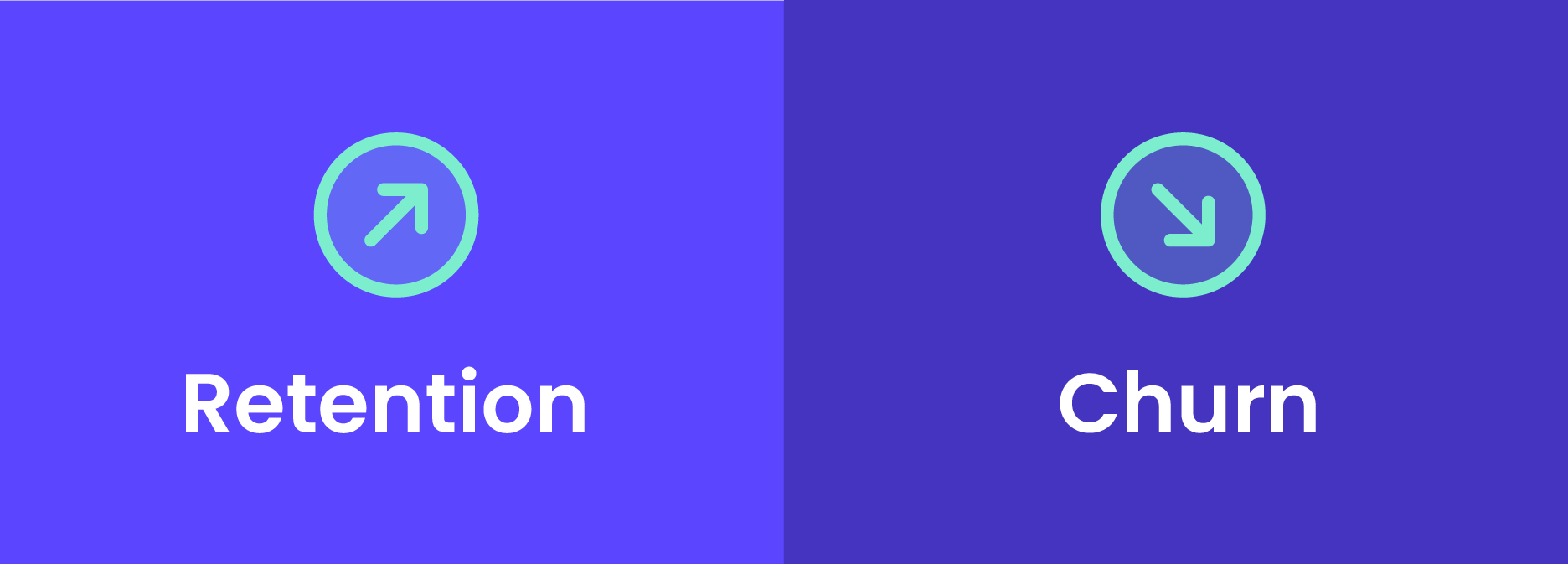
Here's what that looks like in practice:
When automating customer engagement, onboarding goes from a sink-or-swim state to an outstanding experience.
For example, a SaaS project management tool could use automation to send a welcome email to new users with a video tutorial, followed by a drip campaign showing key features like project creation or Kanban boards.
Here, automation shortens time-to-value by nudging users to explore and adopt core functionality. This way, the user doesn't abandon your platform just because they're confused with the interface or you're throwing too much information at them.
New users need to stay involved. Automation is the best way to recognize when users disengage so you can get them back before it's too late. (For more on this, see our guide to customer retention strategies.)
Take a B2B analytics platform as an example: if a user hasn't built a dashboard in their first week, you can trigger an automated in-app checklist highlighting their most relevant templates, followed by an email with a quick-start video. That combination of contextual nudges keeps users moving toward value instead of drifting away.
Note that you'll only keep this benefit if the in-app experience delivers on your promise. If you don't fix the issues that cause people to leave, your re-engagement efforts won't cut it.
Got a smaller team? You have a big advantage. Automation instantly allows you to manage loads of users without needing extra employees.
For instance, if you've got only five people on your growth team, you can still automate it all - from lead nurturing emails to in-app tips and reminders for renewals.
Yes, you can actually deliver a custom message to every single one of your users through automation.
If you want (and you should) to ditch blast emails, you can use automation to build a more cohesive messaging flow: an email announcing a new security feature, an in-app banner for active users, and a push notification for trial users. All three messages maintain the same tone and go out at the exact time you set.
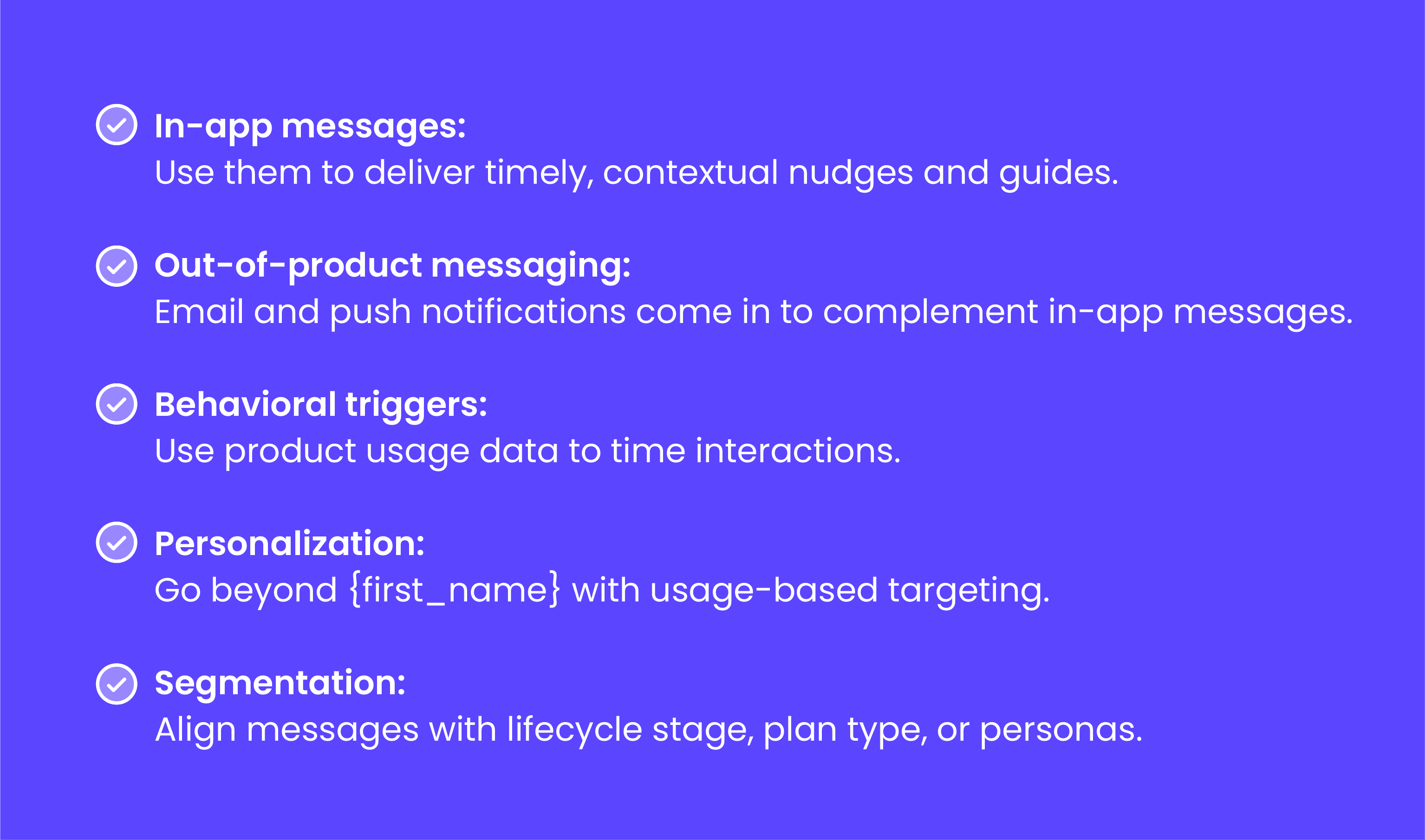
Effective engagement automation isn't one thing - it's a system of connected components. Here's what goes into the programs that actually work:
These are the contextual nudges, tours, checklists, and banners delivered inside the product itself. Because they reach users in the moment they're taking action, in-app experiences tend to drive strong engagement. Think: a tooltip that appears when a user opens a feature for the first time, or a checklist that guides them through setup steps.
Out-of-product messaging fills the gap when users aren't in the app. A behavioral email triggered by three days of inactivity, or a push notification celebrating a usage milestone, keeps the relationship alive outside the product. The key is that these messages are triggered by what users do (or don't do) - not sent on a static calendar.
Triggers are the event-based logic that times everything. A user's first login, completing a key task, reaching a usage milestone, or going inactive for a set period - these are the signals that tell your system when to act. Without well-defined triggers, automation is just scheduled messaging with extra steps.
For instance, a B2B collaboration tool might fire an in-app prompt when a new user hasn't invited a teammate within 48 hours of signing up - because their own data showed that users who invite a teammate in the first week retained at significantly higher rates. That's a trigger tied to a specific outcome, not a calendar date.
Going beyond first-name merge tags to usage-based targeting is what separates effective automation from noise. Segment users by lifecycle stage, plan type, role, or behavior patterns - then tailor the message, channel, and timing to each group. A trial user exploring reporting features needs a different experience than a power user who hasn't tried your newest integration.
Each channel has strengths on its own, but the real impact comes from combining them. An in-app onboarding flow displays a tooltip to help users create a new project. A day later, a follow-up email with a video tutorial and CTA to continue arrives. Together, they create a 1+1=3 effect - reinforcing the message without repeating it. (For a deeper dive on this approach, see our guide to omnichannel engagement.)
Platforms like Appcues tie these components together, letting teams sync in-app messages with email and push using product data - so the experience feels connected, not cobbled together.
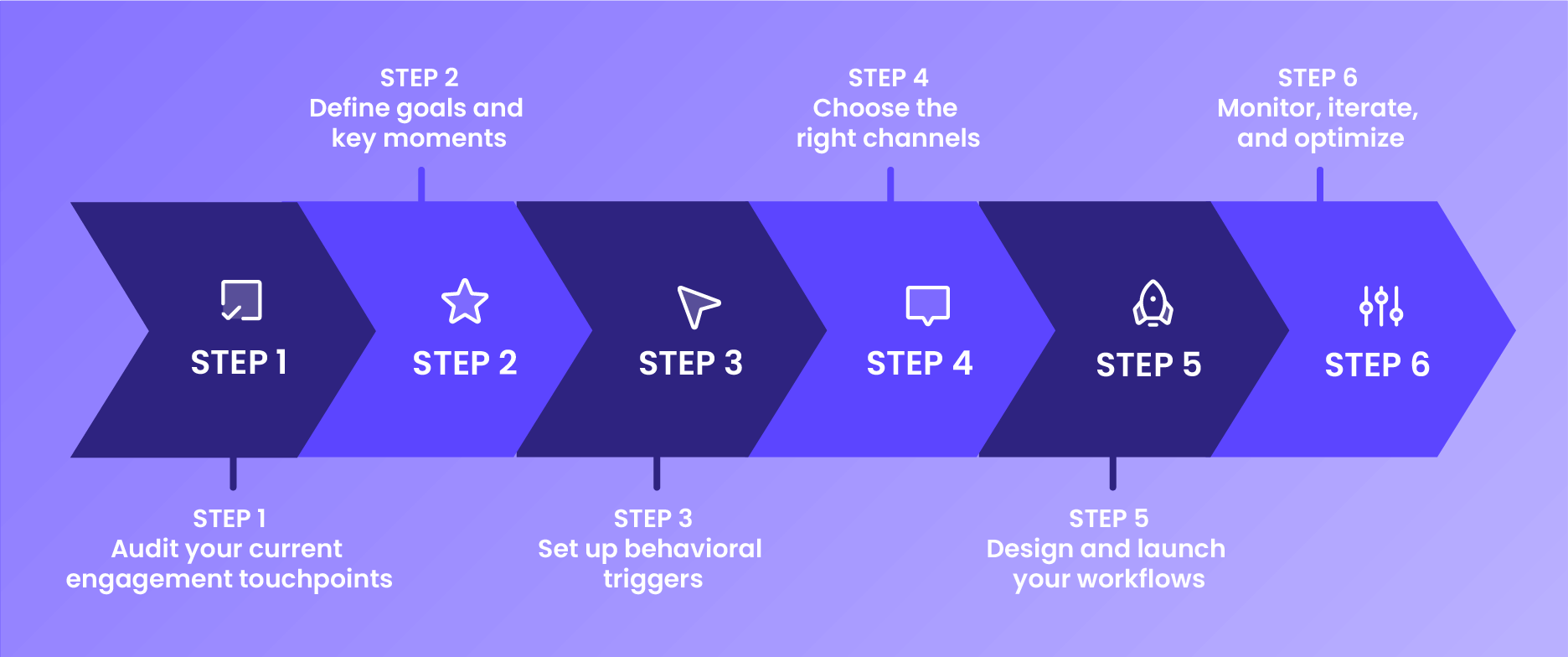
How should you actually put all of this into practice? Here's a six-step process for building engagement automation that works:
Identify gaps and redundancies in messaging.
Are new users receiving onboarding emails but lacking any guidance in the app? That's a gap. Are they receiving duplicate "welcome" messages through an email notification and an app notification? That's redundancy.
Go through and determine when messaging goes silent (e.g., after a user drops off during their trial) or duplicates unnecessarily (e.g., multiple nudges about the same feature).
Dig into customer data to review performance metrics and customer journey maps. If you can prove elevated churn rates occur after sign-up when no engagement cues were offered, you know your starting point.
Example: A project management SaaS audits their first-week experience and discovers that trial users get a welcome email but zero in-app guidance after signup. Users are left staring at an empty dashboard with no direction - and 40% of them never come back after day one. That's the gap to close first.
Recognize the major moments that influence the customer experience. You can automate user onboarding to direct newly signed-up users toward their "aha moment."
For instance, a well-designed workflow could trigger in-app tips and a welcome email for new users. For feature launches, try scheduling announcements and tutorials to encourage users to discover new features.
Find moments that will move you closer to your goals, rather than just help you score the low-hanging fruit. Once you identify high-impact moments in the user journey, connect those moments to measurable outcomes.
Example: An analytics platform identifies that users who build their first custom dashboard within 48 hours retain at 3x the rate of those who don't. They tie their onboarding automation directly to that "aha moment" - triggering a guided setup flow, followed by a template gallery prompt, all aimed at getting users to that first dashboard fast.
Use product usage data to improve user engagement through targeted messaging. User behaviors that mark important events include logins, feature usage, or the completion of a task.
Once you find these trigger behaviors, you can start automating timely and relevant messaging that's more likely to resonate with the user's context.
Take this raw product usage data and develop triggers that are actionable, valuable, and connected to specific outcomes. Triggers include a user's first login, inactivity after 3 days, milestone usage, or similar.
Don't neglect inactivity triggers either. Use these to send a gentle push to bring the user back to see what's new in the app.
Example: A user signs up for a collaboration tool but hasn't invited a teammate after 3 days. An in-app prompt says "Teams that invite a colleague in their first week are 2x more likely to stick around" - followed by a one-click invite button. That's a trigger tied to a specific outcome, not a generic reminder. Appcues' Segmentation Planner can help you turn audience ideas like "inactive new users" into precise targeting logic, so you don't have to build every trigger rule from scratch.
In-app messages are great for delivering real-time, contextual engagement - like guiding a user through their first login with a short tutorial before they're immersed in the experience.
Email works best for broader communication or less urgent updates, such as re-engaging inactive users with a recap of newly added features.
Push notifications do best at grabbing attention for time-sensitive, immediate prompts - like celebrating a milestone in their use of your product - but they need to be used sparingly.
A quick decision framework: If the user is in the app right now, use in-app messaging. If they haven't been in the app for a few days, reach them via email. If something is time-sensitive and they've opted in, push notifications work well. The sweet spot is a thoughtful blend - using frequency caps and observing responses like open rates or opt-outs to keep things helpful instead of annoying.
You can design your first workflows with a low-code platform like Appcues, which relies on behavioral triggers and user activities. Appcues lets you map your entire user journey, create triggers, and set up messages specific to each path.
You'll be able to launch and change workflows quickly and easily, without relying on developers and design resources. Appcues' Experience Builder can help you create and optimize experiences faster by turning your brief into a ready-to-launch flow.
Once you have your workflows, start A/B testing to see how effective they are. For example, test two versions of a congratulatory milestone message against each other to see which has a higher click-through rate. Try Appcues to conduct your first A/B tests, analyze data, and then refine your work based on the results.
Once your behavior-triggered workflows are live, start tracking your engagement metrics to evaluate how well they're performing:
With Appcues' built-in analytics, you get this data in real time. Appcues' Growth Analyst can surface performance insights and improvement ideas so you know exactly where to iterate. If your users say your inactivity push felt intrusive (or you see a low CTR), you simply adjust the tone, timing, or frequency.
You've probably already tried automation to some extent and likely fell into some common traps. Here's how to spot them and fix them.
When you send generic or irrelevant messages (not to mention when you pair them with poor timing), the user has a poor experience. Instead of sending something to everyone, create custom messages for distinct personas and send them when specific triggers occur based on product usage data.
How to fix it: Start by auditing your current automated messages. If any of them could be sent to literally anyone, they need better targeting. Segment by behavior, not just demographics.
Failure to align messaging with user behavior or lifecycle stage leads to inefficient (and often useless) engagement tactics. Sending onboarding best practices to advanced or inactive users accomplishes nothing.
How to fix it: Map every automated message to a specific lifecycle stage and behavioral trigger. If you can't answer "who gets this and why right now?" for a message, it shouldn't be automated yet.
Too frequent touchpoints can induce messaging fatigue among users, leading to opt-outs or churn. Consider capping frequency (like one push notification per day or one email per week).
At the same time, try to promote the highest-value channel for every trigger. In some cases, you might want to prioritize in-app messaging for onboarding, or behavioral email and push notifications for re-engaging users who've gone quiet.
How to fix it: Set frequency caps per channel and per user. Then review your messaging cadence monthly - if opt-out rates or unsubscribe rates are climbing, you're overdoing it.
If you're not measuring the impact on your business goals, you'll fail. Before you even start automating, define the metrics you'll track - CTR, activation rate, retention rate - and then link each workflow to a specific outcome through analytics.
How to fix it: Before launching any workflow, write down the metric it's meant to move. If you can't tie a workflow to a number, rethink whether it should exist.
Theory is helpful, but seeing these principles applied makes them concrete. Here are three scenarios that illustrate how SaaS teams typically put engagement automation to work:
A B2B scheduling platform noticed that new users who completed their calendar integration within the first session retained at nearly double the rate of those who didn't. They built an automated onboarding flow that detected whether a user had connected their calendar - if not, an in-app checklist appeared highlighting the integration step, followed by an email 24 hours later with a step-by-step walkthrough. Teams running this kind of flow typically see meaningful lifts in first-session completion and 14-day retention. The key was tying the automation to a specific activation metric, not just "getting users to click around."
A SaaS reporting tool saw a pattern: users who stopped logging in for more than 7 days rarely came back on their own. They set up a three-touch re-engagement sequence. First, a push notification on day 7 highlighting a new feature relevant to the user's past activity. Then, an email on day 10 with a personalized summary of what they'd missed - new reports from their team, recent data imports, and a one-click link back to their dashboard. Finally, if the user returned, an in-app modal welcomed them back and surfaced their most-used features. This type of sequence can recover a meaningful share of at-risk users each month, with personalized emails often driving the highest re-entry rates.
A collaboration platform launched a new commenting feature but saw low adoption in the first two weeks. Instead of blasting an announcement to all users, they segmented by behavior: users who had shared at least one document (and would benefit most from inline comments) received a targeted in-app tooltip the next time they opened a shared file. Users who hadn't shared anything yet were excluded to avoid confusion. They also collected survey responses from users who dismissed the tooltip to understand objections. The result: feature adoption among the targeted segment climbed noticeably within weeks, and the survey feedback informed the next iteration of the commenting UX.
Recommended next steps: Audit your current engagement touchpoints this week. Identify one high-impact moment to automate first. Measure results for 30 days before scaling to additional workflows.
Customer engagement automation works best when your platform does the heavy lifting - connecting behavioral data, multi-channel messaging, and real-time analytics into one system your team can actually use.
Book a demo to see how Appcues helps teams automate engagement across the full customer lifecycle - from onboarding to retention to expansion - without waiting on engineering.
Lifecycle Marketing
Email Marketing
Personalization
Customer Engagement
TL;DR
Customer engagement automation uses behavioral data to deliver personalized messages across channels automatically - so your team can scale experiences without scaling headcount.
It connects in-app experiences, email, and push notifications into one system that responds to what users actually do, not a calendar schedule.
The best automation programs start small. Audit your current touchpoints, identify one high-impact moment (like onboarding or re-engagement), and build from there.
Done well, it reduces churn, shortens time-to-value, and frees your team to focus on strategy - not manual follow-ups.
Your team sends the same onboarding email to every new user, whether they signed up to manage a 5-person team or a 500-person org. A trial user who explored your reporting features gets the same re-engagement nudge as someone who never logged in after day one. What you're sending isn't engagement, it's noise.
If you're a growth marketer, lifecycle marketer, or product team lead at a scaling SaaS company, you already know the problem. Manual engagement doesn't survive past a few hundred users. Support tickets pile up, onboarding feels generic, and your best users churn before they ever reach their "aha moment" - not because your product lacks value, but because nobody showed them where to find it.
Customer engagement automation changes that equation. It lets you deliver the message that fits each user's moment, in whichever channel will reach them, based on what they're actually doing inside your product. And it does it without requiring your team to manually track every user's journey.
This guide breaks down what customer engagement automation is, why it matters for SaaS teams specifically, and how to build a program that scales. You'll get a step-by-step framework, real-world examples, and the common mistakes that trip up even experienced teams. Whether you're starting from scratch or refining an existing setup, the goal is the same: turn reactive, one-size-fits-all messaging into a system that grows with your users.
Customer engagement automation is the process of using technology (like a customer engagement platform) to draw in and engage customers, no matter what lifecycle stage they're at.
When you automate customer engagement, you can expect two things:
For example, a SaaS company might set up a welcome flow that adapts based on the user's role and plan type - showing a project manager a quick tutorial on team collaboration features, while guiding a solo user straight to their first task.
Automation is often mistaken for personalization. The two have distinct, yet complementary roles.
Automation is what drives it all. It handles repetitive tasks and helps you avoid human errors like things falling through the cracks.
Personalization is what fuels the driver. It lets you customize every customer touchpoint - content, tone, and timing - to individual customers' unique needs, preferences, and behaviors.
You can automate personalization, but automation isn't meant to replace human connection. It enhances it by freeing your time for the work that actually requires a human touch.
For example, a B2B project management platform might use automation to route every new user into an onboarding flow, but personalization determines which flow they see. An admin setting up a team workspace gets a guided tour of permissions and billing. A team member invited by that admin skips straight to their first task. Same automation engine, completely different experiences.
When you don't automate engagement, the costs show up fast. Retention drops because users never reach their "aha moment." Support tickets pile up as your team manually onboards, educates, and re-engages users one by one. And your growth team spends more time on repetitive follow-ups than on strategy.
The numbers back this up. 71% of customers expect personalized interactions with businesses. And when other businesses deliver that kind of personalized experience, the gap between you and your competitors widens fast.
Users expect more than a one-size-fits-all experience. They expect messages that feel relevant to where they are and what they're doing - and when other businesses deliver that, yours can't afford to fall behind.
Here's what that looks like in practice:
When automating customer engagement, onboarding goes from a sink-or-swim state to an outstanding experience.
For example, a SaaS project management tool could use automation to send a welcome email to new users with a video tutorial, followed by a drip campaign showing key features like project creation or Kanban boards.
Here, automation shortens time-to-value by nudging users to explore and adopt core functionality. This way, the user doesn't abandon your platform just because they're confused with the interface or you're throwing too much information at them.
New users need to stay involved. Automation is the best way to recognize when users disengage so you can get them back before it's too late. (For more on this, see our guide to customer retention strategies.)
Take a B2B analytics platform as an example: if a user hasn't built a dashboard in their first week, you can trigger an automated in-app checklist highlighting their most relevant templates, followed by an email with a quick-start video. That combination of contextual nudges keeps users moving toward value instead of drifting away.
Note that you'll only keep this benefit if the in-app experience delivers on your promise. If you don't fix the issues that cause people to leave, your re-engagement efforts won't cut it.
Got a smaller team? You have a big advantage. Automation instantly allows you to manage loads of users without needing extra employees.
For instance, if you've got only five people on your growth team, you can still automate it all - from lead nurturing emails to in-app tips and reminders for renewals.
Yes, you can actually deliver a custom message to every single one of your users through automation.
If you want (and you should) to ditch blast emails, you can use automation to build a more cohesive messaging flow: an email announcing a new security feature, an in-app banner for active users, and a push notification for trial users. All three messages maintain the same tone and go out at the exact time you set.
Effective engagement automation isn't one thing - it's a system of connected components. Here's what goes into the programs that actually work:
These are the contextual nudges, tours, checklists, and banners delivered inside the product itself. Because they reach users in the moment they're taking action, in-app experiences tend to drive strong engagement. Think: a tooltip that appears when a user opens a feature for the first time, or a checklist that guides them through setup steps.
Out-of-product messaging fills the gap when users aren't in the app. A behavioral email triggered by three days of inactivity, or a push notification celebrating a usage milestone, keeps the relationship alive outside the product. The key is that these messages are triggered by what users do (or don't do) - not sent on a static calendar.
Triggers are the event-based logic that times everything. A user's first login, completing a key task, reaching a usage milestone, or going inactive for a set period - these are the signals that tell your system when to act. Without well-defined triggers, automation is just scheduled messaging with extra steps.
For instance, a B2B collaboration tool might fire an in-app prompt when a new user hasn't invited a teammate within 48 hours of signing up - because their own data showed that users who invite a teammate in the first week retained at significantly higher rates. That's a trigger tied to a specific outcome, not a calendar date.
Going beyond first-name merge tags to usage-based targeting is what separates effective automation from noise. Segment users by lifecycle stage, plan type, role, or behavior patterns - then tailor the message, channel, and timing to each group. A trial user exploring reporting features needs a different experience than a power user who hasn't tried your newest integration.
Each channel has strengths on its own, but the real impact comes from combining them. An in-app onboarding flow displays a tooltip to help users create a new project. A day later, a follow-up email with a video tutorial and CTA to continue arrives. Together, they create a 1+1=3 effect - reinforcing the message without repeating it. (For a deeper dive on this approach, see our guide to omnichannel engagement.)
Platforms like Appcues tie these components together, letting teams sync in-app messages with email and push using product data - so the experience feels connected, not cobbled together.
How should you actually put all of this into practice? Here's a six-step process for building engagement automation that works:
Identify gaps and redundancies in messaging.
Are new users receiving onboarding emails but lacking any guidance in the app? That's a gap. Are they receiving duplicate "welcome" messages through an email notification and an app notification? That's redundancy.
Go through and determine when messaging goes silent (e.g., after a user drops off during their trial) or duplicates unnecessarily (e.g., multiple nudges about the same feature).
Dig into customer data to review performance metrics and customer journey maps. If you can prove elevated churn rates occur after sign-up when no engagement cues were offered, you know your starting point.
Example: A project management SaaS audits their first-week experience and discovers that trial users get a welcome email but zero in-app guidance after signup. Users are left staring at an empty dashboard with no direction - and 40% of them never come back after day one. That's the gap to close first.
Recognize the major moments that influence the customer experience. You can automate user onboarding to direct newly signed-up users toward their "aha moment."
For instance, a well-designed workflow could trigger in-app tips and a welcome email for new users. For feature launches, try scheduling announcements and tutorials to encourage users to discover new features.
Find moments that will move you closer to your goals, rather than just help you score the low-hanging fruit. Once you identify high-impact moments in the user journey, connect those moments to measurable outcomes.
Example: An analytics platform identifies that users who build their first custom dashboard within 48 hours retain at 3x the rate of those who don't. They tie their onboarding automation directly to that "aha moment" - triggering a guided setup flow, followed by a template gallery prompt, all aimed at getting users to that first dashboard fast.
Use product usage data to improve user engagement through targeted messaging. User behaviors that mark important events include logins, feature usage, or the completion of a task.
Once you find these trigger behaviors, you can start automating timely and relevant messaging that's more likely to resonate with the user's context.
Take this raw product usage data and develop triggers that are actionable, valuable, and connected to specific outcomes. Triggers include a user's first login, inactivity after 3 days, milestone usage, or similar.
Don't neglect inactivity triggers either. Use these to send a gentle push to bring the user back to see what's new in the app.
Example: A user signs up for a collaboration tool but hasn't invited a teammate after 3 days. An in-app prompt says "Teams that invite a colleague in their first week are 2x more likely to stick around" - followed by a one-click invite button. That's a trigger tied to a specific outcome, not a generic reminder. Appcues' Segmentation Planner can help you turn audience ideas like "inactive new users" into precise targeting logic, so you don't have to build every trigger rule from scratch.
In-app messages are great for delivering real-time, contextual engagement - like guiding a user through their first login with a short tutorial before they're immersed in the experience.
Email works best for broader communication or less urgent updates, such as re-engaging inactive users with a recap of newly added features.
Push notifications do best at grabbing attention for time-sensitive, immediate prompts - like celebrating a milestone in their use of your product - but they need to be used sparingly.
A quick decision framework: If the user is in the app right now, use in-app messaging. If they haven't been in the app for a few days, reach them via email. If something is time-sensitive and they've opted in, push notifications work well. The sweet spot is a thoughtful blend - using frequency caps and observing responses like open rates or opt-outs to keep things helpful instead of annoying.
You can design your first workflows with a low-code platform like Appcues, which relies on behavioral triggers and user activities. Appcues lets you map your entire user journey, create triggers, and set up messages specific to each path.
You'll be able to launch and change workflows quickly and easily, without relying on developers and design resources. Appcues' Experience Builder can help you create and optimize experiences faster by turning your brief into a ready-to-launch flow.
Once you have your workflows, start A/B testing to see how effective they are. For example, test two versions of a congratulatory milestone message against each other to see which has a higher click-through rate. Try Appcues to conduct your first A/B tests, analyze data, and then refine your work based on the results.
Once your behavior-triggered workflows are live, start tracking your engagement metrics to evaluate how well they're performing:
With Appcues' built-in analytics, you get this data in real time. Appcues' Growth Analyst can surface performance insights and improvement ideas so you know exactly where to iterate. If your users say your inactivity push felt intrusive (or you see a low CTR), you simply adjust the tone, timing, or frequency.
You've probably already tried automation to some extent and likely fell into some common traps. Here's how to spot them and fix them.
When you send generic or irrelevant messages (not to mention when you pair them with poor timing), the user has a poor experience. Instead of sending something to everyone, create custom messages for distinct personas and send them when specific triggers occur based on product usage data.
How to fix it: Start by auditing your current automated messages. If any of them could be sent to literally anyone, they need better targeting. Segment by behavior, not just demographics.
Failure to align messaging with user behavior or lifecycle stage leads to inefficient (and often useless) engagement tactics. Sending onboarding best practices to advanced or inactive users accomplishes nothing.
How to fix it: Map every automated message to a specific lifecycle stage and behavioral trigger. If you can't answer "who gets this and why right now?" for a message, it shouldn't be automated yet.
Too frequent touchpoints can induce messaging fatigue among users, leading to opt-outs or churn. Consider capping frequency (like one push notification per day or one email per week).
At the same time, try to promote the highest-value channel for every trigger. In some cases, you might want to prioritize in-app messaging for onboarding, or behavioral email and push notifications for re-engaging users who've gone quiet.
How to fix it: Set frequency caps per channel and per user. Then review your messaging cadence monthly - if opt-out rates or unsubscribe rates are climbing, you're overdoing it.
If you're not measuring the impact on your business goals, you'll fail. Before you even start automating, define the metrics you'll track - CTR, activation rate, retention rate - and then link each workflow to a specific outcome through analytics.
How to fix it: Before launching any workflow, write down the metric it's meant to move. If you can't tie a workflow to a number, rethink whether it should exist.
Theory is helpful, but seeing these principles applied makes them concrete. Here are three scenarios that illustrate how SaaS teams typically put engagement automation to work:
A B2B scheduling platform noticed that new users who completed their calendar integration within the first session retained at nearly double the rate of those who didn't. They built an automated onboarding flow that detected whether a user had connected their calendar - if not, an in-app checklist appeared highlighting the integration step, followed by an email 24 hours later with a step-by-step walkthrough. Teams running this kind of flow typically see meaningful lifts in first-session completion and 14-day retention. The key was tying the automation to a specific activation metric, not just "getting users to click around."
A SaaS reporting tool saw a pattern: users who stopped logging in for more than 7 days rarely came back on their own. They set up a three-touch re-engagement sequence. First, a push notification on day 7 highlighting a new feature relevant to the user's past activity. Then, an email on day 10 with a personalized summary of what they'd missed - new reports from their team, recent data imports, and a one-click link back to their dashboard. Finally, if the user returned, an in-app modal welcomed them back and surfaced their most-used features. This type of sequence can recover a meaningful share of at-risk users each month, with personalized emails often driving the highest re-entry rates.
A collaboration platform launched a new commenting feature but saw low adoption in the first two weeks. Instead of blasting an announcement to all users, they segmented by behavior: users who had shared at least one document (and would benefit most from inline comments) received a targeted in-app tooltip the next time they opened a shared file. Users who hadn't shared anything yet were excluded to avoid confusion. They also collected survey responses from users who dismissed the tooltip to understand objections. The result: feature adoption among the targeted segment climbed noticeably within weeks, and the survey feedback informed the next iteration of the commenting UX.
Recommended next steps: Audit your current engagement touchpoints this week. Identify one high-impact moment to automate first. Measure results for 30 days before scaling to additional workflows.
Customer engagement automation works best when your platform does the heavy lifting - connecting behavioral data, multi-channel messaging, and real-time analytics into one system your team can actually use.
Book a demo to see how Appcues helps teams automate engagement across the full customer lifecycle - from onboarding to retention to expansion - without waiting on engineering.

Sign up for Quickcues and get our monthly updates!
.svg)


